
Minecraft Font (PC) Ressourcenpaket für Minecraft 1.12.2
Ersatz für die Standard-Schriftart (dünne Unicode-Schriftart)
Über das Minecraft Font (PC)-Ressourcenpaket
Minecraft Font (PC) resourcepack created to bring "thick" font into Minecraft and replace the default font (thin) that used in Minecraft for Cyrillic and some other languages.
If you need the same font for Minecraft Pocket Edition / Minecraft Windows 10 Edition you can download it here.
How to use
- Install and activate resource pack
- Enjoy :)
Info for server owners
You can suggest this font for your players using bukkit/spigot plugin MinecraftFont.
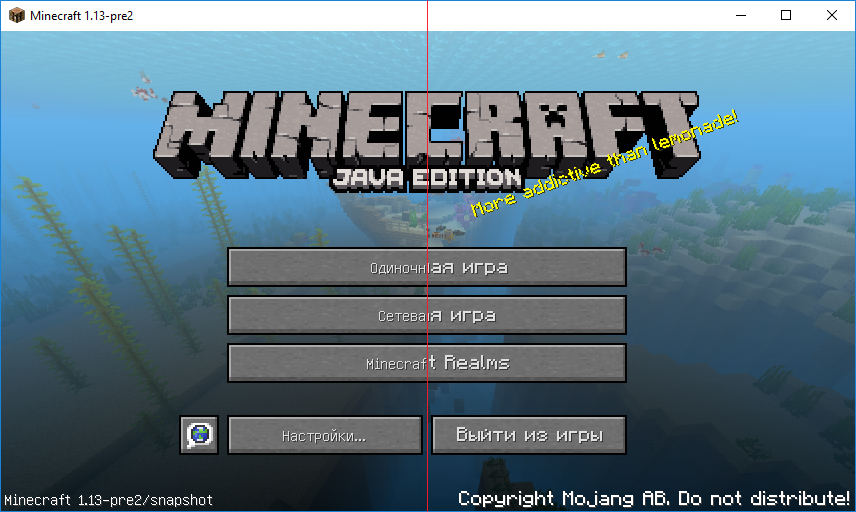
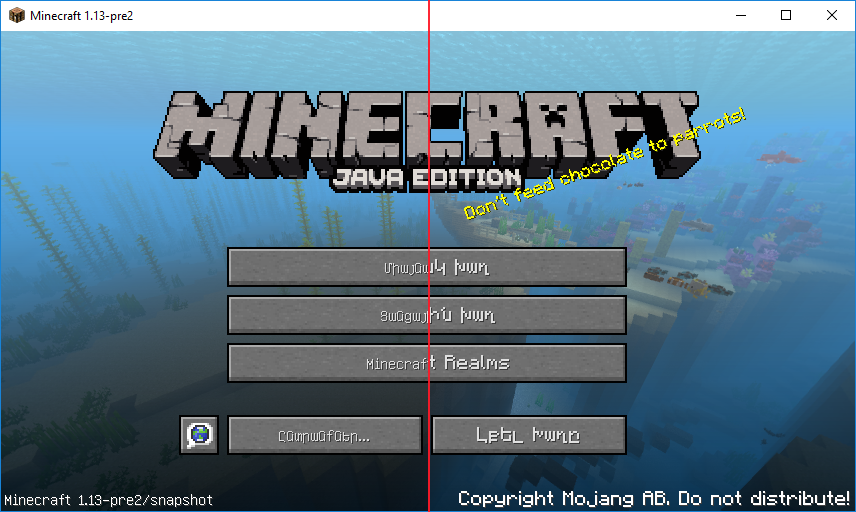
Example of the font (Before / After)
Credits
Font included into this resourcepack based on mod Default Font for Everything v0.1 for 1.9.2 created by Kapos.
Installation von Minecraft Font (PC)
Install Millida Launcher
The launcher is free: download it at millida.net/launcher and sign in with any nickname.
Click “Install” on this page
The launcher opens and installs the resource pack for Minecraft 1.10–1.12.2 automatically.
Launch the game
A profile with it appears in the launcher: click “Play”.
Versionen
Mit Abhängigkeiten
| Minecraft | Loader | Datei | Datum | Aktionen |
|---|---|---|---|---|
| 1.12.1 | — | MinecraftFont v2.0.345.6 KB 3 |
FAQ
Which Minecraft versions does Minecraft Font (PC) work on?
There are files for 1.10–1.12.2, 9 versions in total. The newest is 1.12.2.
How do I download Minecraft Font (PC)?
With Millida Launcher: it installs Minecraft Font (PC) into a modpack by itself, for the right game version and loader. The launcher is free.
Bewertungen
Bewerten Sie Minecraft Font (PC) als Erster


