

MY DISCORD
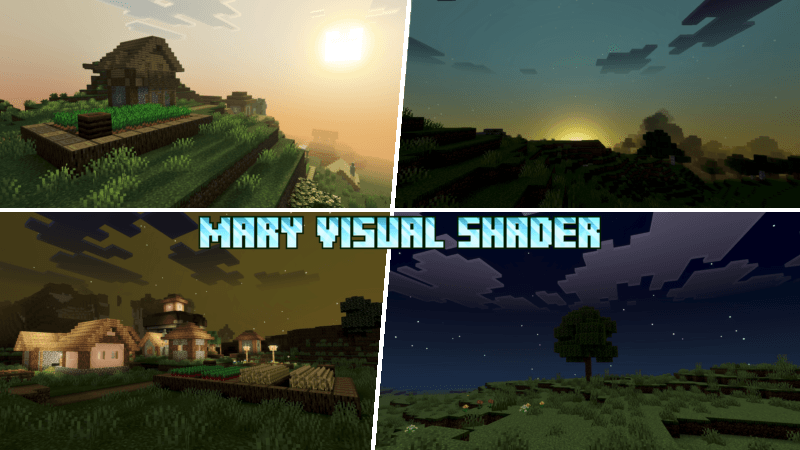
Mary Visual Shader is a beautiful shader for Bedrock that brings a calm sunset atmosphere and a deeply comforting night, creating a peaceful and relaxing experience. Soft colors blend smoothly across the sky, while gentle lighting makes every moment feel warm and immersive, making you fall in love with Minecraft all over again.
I used the name from an old game, just like Lumina Visual Shader.
This add-on does not include player.json. This add-on does not require experimental features. If the add-on does not work, please report it on Discord. If you want to request an add-on, please make a request on Discord. If you want to collaborate or work together, please contact me on Discord.

Installation von Mary Visual Shader
With Millida Launcher
Install Millida Launcher
The launcher is free: download it at millida.net/launcher and sign in with any nickname.
Click “Install” on this page
The launcher opens and installs the resource pack for Minecraft 26.30–26.50 automatically.
Launch the game
A profile with it appears in the launcher: click “Play”.
Manually
Download the archive
Pick the file Mary Visual Shader 1.8.mcpack (286 KB) for your game version. No need to unpack it.
Put it in the resourcepacks folder
The easiest way: “Options”, then “Resource Packs”, then “Open Pack Folder”, and drag the archive there.
Enable the pack
In the same window, move the pack to the right-hand “Selected” column and click “Done”.
Versionen
Mit Abhängigkeiten
| Minecraft | Loader | Datei | Datum | Aktionen |
|---|---|---|---|---|
| 26.30 | — | Mary Visual Shader 1.8286 KB |
FAQ
Which Minecraft versions does Mary Visual Shader work on?
There are files for 26.50, 26.40, 26.30. The newest is 26.50.
Where can I download Mary Visual Shader safely?
On this page: the file Mary Visual Shader 1.8.mcpack (286 KB) is stored on Millida’s server, with no link shorteners. SHA-1 checksum: 3766f1cc207b8bae112528e4b5b1c96e5d692156.
Bewertungen
Bewerten Sie Mary Visual Shader als Erster


