

Über das Lunastra Visual-Ressourcenpaket
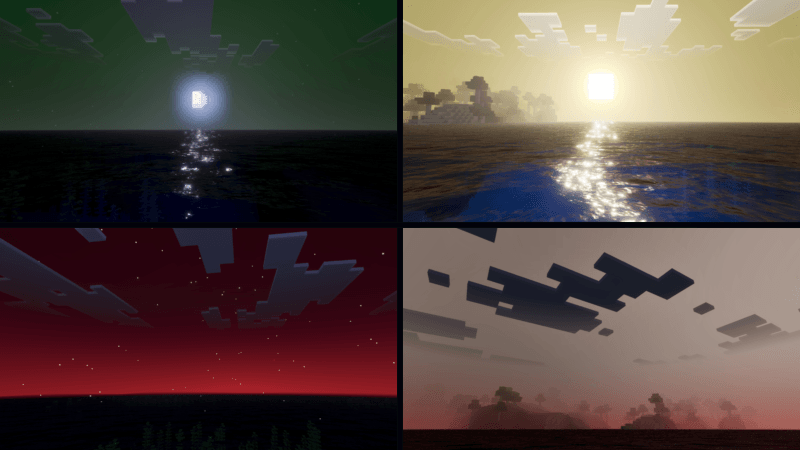
Lunastra Shader is a shader that makes your world feel alive with the powerful energy of the Lunastra dragon. Inspired by the blazing aura and mystical presence of Lunastra, this shader transforms the atmosphere of your Minecraft world with vibrant lighting, glowing reflections, and dramatic skies.
During the day, the sunlight shines warmly across the world, reflecting beautifully on water and landscapes. As evening arrives, the sky slowly shifts into deep, fiery tones, creating a powerful and mystical mood. At night, the world becomes darker and more mysterious, illuminated by soft light and glowing reflections that feel like lingering dragon energy in the air.

With enhanced colors, atmospheric lighting, and immersive skies, Lunastra Shader makes every moment in your world feel more magical, powerful, and alive-just like standing in the presence of a legendary dragon.
This shader will enhance your visuals. It is equipped with PBR, ACE tone mapping, white balance temperature, and complex midtones.
(All photos can be checked in the media or below)

Installation von Lunastra Visual
With Millida Launcher
Install Millida Launcher
The launcher is free: download it at millida.net/launcher and sign in with any nickname.
Click “Install” on this page
The launcher opens and installs the resource pack for Minecraft 26.10–26.50 automatically.
Launch the game
A profile with it appears in the launcher: click “Play”.
Manually
Download the archive
Pick the file Lunastra 1.7.mcpack (242 KB) for your game version. No need to unpack it.
Put it in the resourcepacks folder
The easiest way: “Options”, then “Resource Packs”, then “Open Pack Folder”, and drag the archive there.
Enable the pack
In the same window, move the pack to the right-hand “Selected” column and click “Done”.
Versionen
Mit Abhängigkeiten
| Minecraft | Loader | Datei | Datum | Aktionen |
|---|---|---|---|---|
| 26.10 | — | Lunastra 1.7242 KB |
FAQ
Which Minecraft versions does Lunastra Visual work on?
There are files for 26.50, 26.30, 26.20, 26.10. The newest is 26.50.
Where can I download Lunastra Visual safely?
On this page: the file Lunastra 1.7.mcpack (242 KB) is stored on Millida’s server, with no link shorteners. SHA-1 checksum: 45fb792aeaf551609b1a621a26432baa4c16b575.
Bewertungen
Bewerten Sie Lunastra Visual als Erster


