

Glowing Glazed Ressourcenpaket für Minecraft 26.3
Lässt glasierten Terrakotta leuchten, um die Sichtbarkeit zu verbessern. (OptiFine/Continuity erforderlich)
- Downloads
- 1 Downloads
- Aufrufe
- 49 Aufrufe
- Aktualisiert
- Aktualisiert 18.10.2026
- 1.21.9 — 26.3
 Vanilla-Spiel
- Client
Über das Glowing Glazed-Ressourcenpaket
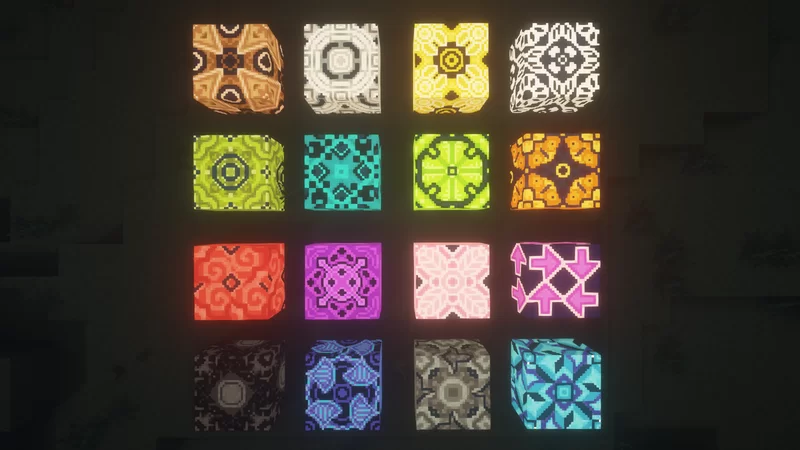
Glowing Glazed makes all glazed terracotta blocks glow. OptiFine, Continuity or any other mod that supports emissive textures is required, else nothing will be changed.
Installation von Glowing Glazed
With Millida Launcher
Install Millida Launcher
The launcher is free: download it at millida.net/launcher and sign in with any nickname.
Click “Install” on this page
The launcher opens and installs the resource pack for Minecraft 1.21.9–26.3 automatically.
Launch the game
A profile with it appears in the launcher: click “Play”.
Manually
Download the archive
Pick the file Glowing Glazed (26.3).zip (58 KB) for your game version. No need to unpack it.
Put it in the resourcepacks folder
The easiest way: “Options”, then “Resource Packs”, then “Open Pack Folder”, and drag the archive there.
Enable the pack
In the same window, move the pack to the right-hand “Selected” column and click “Done”.
Versionen
Mit Abhängigkeiten
| Minecraft | Loader | Datei | Datum | Aktionen |
|---|---|---|---|---|
| 26.3 | — | 26.357.8 KB 1 | ||
| 26.2 | — | 26.257.8 KB | ||
| 26.1 | — | 26.157.8 KB | ||
| 1.21.11 | — | 1.21.1157.8 KB |
FAQ
Which Minecraft versions does Glowing Glazed work on?
There are files for 1.21.9–26.3, 8 versions in total. The newest is 26.3.
Does Glowing Glazed need mods?
No, the resource pack works in the plain game without loaders: put it into the resourcepacks folder and enable it in the options.
Where can I download Glowing Glazed safely?
On this page: the file Glowing Glazed (26.3).zip (58 KB) is stored on Millida’s server, with no link shorteners. SHA-1 checksum: f325fa206282880769ed416ed26f33c44ea1b6e9.
Bewertungen
Bewerten Sie Glowing Glazed als Erster



