

Flower Pots + Ressourcenpaket für Minecraft 1.20.1, 1.21.1
Verleiht Blumentöpfen das Upgrade, das sie verdienen
- Aufrufe
- 15 Aufrufe
- Aktualisiert
- Aktualisiert 30.09.2026
- 1.16 — 1.21.11
 Vanilla-Spiel
- Client

📋 About
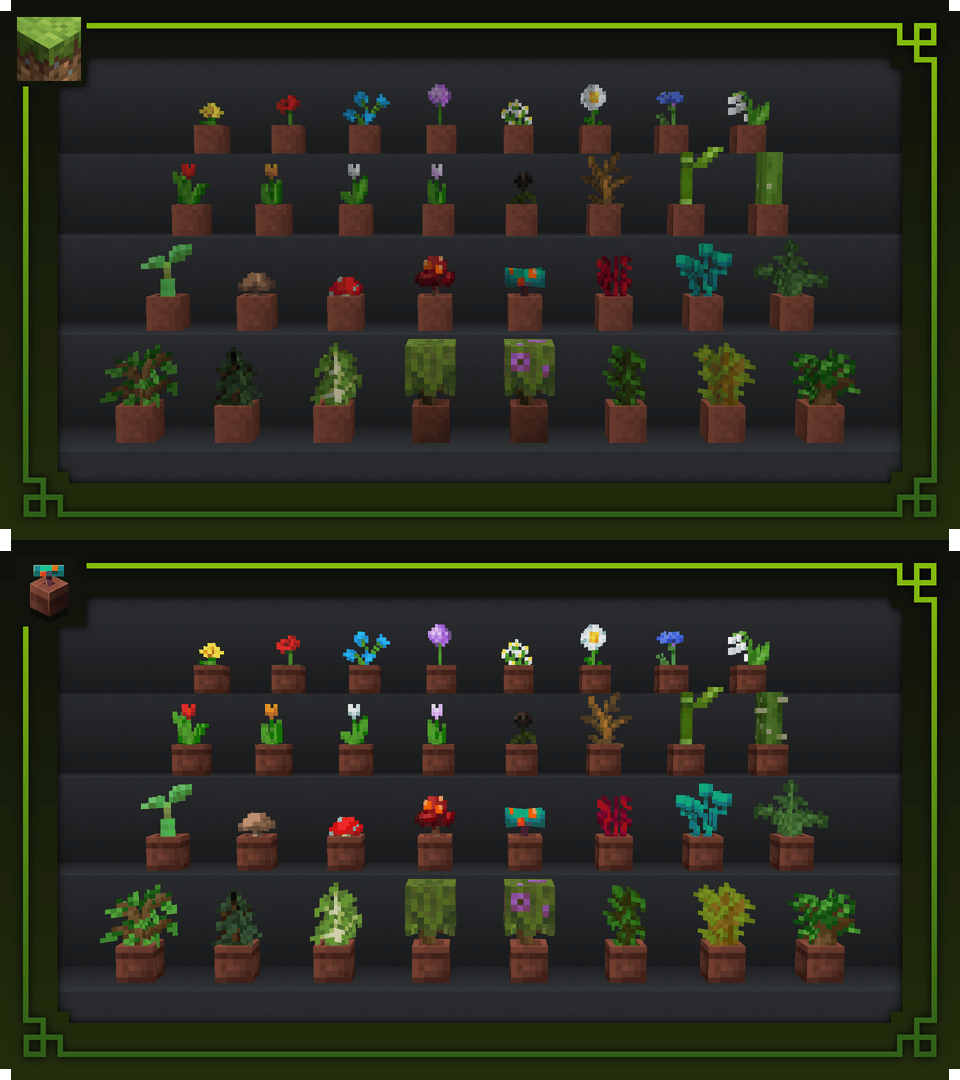

Flower Pots + improves flower pots visually by adding unique soil textures depending on the plant and by changing the texture of the flower pot block and item.
The shading of all plants has been removed so that they are as bright as their normal counterpart.
Additionally, all flower pot models have been improved for better performance.
The recent version of this pack is made for Minecraft Version 1.20.x-1.21.x and might not work with any other version.

✅ Recommendations
If you want to have some very colourful and stylish flower pots, you should check out Colourful Pots:
Check out More Pots if you want to use Flower Pots + and Daggsy's packs:
Want to check out more flower pot resource packs?
⚙️ Compatibility
Flower Pots + supports 80 different mods:



















































📄 Terms of Use & Attribution
You can:
- ✅ Use Flower Pots + in Modpacks
- ✅ Use Flower Pots + for Content Creation (with attribution/link)*
- ✅ Use Flower Pots + as reference to create something on your own
- ✅ Edit Flower Pots + for personal use
- ✅ Create Addons, Extensions and anything similiar
*Pages that can be linked back to include CurseForge, Modrinth or Planet Minecraft
You cannot:
- ❌ Redistribute edited or unedited assets
- ❌ Re-upload Flower Pots +
- ❌ Claim ownership of Flower Pots + assets
Installation von Flower Pots +
With Millida Launcher
Install Millida Launcher
The launcher is free: download it at millida.net/launcher and sign in with any nickname.
Click “Install” on this page
The launcher opens and installs the resource pack for Minecraft 1.16–1.21.11 automatically.
Launch the game
A profile with it appears in the launcher: click “Play”.
Manually
Download the archive
Pick the file FlowerPots+V.2.8.zip (783 KB) for your game version. No need to unpack it.
Put it in the resourcepacks folder
The easiest way: “Options”, then “Resource Packs”, then “Open Pack Folder”, and drag the archive there.
Enable the pack
In the same window, move the pack to the right-hand “Selected” column and click “Done”.
Versionen
Mit Abhängigkeiten
| Minecraft | Loader | Datei | Datum | Aktionen |
|---|---|---|---|---|
| 1.21.11 | — | 1.21.11783 KB | ||
| 1.21.5 | — | 1.21.5626 KB | ||
| 1.21.1 | — | 1.21.1492 KB | ||
| 1.20.1 | — | 1.20.1223 KB | ||
| 1.19.2 | — | 1.19.2115 KB |
FAQ
Which Minecraft versions does Flower Pots + work on?
There are files for 1.16–1.21.11, 35 versions in total. The newest is 1.21.11.
Does Flower Pots + need mods?
No, the resource pack works in the plain game without loaders: put it into the resourcepacks folder and enable it in the options.
Where can I download Flower Pots + safely?
On this page: the file FlowerPots+V.2.8.zip (783 KB) is stored on Millida’s server, with no link shorteners. SHA-1 checksum: 038a1128676968e9d8d145e637da283258b317d7.
Bewertungen
Bewerten Sie Flower Pots + als Erster



