

Borderless Glass Pro
Borderless Glass Pro is a Minecraft Bedrock Edition resource pack designed to give glass blocks and panes a clean, modern, and seamless appearance by removing their traditional borders.
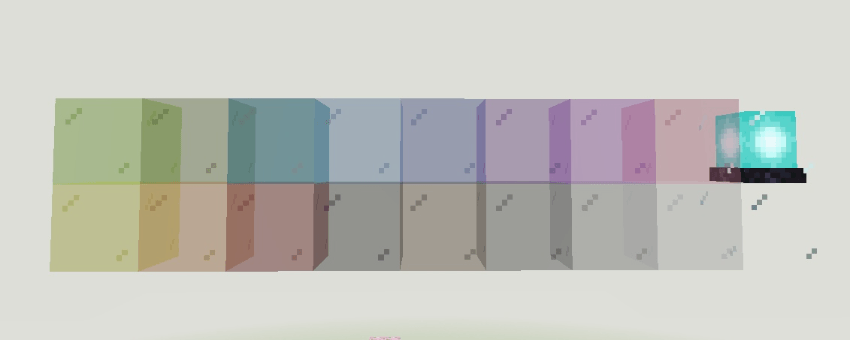
✨Key Features:
True Borderless Visuals: The pack replaces standard textures with borderless versions to ensure that glass structures look like a single, continuous sheet.
Multi-Versions Support: ⭐ 1st Texture Pack who supported 1.20+ to 1.26+ versions.
Full Color Variety: It includes updated textures for all 16 color variants, such as black, blue, brown, cyan, gray, green, light blue, lime, magenta, orange, pink, purple, red, silver, white, and yellow.
Enhanced Glass Panes: Specifically includes glass pane textures for every color to maintain a consistent "pro" look from every angle.
Installation von Borderless Glass Pro
With Millida Launcher
Install Millida Launcher
The launcher is free: download it at millida.net/launcher and sign in with any nickname.
Click “Install” on this page
The launcher opens and installs the resource pack for Minecraft 1.20–26.30 automatically.
Launch the game
A profile with it appears in the launcher: click “Play”.
Manually
Download the archive
Pick the file Borderless Glass Pro V4.mcpack (31 KB) for your game version. No need to unpack it.
Put it in the resourcepacks folder
The easiest way: “Options”, then “Resource Packs”, then “Open Pack Folder”, and drag the archive there.
Enable the pack
In the same window, move the pack to the right-hand “Selected” column and click “Done”.
Versionen
Mit Abhängigkeiten
| Minecraft | Loader | Datei | Datum | Aktionen |
|---|---|---|---|---|
| 1.20.40 | — | Borderless Glass Pro V4.mcpack31.3 KB 3 |
Bewertungen
Bewerten Sie Borderless Glass Pro als Erster


