
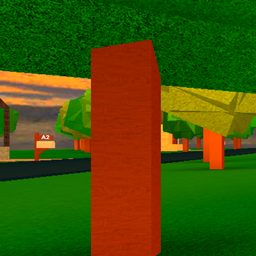
Xray entities shaders für Minecraft 1.20.1, 1.21.1
Dieses Modpack sorgt dafür, dass du Entitäten sehen kannst und keine Blöcke außer Wasser; sei gewarnt, ich kann nicht programmieren, also habe ich Gemini machen lassen, und es hat jetzt einen seltsamen gelben Kreis, wenn du in eine bestimmte Richtung schaust
Über Xray entities shaders-Shader
This shader is about seeing entities only and water and maybe lava. i can't code to make a shader so i let gemini cook but it didn't. i am sorry if you get annoyed by the yellow oval gemini is really stupid. you can't see any blocks.
Installation von Xray entities shaders
With Millida Launcher
Install Millida Launcher
The launcher is free: download it at millida.net/launcher and sign in with any nickname.
Click “Install” on this page
The launcher opens and installs the shaders for Minecraft 1.19.2–26.2 automatically.
Launch the game
A profile with it appears in the launcher: click “Play”.
Manually
Install Iris or OptiFine
Without a shader mod the game cannot see shaders. Install it for the same Minecraft version.
Download the shader archive
Pick the file MyCustomShader (2).zip (2 KB) and do not unpack it.
Put it in the shaderpacks folder
“Options”, then “Video Settings”, then “Shader Packs”, then “Open Shader Pack Folder”, and drag the archive there.
Select the shaders
In the same window, click the pack name and “Apply”.
Versionen
Mit Abhängigkeiten
| Minecraft | Loader | Datei | Datum | Aktionen |
|---|---|---|---|---|
| 1.21 | — | MyCustomShader (2).zip2.4 KB 6 |
FAQ
Which Minecraft versions does Xray entities shaders work on?
There are files for 1.19.2–26.2, 24 versions in total. The newest is 26.2.
Where can I download Xray entities shaders safely?
On this page: the file MyCustomShader (2).zip (2 KB) is stored on Millida’s server, with no link shorteners. SHA-1 checksum: b7dec5a462e9252c9f5a151c15387e24dc1a8e77.
Bewertungen
Bewerten Sie Xray entities shaders als Erster


