

Rev’s Better Shaders
Rev’s Better Shaders is a Minecraft Java Edition shader pack focused on giving the game a beautiful, natural, and polished look without destroying performance. Join our discord here.
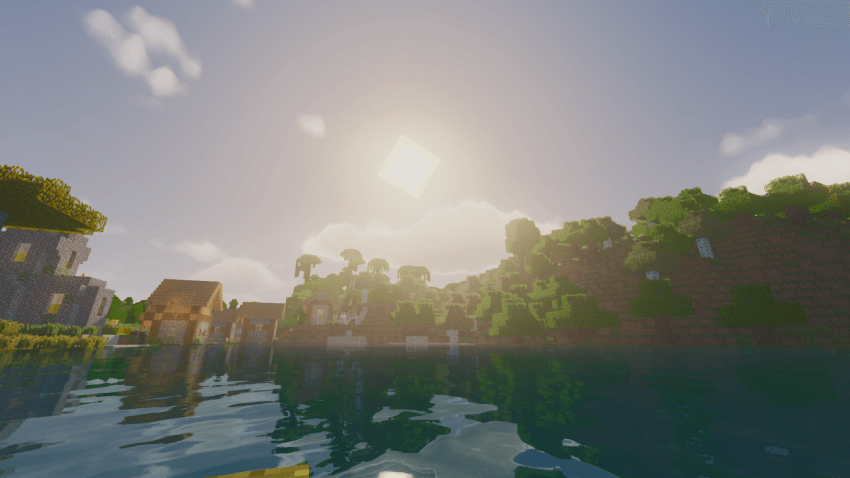
It is designed for players who want a clean visual upgrade: softer shadows, better sky color, reflective water, improved atmosphere, smoother contrast, and a more cinematic feel while still keeping Minecraft readable and playable. Make sure you play with the settings to achieve the most possible with the shader.
Features
- Natural lighting and color grading
- Soft shadows
- Reflective and animated water
- Improved sky and cloud atmosphere
- Balanced contrast without extreme overexposure
- Colored glass shadows
- Performance-friendly profiles
- Compatible with Iris and Sodium
- Works on a wide range of hardware, including macOS systems
- No compute shaders, SSBOs, or heavy GPU-only features required
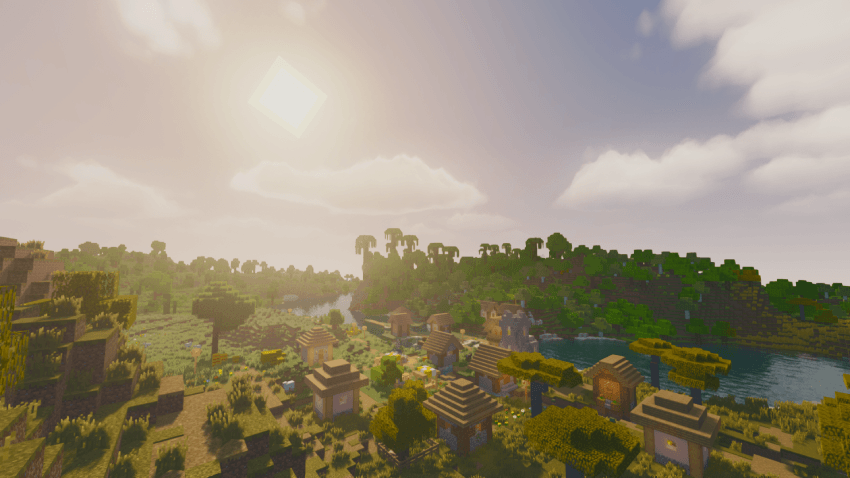
Shader Profiles
Rev’s Better Shaders includes multiple built-in profiles:
- Performance — lighter settings for weaker hardware
- Balanced — recommended default
- Quality — stronger visuals with higher settings
- Cinematic — more atmospheric visuals for screenshots and higher-end systems
Recommended Setup
This shader pack is made for:
- Minecraft Java Edition
- Fabric
- Sodium
- Iris Shaders
OptiFine is not the main target. For the best experience, use Iris + Sodium.
Installation
- Install Fabric.
- Install Sodium and Iris.
- Download Rev’s Better Shaders.
- Place the .zip file in your .minecraft/shaderpacks folder.
- Open Minecraft.
- Go to Options > Video Settings > Shader Packs.
- Select Rev’s Better Shaders.
- Start with the Balanced profile.
Compatibility Notes
Rev’s Better Shaders is built to avoid GPU features that commonly cause problems on some systems, such as compute shaders, shader storage buffers, and image storage. This makes it friendlier to macOS and other hardware with stricter OpenGL support.
Credits and License
Rev’s Better Shaders includes modified code from MakeUp Ultra Fast 9.5c by Javier Garduño, licensed under the GNU Lesser General Public License v3.0.
This project is distributed under the GNU Lesser General Public License v3.0.
See the included license and notice files for details.
Installation von Rev's Better Shaders
With Millida Launcher
Install Millida Launcher
The launcher is free: download it at millida.net/launcher and sign in with any nickname.
Click “Install” on this page
The launcher opens and installs the shaders for Minecraft 1.12–26.2 automatically.
Launch the game
A profile with it appears in the launcher: click “Play”.
Manually
Install Iris or OptiFine
Without a shader mod the game cannot see shaders. Install it for the same Minecraft version.
Download the shader archive
Pick the file Revs_Better_Shaders_v1.1.1.zip (2.8 MB) and do not unpack it.
Put it in the shaderpacks folder
“Options”, then “Video Settings”, then “Shader Packs”, then “Open Shader Pack Folder”, and drag the archive there.
Select the shaders
In the same window, click the pack name and “Apply”.
Versionen
Mit Abhängigkeiten
| Minecraft | Loader | Datei | Datum | Aktionen |
|---|---|---|---|---|
| 1.16.3 | — | Revs Better Shaders v1.1.12.8 MB 4 |
Bewertungen
Bewerten Sie Rev's Better Shaders als Erster


