

Ome Shaders für Minecraft 1.20.1, 1.21.1
Für Spieler entwickelt, die die Ästhetik warmer Sonnenuntergänge lieben.
 Fabric
 OptiFine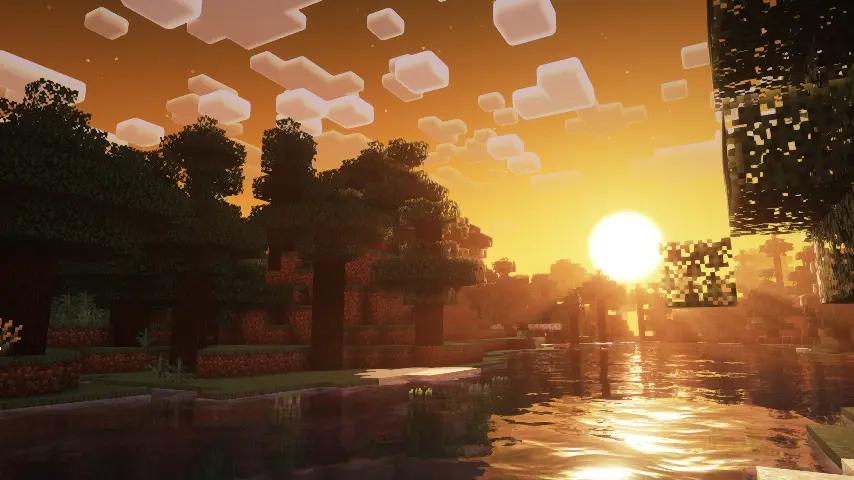
ABOUT
OmeShaders is a yellow-themed edit of Complementary Unbound made by EMIN GT. It is designed for players who love warm sunset aesthetics and want a more vibrant and glowing version of Minecraft's lighting and atmosphere. OmeShaders adds a golden, sunset-drenched vibe with glowing white clouds while maintaining the high-quality effects of the original shader.

Features
OmeShaders keeps most core features of Complementary Unbound but introduces a complete yellow sunset color theme across the sky, lighting, and overall ambience, paired with soft glowing white clouds. It's perfect for those who want a warm, radiant, and visually unique experience without straying too far from the original visual fidelity.

Installation von Ome Shaders
Install Millida Launcher
The launcher is free: download it at millida.net/launcher and sign in with any nickname.
Click “Install” on this page
The launcher opens and installs the shaders for Minecraft 1.19–26.2 automatically.
Launch the game
A profile with it appears in the launcher: click “Play”.
Versionen
Mit Abhängigkeiten
| Minecraft | Loader | Datei | Datum | Aktionen |
|---|---|---|---|---|
| 26.2 | Iris, OptiFine | 26.2444 KB |
FAQ
Which Minecraft versions does Ome Shaders work on?
There are files for 1.19–26.2, 28 versions in total. The newest is 26.2.
What do I need to run Ome Shaders?
Shaders are loaded through Iris or OptiFine: without one of them the game cannot see them.
How do I download Ome Shaders?
With Millida Launcher: it installs Ome Shaders into a modpack by itself, for the right game version and loader. The launcher is free.
Bewertungen
Bewerten Sie Ome Shaders als Erster


