

Über das VIPLobby Reloaded-Plugin
Please dont use the Old Version they are outdated! (Newest is: VIPLobby Reloaded for Spigot 1.9 and 1.8)
Welcome Player to the VIPLobby Reloaded Plugin Page.
It's just a Simple Plugin where you can set unlimited VIPLobby's for your Players.
You can find a List with all Features under here.
I hope you have Fun. Best Regards nflug
Features:
- Unlimited Lobbys
- Lobby Join Text
- Lobby Join BossBarText
- Lobby Join ActionBar Text
- Lobby Join Title Text
- Lobby Join Sound
- Lobby Join Custom Effects
- Signs to join Lobbys
- GUI to Edit the Lobbys
- GUI to join Lobbys
- Reload Command
- Good Config
- Easy to use
- No Depencies
- 1.9 and 1.8 compatible
- You can edit all Messages, Textes, Items, Sound and Effects

Commands
- /vl | ===== To get the HelpPage ===== | Permission: viplobby.helppage
- /vl create <name> | ===== To create a Lobby ===== | Permission: viplobby.create
- /vl delete <name> | ===== To delete a Lobby ===== | Permission: viplobby.delete
- /vl set <name> | ===== To set the Settings of a Lobby ===== | Permission: viplobby.set
- /vl list | ===== To get a List with all Lobby Names ===== | Permission: viplobby.list
- /vl reload | ===== To reload the Plugin&Config ===== | Permission: viplobby.reload
- /viplobby | ===== To open the GUI Menu ===== | Permission: viplobby.opengui
- /viplobby <name> | ===== To teleport to a Lobby ===== | Permission: viplobby.lobby.<name>
Permissions:
- viplobby.* | For all Permissions
- viplobby.admin | Contains:
- viplobby.opengui
- viplobby.alllobbys
- viplobby.create
- viplobby.delete
- viplobby.set
- viplobby.list
- viplobby.reload
- viplobby.joinitem
- viplobby.signs
- viplobby.alllobbys | To join all Lobbys
- viplobby.player | Contains:
- viplobby.opengui
- viplobby.joinitem
- viplobby.joinitem | To use and get the JoinItem if its activated
- viplobby.signs | To create VIPLobby Signs
Reload:
♦ If you update the plugin you need to restart the server.
♦ If you change something in the config.yml or Lobbys.yml enough already one /vl reload
Config.yml and Lobbys.yml
Config.yml: http://pastebin.com/5ULNFrRv
Lobbys.yml (With example Lobbys) http://pastebin.com/NckaG4Rz
Signs
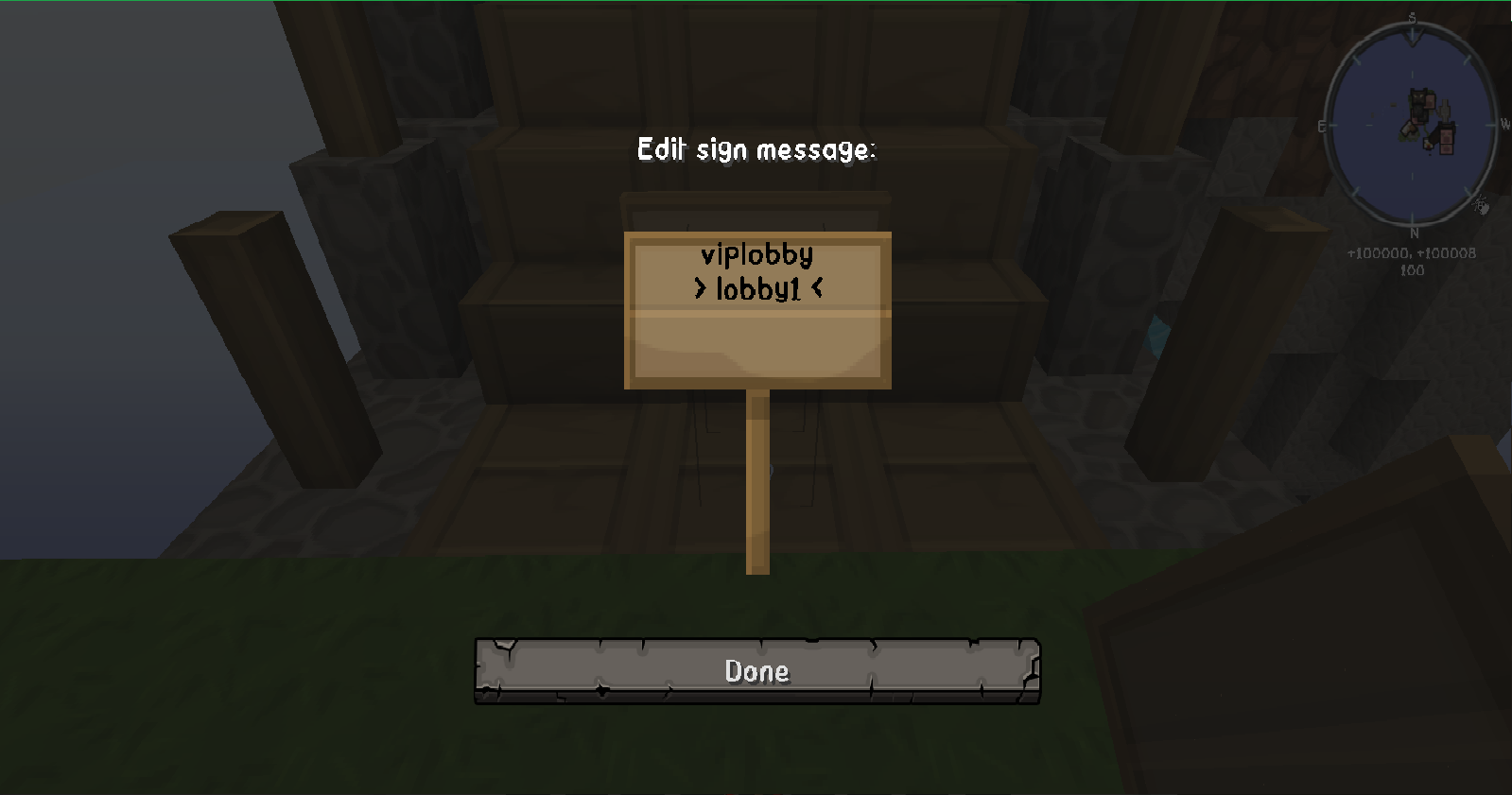
To create a Sign write in the first line: viplobby And in the Second Line the name of your Lobby.
New Tutorials:
- No One :,(
Old Tutorials:
https://www.youtube.com/watch?v=xfaDe2acnYo
by VariationVault ♦ Thank You !
https://www.youtube.com/watch?v=qNuEMPzgM2c
by QuartzNetwork ♦ Thank You !
https://www.youtube.com/watch?v=qAOnT_kO_g4
by nflug ♦ Thanks to me !
https://www.youtube.com/watch?v=NiHVtDpXalY
by Yan Francisco Perez ♦ Thank You !
https://www.youtube.com/watch?v=CQW5BmK_EPQ
by Angel Vault ♦ Thank You !
https://www.youtube.com/watch?v=aplFQ6Pak10
by ThePedro ☽ Plugins e Tutoriais ♦ Thank You !
https://www.youtube.com/watch?v=9QYKiKgtxuU
by TutoPlugins ♦ Thank You !
https://www.youtube.com/watch?v=F_BER7BggN4
by Themax112 ♦ Thank You !
https://www.youtube.com/watch?v=R0Ur9u3eofQ
by Raksitoh ♦ Thank You !
https://www.youtube.com/watch?v=kPyZ_Biwq-Q
by EINe0 ♦ Thank You !
https://www.youtube.com/watch?v=19m305k8Kpw
by MasterLP ♦ Thank You !
https://www.youtube.com/watch?v=xDxG9FVZRlg
by SrKalvin - Ps: Este canal não é bom. ♦ Thank You !
https://www.youtube.com/watch?v=8xqcIR4KH88
by Aleexelcanario | Minecraft Plugins | ♦ Thank You !
Have a Question or Bug?
♦ If you find a Bug or have a Question write me a PM or write it into the comments
♦ Of course you can also write what I should change.
Installation von VIPLobby Reloaded
A server on Paper or Spigot
The plugin runs on the server core for Minecraft 1.9; players do not need to install anything.
File goes into the plugins folder
Download the file VIPLobby.jar (185 KB) and put it into the server’s plugins folder.
Restart the server
On startup the plugin creates its own settings folder in plugins.
Use the “To server” button
On Millida Hosting, the button at the top of the page uploads the file to your server and restarts it for you.
Minecraft 1.9 runs on Java 8: with a different Java version the game may close right after launch.
Versionen
Mit Abhängigkeiten
| Minecraft | Loader | Datei | Datum | Aktionen |
|---|---|---|---|---|
| 1.9 | — | VIPLobby Reloaded for Spigot 1.9185 KB | ||
| — | — | VIPLobby 1.911.3 KB | ||
| — | — | VIPLobby 1.05 KB |
Bewertungen
Bewerten Sie VIPLobby Reloaded als Erster



