
Über das TeslaCoil-Plugin
TeslaCoil - Tesla Coil mob control: Version: v2.6.5
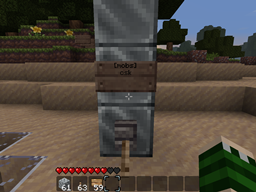
Usage: the player must construct a tower of no less than 3 iron(configurable) blocks, and connect this directly to a redstone current. While the current is active, targetted mobs and players within a configurable radius, above or below ground, will be fried. The towers ping every second by default, so mobs chasing you will quickly regret it :p Feedback/constructive criticism is welcome.
Features:
- Tower of 3> configurable blocks will continually zap mobs in a proportionate radius
- Lightning striking mobs on sand turns the sand into glass
- Configuration for radius, vertical radius, sand-to-glass, toggleable targets, and ping time
- Sign-based mob filtering, and player targeting.
- Option to hit all mobs but those specified.
- To avoid being hit as a targeted player, pumpkin helmets have been added as a safe item.
- Command /teslareload allows ops to reload config without reloading all plugins.
- Only users with the permission 'teslacoil.use' can activate coils, and 'teslacoil.reload' for the config.
- Users can be limited with 'teslacoil.limit.#' as well as 'teslacoil.use.mobs' and 'teslacoil.use.players'. shoutout to Chaznuts thanks buddy!
- Towers may have a general cap set, or be limited per group/user.
- Can warn users if they are approaching dangerously close to a coil.
- The towers can be built to shoot fireballs, wither skulls, or simply ignite targets.
- Towers can construct an iron-fence shell.
Configuration:
Permission:
teslacoil.use | Activate coils teslacoil.use.mobs | Ability to target mobs teslacoil.use.players | Ability to target players teslacoil.reload | Use /teslarelaod teslacoil.nolimit | Bypass coil restriction teslacoil.limit.# | # is the number of coils that should be restricted per user/group
Configuration Properties
coillimit: 3 #How many coils users without teslacoil.nolimit can activate, max sandtoglass: true #If false, sand will not turn into glass if a mob is standing on it vradius: 2 #Sets veritcal radius to scan for mobs setping: 1 #Sets seconds the towers wait to ping the area around them blocktype: 42 #Type of block for tower teslaradius: 8 #Can be 0(based on tower height) or a number to set a constant radius. deathblocktype: 49 #Type of block that should be present at the top of the tower for wither mode. radiusmultiplier: 1 #Used only if teslaradius is 0; for each block, the radius is this much bigger. safelightning: false #Safe lightning will only hit the target and not cause splash-damage. fireblocktype: 89 #Type of block that should be present at the top of the tower for fireball mode. buildcage: false #When a normal (not fire-type) coil is enabled, constructs an iron-fence cage around it. warnthreshold: 10 #Can be 0(deactivated) or a number to designate, from the coil's usual effect radius, at what point an approaching player is warned. igniteblocktype: 20 #Type of block that should be present at the top of the tower for ignite mode. damage: 0 #Can be 0(no additional damage) or a number indicating how much additional damage will be applied to targets.
Signs: Signs may be placed anywhere on the coil, above the block the power is running in through.
To Filter Players: Same idea as below, place a sign on any side of the block above where the power is input, with the first line being [players] and the subsequent lines containing a player name per line. You can have as many of these signs as there are places on the coil to put them.
To Filter Mobs: Place a sign above the block where the power is input (doesn't matter which direction it faces), where the first line is [mobs] and the second line contains a list of all mobs that should be targeted by the coil. Alternatively, by including 'ex' on the top of any sign (like [players]ex) will put the coil in Exclusion mode, avoided the specified mobs and hitting all others. The characters are as follows:
c - Creeper s - Spider k - Skeleton z - Zombie h - Chicken o - Cow e - Sheep w - Angry wolf p - Cave Spider b - Blaze m - Magma Cube v - Villager d - Ender Dragon i - Pig Zombie n - Enderman q - Ocelot r - Wither t - Witch l - Slime
Installation von TeslaCoil
A server on Paper or Spigot
The plugin runs on the server core; players do not need to install anything.
File goes into the plugins folder
Download the file teslacoil.jar (32 KB) and put it into the server’s plugins folder.
Restart the server
On startup the plugin creates its own settings folder in plugins.
Or use the “To hosting” button
On Millida Hosting, the button at the top of the page uploads the file to your server and restarts it for you.
Versionen
Mit Abhängigkeiten
| Minecraft | Loader | Datei | Datum | Aktionen |
|---|---|---|---|---|
| — | — | TeslaCoil v2.6.532 KB |
FAQ
Do players need to install TeslaCoil?
No, the plugin goes only on the server, into the plugins folder: players do not need to download anything.
Where can I download TeslaCoil safely?
On this page: the file teslacoil.jar (32 KB) is stored on Millida’s server, with no link shorteners. SHA-1 checksum: 8403e365f30eeff6b4ecab1e08e5dca72b65e4f3.
Bewertungen
Bewerten Sie TeslaCoil als Erster


