
Über das Subterranea-Plugin
With the death of Bukkit, I will no longer be supporting this plugin. If it still works for you, fantastic. If not, you are on your own. All the source will remain available on GitHub. Farewell, -DeltaHat
Overview
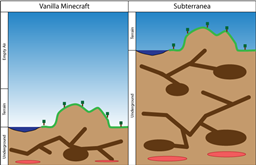
Subterranea is a modification of the Vanilla terrain generator that switches the above and below ground spaces so your world has 192 layers below sea level and 64 layers above. Great for Mole Man worlds.
Works Best With
Giant Caves Toxic Skies
Features
- Creates a world mostly underground instead of mostly full of air.
- Fully supports Multiverse2
- Tightly integrated with GiantCaves
- All the expected above ground features of the vanilla terrain generator: villages, temples, trees, etc.
- All the expected below ground features of the vanilla terrain generator: caves, ores, lakes, lava, etc.
- Increased ore generation - since the world is three times as deep, ores range three times as high
- Underground biomes - find hidden mushroom caverns and mysterious underground trees burried in the depths
- Silverfish colonies - rare but terrifying
Installation
- Put the plugin in your plugins directory
- Add a worlds section to your bukkit.yml or use Multiverse
- Visit your new world and start exploring
worlds: [worldname]: generator: Subterranea[:options]
bukkit.yml example
worlds: world: generator: Subterranea:-giant-caves
Notes:
- If you use "world" for [worldname] in your bukkit.yml, Subterranea will run in your default world.
- [:options] can be omitted to use the default settings. See below for details.
- I highly recommend using a plugin like World Border to pre-generate your map. Generating new chunks with Subterranea is very CPU intensive.
Subterranea Options
The Subterranea world generator supports a number of options. Options are passed into the generator using the [:options] string in the above examples. Always put a colon between the word Subterranea and the options string.
-underground-biomes: (true or false, default true) Enables or disables underground bionme creation
-silverfish: (true or false, default true) Enables or disables silverfish colony creation hidden in the stone.
-giant-caves: (default sxz=500,sy=175,cutoff=65,miny=40,maxy=160) Enables or disables the Giant Caves plugin. An optional configuration string can be passed into this option to configure the Giant Caves generator. See the Giant Caves documentation for a description of each setting and how it affects cave creation. You need to install Giant Caves for this to work!
-ore-multiplier: (default 3) Sets how many passes the ore populator should make over each chunk. A value of three keeps about the same or density as vanilla. A value above ten may significantly slow down chunk creation.
Using Subterranea with Giant Caves
Subterranea is compatible with Giant Caves. To add Giant Caves to a Subterranea world, just add -giant-caves to the [:options] string.
Using Subterranea with Multiverse
To use Subterranea with Multiverse, use the following sequence of commands
- mv create world_name NORMAL -g "Subterranea[:options]"
- mv tp world_name
Notes:
- [:options] can be omitted to use the default settings. See below for details.
- If you plan on using Subterranea in conjunction with Giant Caves and Multiverse, delete the contents of the Giant Caves config.yml file.
Multiverse Example:
mv create DeepWorld NORMAL -g "Subterranea:-underground-biomes true -silverfish true -giant-caves sxz=500,sy=175,cutoff=65,miny=10, maxy=180"
Create a new Subterranea world called DeepWorld with underground biomes, silverfish, and gaint caves from layer 10 to layer 180
Metrics
This plugin utilizes Hidendra's plugin metrics system. the following information is collected and sent to mcstats.org unless opted out:
- A unique identifier
- The server's version of Java
- Whether the server is in offline or online mode
- Plugin's version
- Server's version
- OS version/name and architecture
- core count for the CPU
- Number of players online
- Metrics version
Opting out of this service can be done by editing plugins/Plugin Metrics/config.yml and changing opt-out to true.
Installation von Subterranea
A server on Paper or Spigot
The plugin runs on the server core for Minecraft 1.6.4; players do not need to install anything.
File goes into the plugins folder
Download the file Subterranea-1.6.4-R02.jar (44 KB) and put it into the server’s plugins folder.
Restart the server
On startup the plugin creates its own settings folder in plugins.
Or use the “To hosting” button
On Millida Hosting, the button at the top of the page uploads the file to your server and restarts it for you.
Minecraft 1.6.4 runs on Java 8: with a different Java version the game may close right after launch.
Versionen
Mit Abhängigkeiten
| Minecraft | Loader | Datei | Datum | Aktionen |
|---|---|---|---|---|
| — | — | Subterranea-1.7.10-R01.jar61.3 KB | ||
| 1.6.4 | — | Subterranea-1.6.4-R02.jar43.9 KB | ||
| 1.6.4 | — | Subterranea-1.6.4-R01.jar43.2 KB |
FAQ
Which Minecraft versions does Subterranea work on?
Only Minecraft 1.6.4: there are no files for other versions.
Which Java does Subterranea need?
Minecraft 1.6.4 runs on Java 8. If the game closes right after launch, the usual cause is the wrong Java version in the profile settings.
How do I download Subterranea?
With Millida Launcher: it installs Subterranea into a modpack by itself, for the right game version and loader. The launcher is free.
Bewertungen
Bewerten Sie Subterranea als Erster


