

Über das Simple Chat Channels-Plugin
Description: SimpleChatChannels brings the functionality of IRC style chat channels to minecraft. Using SimpleChatChannels one can easily create or remove public or private chat channels, set channel topics, remove unwanted users from channels and more. With ever-expanding features and increased configurability, simplechatchannels can help to manage the noisiest of servers.
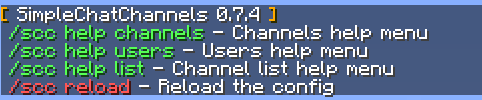
Updating to 0.7?
Remember to delete StorageConfig.yml in your SimpleChatChannels plugin directory, as the format for storing data has changed slightly.
To Do: • Colours in channel topic • Paginated channels list • Option to list users in channel upon join • Option to join a default channel upon joining server • SQL + SQLite support Installation:
- Download the .jar
- Place the .jar in your plugins directory
- Restart the server
Configuration: • SilenceGeneralChat - Silence general server chat when in a chat channel • PublicJoinPartMessaes - Broadcast join / part messages to whole server • ChatPrefix - Define the chat prefix for users in a channel
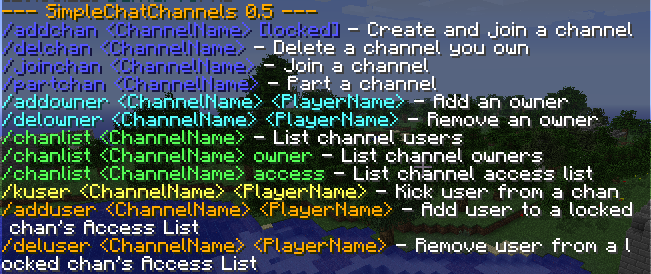
Commands: • /scc - Main menu Channels • /addchan (channelname) - Add/Create a channel • /addchan -L (channelname) - Add/Create a locked channel • /delchan (channelname) - Delete a channel • /joinchan (channelname) - Join a channel • /partchan (channelname) - Part (LEAVE) a channel • /kuser (channelname) (playername) - Kick a user from a channel • /topic (channelname) (topic) - Set a channel topic • /spychan [channelname] - spy on all/specific channel conversation Users • /adduser (channelname) (playername) - Add a user to a locked channel's Access List • /deluser (channelname) (playername) - Delete a user from a locked channel's Access List • /addowner (channelname) (playername) - give a user owner rights to your channel • /delowner (channelname) (playername) - remove a user's owner rights to your channel Lists • /chanlist - List channels • /chanlist -o (channelname) - List channel's owner list • /chanlist -a (channelname) - List channel's access list • /chanlist -p (channelname) - List which channel a user is in
Permissions: • scc.addchan - ability to create a channel • scc.join - ability to join a channel • scc.chanlist - ability to view the channel's list • scc.spychan - ability to spy on all/specific channels • scc.admin - ability to administrate all channels • scc.reload - ability to reload the config
Thankyou for your Kindness & Support! :D Change-Log:
0.7.6
- BugFix: Channel members not notified of a user parting the channel.
- Updated for Spigot API 1.10.2
0.7.5
- Added /spychan command
- Bugfix: Joining a channel while already in another channel
0.7.4
- Updated Menu
- Updated Channels list
- Added Channel topics
- Added Configurable Chat Prefix
- Added flag (-p) to chanlist for finding a user
- Added configurable public notice on user joining/parting a chat channel
0.7.3
- BugFix: Players not leaving channel upon quit/disconnect
0.7.2
- Updated for 1.3
0.7.1
- Fixed bug with creating locked channels
0.7
- Fixed bug with case-sensitive channel names
- Updated appearance and output
- Code clean-up and minor bugfixes
- Updated missing/broken sanity checks
Installation von Simple Chat Channels
A server on Paper or Spigot
The plugin runs on the server core for Minecraft 1.12; players do not need to install anything.
File goes into the plugins folder
Download the file SimpleChatChannels.jar (38 KB) and put it into the server’s plugins folder.
Restart the server
On startup the plugin creates its own settings folder in plugins.
Or use the “To hosting” button
On Millida Hosting, the button at the top of the page uploads the file to your server and restarts it for you.
Minecraft 1.12 runs on Java 8: with a different Java version the game may close right after launch.
Versionen
Mit Abhängigkeiten
| Minecraft | Loader | Datei | Datum | Aktionen |
|---|---|---|---|---|
| 1.12 | — | SimpleChatChannels-0.7.6.jar37.9 KB | ||
| — | — | SimpleChatChannels-0.7.537.5 KB |
FAQ
Which Minecraft versions does Simple Chat Channels work on?
Only Minecraft 1.12: there are no files for other versions.
Do players need to install Simple Chat Channels?
No, the plugin goes only on the server, into the plugins folder: players do not need to download anything.
Which Java does Simple Chat Channels need?
Minecraft 1.12 runs on Java 8. If the game closes right after launch, the usual cause is the wrong Java version in the profile settings.
Where can I download Simple Chat Channels safely?
On this page: the file SimpleChatChannels.jar (38 KB) is stored on Millida’s server, with no link shorteners. SHA-1 checksum: 2ae5f2e01dbddca0d2f20e605aba35efaeb42f05.
Bewertungen
Bewerten Sie Simple Chat Channels als Erster


