

ServerTP Plugin für Minecraft 1.12
Ermöglicht Spielern, sich zu einem Server-Hub, Shop und anderen von Serveradministratoren festgelegten Orten zu teleportieren
Über das ServerTP-Plugin
Welcome to our page! Look below for useful information. If you have any questions drop us a line (details on how to do so below). This is our first Bukkit plugin publicly released. We hope to add screenshots etc at a future date.
This plugin allows you to easily set the spawn in a hub server and a shop in wherever your server might have one and teleport to it with simple commands and permissions! See down below for what we hope/want to add in the near future (odds are in the next update we will be adding one or more of the below). What we want to do with this plugin/add: Compass teleportation, which would be fully customizable (right down to the lore etc). Add more locations available to teleport to. Add more customization abilities/options.
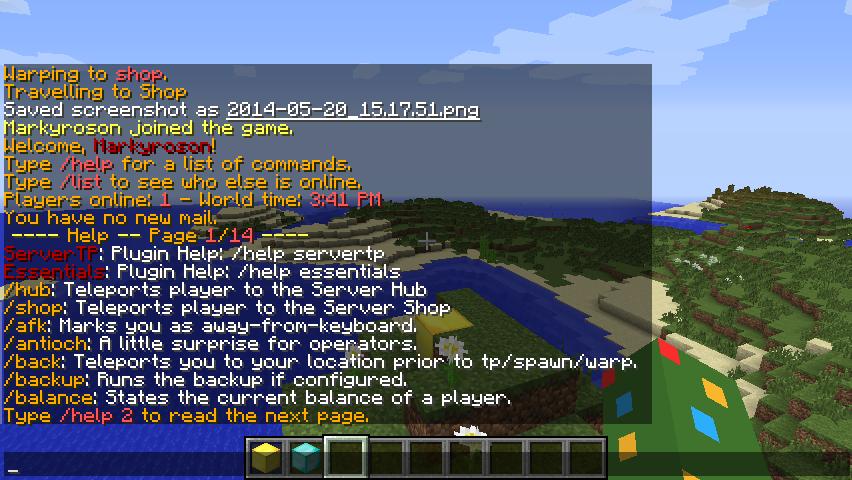
Features:
Teleport to a server hub Teleport to a server shop Set shop location Set hub location Admins can set custom teleport locations (as of v2.0) Configurability If a player types a command wrong it notifies them and tells them the command that they can enter to view all plugin commands. /st admin command to allow admins to see full set of commands for plugin Installation: Click the download button Drag the jar file into your /server/plugins folder, restart/reload/start the server or use a plugin like Plugin Manager or PlugMan to avoid having to reload, or stop your server provided that your server is running of course. After that the plugin should be loaded/registered and ready to go! Questions, concerns, ideas or bugs? Let us know! Create a ticket with the built in ticket system located to the left of the page. Also, if you want anything added to the plugin we will most likely be willing to help (for free) and add it to future versions of the plugin. We help you and your idea helps us grow.

Commands
This is a sampling of the commands, please refer to the official Wiki for this plugin for more details and commands. /hub- This command teleports you to the hub location /shop - This command teleports you to the shop location /setshop - This command sets the shop which is teleported to via the command /shop /sethub - This command sets the hub location. /st - Displays full list of commands accessible to regular users/guests /servertp - Alternative way to display full list of commands accessible to regular users/guests /stinfo - Displays important plugin information /servertpinfo - Alternate way to display important plugin information /st version - Displays the plugin version /servertp version - Alternate way to display the plugin version. /st admin - Displays the full list of commands for admins (ALL COMMANDS in plugin) REQUIRES: servertp.admin permission /servertp admin - Alternate way to display full list of commands for admin For more commands, see the official Wiki
Permissions
For a full list of the permissions and more details on them, please see the Commands section of the official plugin Wiki. ServerTP.sethub ServerTP.setshop servertp.reload servertp.admin ServerTP.view.help ServerTP.shop servertp.update servertp.admin.teleport.setdelay servertp.admin.teleport.toggle
To Do List:
Expand the plugin Squash any bugs found Anything else you want done? Let us know via the above contact info section. Add more commands and features. If you would like a feature added please let us know either in the comments below, sending Markyroson a private message on dev.bukkit.org, or by email markyroson[at]gmail.com. Thanks!
Stats collection and data gathering
This plugin utilizes Hidendra's plugin metrics system. Opting out of this service can be done by editing plugins/Plugin Metrics/config.yml and changing opt-out to true. The following information is collected and sent to mcstats.org. A unique identifier The server's version of Java Whether the server is in offline or online mode The plugin's version The server's version The OS version/name and architecture The core count for the CPU The number of players online The Metrics version
Donations
Donations are welcome and greatly appreciated however, are not required in any way nor is the project continuing/its support contingent on them. They are merely a way of helping to support future developments and projects as well as getting apps to other platforms (I currently have apps available on android) such as iOS - an expensive process.
Website
You can check out our website at markyrosongaming.com and our Wiki at wiki.markyrosongaming.com
Installation von ServerTP
A server on Paper or Spigot
The plugin runs on the server core for Minecraft 1.8.1–1.12; players do not need to install anything.
File goes into the plugins folder
Download the file ServerTP.jar (57 KB) and put it into the server’s plugins folder.
Restart the server
On startup the plugin creates its own settings folder in plugins.
Or use the “To hosting” button
On Millida Hosting, the button at the top of the page uploads the file to your server and restarts it for you.
Minecraft 1.12 runs on Java 8: with a different Java version the game may close right after launch.
Versionen
Mit Abhängigkeiten
| Minecraft | Loader | Datei | Datum | Aktionen |
|---|---|---|---|---|
| 1.9 | — | ServerTP-v2.0.156.9 KB |
FAQ
Which Minecraft versions does ServerTP work on?
There are files for 1.12, 1.11, 1.10, 1.9, 1.8.1. The newest is 1.12.
Which Java does ServerTP need?
Minecraft 1.12 runs on Java 8. If the game closes right after launch, the usual cause is the wrong Java version in the profile settings.
Where can I download ServerTP safely?
On this page: the file ServerTP.jar (57 KB) is stored on Millida’s server, with no link shorteners. SHA-1 checksum: 435db5799e22240d092591058eea9efaf509877c.
Bewertungen
Bewerten Sie ServerTP als Erster


