

Simple Timer Datenpaket für Minecraft 1.20.1, 1.16.5
Dieses Datapack führt eine einfache, anpassbare Timer- und Countdown-Funktion ein, die sich perfekt für Mini-Spiele, Events oder persönliche Projekte eignet. Es funktioniert einfach in deinen bestehenden Minecraft-Welten.
- Downloads
- 1 Downloads
- Aufrufe
- 49 Aufrufe
- Aktualisiert
- Aktualisiert 02.09.2026
- 1.14 — 1.21.11
 Datenpaket
- Client und Server
Simple Timer Datapack:
This Datapack introduces a simple, customizable timer and countdown feature in various colors, making it perfect for mini-games, events, or personal projects. It’s easy to set up and use, and works seamlessly within your existing Minecraft worlds.
It adds a timer and countdown system that is customizable in different colors (soon for the countdown system), allowing you to fit it to the theme of your game or event.
Menu
The Menu can be opened with
/trigger timer_trigger set 24
Important
If you try to add the Datapack in a newer/older version, you may see a message like this:
This Datapack was made for a newer/older Version of Minecraft
It will still work in certain versions that are displayed in the Versions tab here!!!
Why Download This Project?
This Datapack is designed for anyone who wants to enhance their Minecraft world with a fully customizable and visually appealing timer and countdown system. Whether you're hosting complex mini-games, timing in-game events, or simply adding more functionality to your builds, this project offers a range of useful features:
- Versatile Timer and Countdown System:
Easily set up a timer or countdown for any scenario. From races to timed challenges, this Datapack allows you to manage in-game time with precision. The countdown can be customized down to the second, and there are no limits on how long you can set it — whether it's a short 10-second sprint or a massive 1000-hour countdown for long-term events.
- 16 Color Options & Color Wave Mode:
Choose from 16 different colors to match your Minecraft theme, build, or event. Plus a "color wave" mode, adding even more dynamic visual customization to your timers and countdowns.
- Simple and Intuitive Menu:
You don’t need to deal with complicated setups or commands. The user-friendly menu makes it easy to start, pause, resume, or reset the timer, and you can even hide it from chat if you want a cleaner interface.
- Lightweight and Non-Intrusive:
The Datapack integrates seamlessly into your existing Minecraft world without causing lag or disrupting gameplay. It's designed to enhance the experience without adding unnecessary complexity.
How does the pack work?
First: Paste the Datapack in your world and reload. After that you should see this message in chat.
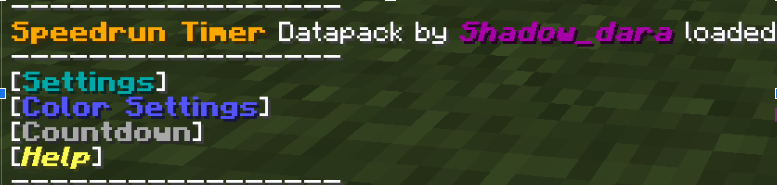
To go trough the menues, you must click on name in the chat.
- Settings: In this menu, you can start, pause, or resume the timer. Additionally, you have the option to disable the timer from appearing over your hotbar for a cleaner experience but the timer wont stop!
- Color Settings: Opens a submenu where you can choose from 16 different colors to customize the timer's appearance and a dynamic color wave mode. If you want too, you suggest options for the color wave mode on my discord server
- Countdown: This option allows you to start a countdown using a bossbar. You can easily adjust the time via a submenu with options to add or subtract in increments of 1 second, 10 seconds, 1 minute, 10 minutes, 1 hour, or 10 hours. There's no upper limit on the countdown, so feel free to set it as high as you'd like—even up to 1000 hours!
- Help: Contains credits, an uninstall option, and a debug menu. The debug menu displays the timer's scoreboard in the sidebar for easy monitoring.
If you need help with this pack, check out my discord server here!
Installation von Simple Timer
With Millida Launcher
Install Millida Launcher
The launcher is free: download it at millida.net/launcher and sign in with any nickname.
Click “Install” on this page
The launcher opens and installs the data pack for Minecraft 1.14–1.21.11 automatically.
Launch the game
A profile with it appears in the launcher: click “Play”.
Manually
Download the archive
Pick the file simple_timer_1.21.5_by_shadowdara.zip (102 KB) for your game version.
New world: “Data Packs”
When creating a world, click “Data Packs”, drag the archive into the window, then move it to “Selected”.
Existing world: the datapacks folder
Put the archive into saves/<world>/datapacks and type /reload in game.
On a server
Archive goes into the server world’s datapacks
The world/datapacks folder on the server; players do not need to install anything.
Reload the data
Type /reload in the server console or restart the server.
Or use the “To hosting” button
On Millida Hosting, the button at the top of the page uploads the file to your server and restarts it for you.
Versionen
Mit Abhängigkeiten
| Minecraft | Loader | Datei | Datum | Aktionen |
|---|---|---|---|---|
| 1.21.11 | Datenpaket | 1.21.11102 KB 1 | ||
| 1.19.2 | Datenpaket | 1.19.225.2 KB | ||
| 1.18.2 | Datenpaket | 1.18.225.2 KB | ||
| 1.17.1 | Datenpaket | 1.17.125.2 KB | ||
| 1.15.2 | Datenpaket | 1.15.225.2 KB | ||
| 1.14.4 | Datenpaket | 1.14.425.2 KB | ||
| 1.16.5 | Datenpaket | 1.16.525.2 KB | — |
Bewertungen
Bewerten Sie Simple Timer als Erster


