

Minecraft Chaos Datapack für Minecraft 26.3
Inspiriert vom GTA Chaos Mod. Es gibt 200 verschiedene mögliche Effekte in diesem Challenge-Datapack!
- Downloads
- 7 Downloads
- Aufrufe
- 50 Aufrufe
- Aktualisiert
- Aktualisiert 14.10.2026
- 1.21.11 — 26.3
 Datenpaket
- Client und Server
Über das Minecraft Chaos Datapack-Datenpaket
Every 60 seconds, you'll get a random chaotic effect applied! It can be effects such as spawning mobs, getting special items, generating structures... or more crazy effects, like making all mobs spin, an anvil apocalypse, or explode all mobs!
This datapack has quite a bunch of settings to customize your experience and have fun the way you would like to - all the details are found below.

Donate
If you like this datapack and what I do, you can consider donating so I can keep this updated with a bit more ease in the future with your support, as my finantial situation hasn't been the best recently. Only do so if you can aford it, anything is appreciated!
Please note that I'm being helped by someone to run this PayPal account, hence the name.

How to use
In version 1.4 and above (Minecraft 1.21.6+)
Simply press the Quick Actions keybind (which is 'G' by default) or pause the game and select Minecraft Chaos in order to open the main menu.
In this menu, you'll be able start the chaos by selecting your settings, stop the chaos, read the credits, check my socials, and take a look at the Hall of Fame!
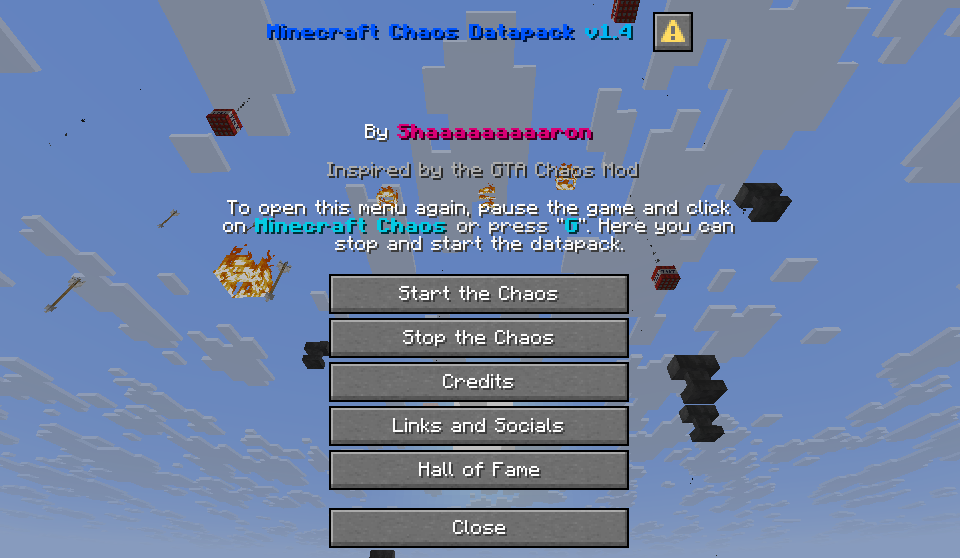
In versions prior to 1.4 (Minecraft 1.21.4 and below)
Use /trigger chaos.info in order to open the settings menu in the chat. Use your mouse to click and select everything in the chat in order to start the chaos.
Modes
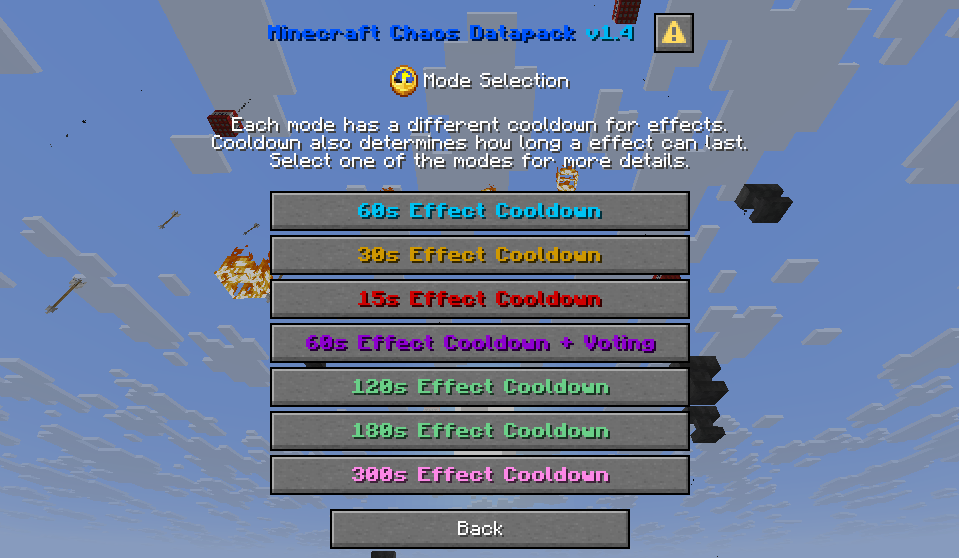
- 60s Cooldown Mode: Every minute you will get a random effect with a duration of 3 minutes in most cases. Some can last 60, 30, or 10 seconds.
- 30s Cooldown Mode: Every 30 seconds you will get a random effect with a duration of 1:30 in most cases. Some can last 45, 15, or 10 seconds.
- 15s Cooldown Mode: Every 15 seconds you will get a random effect with the same duration times as 30s Cooldown Mode.
- 60s Cooldown + Voting Mode: Every 30 seconds players in spectator mode will get a poll and have other 30 seconds to vote for an effect the runner will get. If there is a tie, a random effect from the poll will be selected. This mode is meant to be played in multiplayer.
- 120s, 180s, and 300s Cooldown Modes: Same effect duration times as 60s Cooldown Mode, but with a longer cooldown between effects.
Modifiers
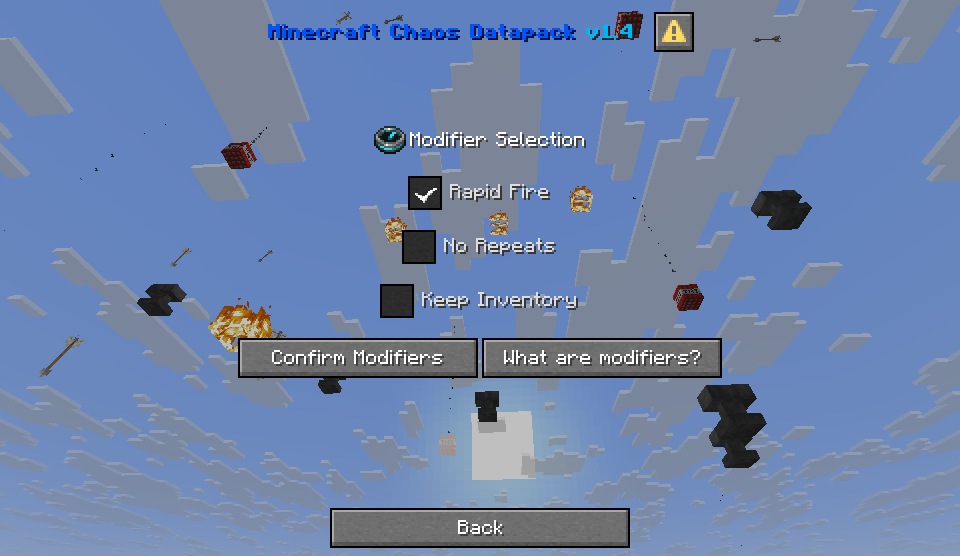
Modifiers are extra options you can enable and disable to the runs that you play
- Rapid Fire: Every so often, a warning of the incoming rapid fire will appear. When the rapid fire happens, a large amount of effects with really short duration will activate in quick succession. Can be very, very chaotic. Yet fun, though. Give it a try before disabling it!
- No Repeats: If enabled, effects cannot be selected again after being applied during the run. After all effects have been applied, everything will be able to be available to be selected again.
- Keep Inventory: If enabled, the gamerule Keep Inventory will be set to true for the run. It's important you enable it this way instead of manually using the /gamerule command since an effect can disable it after it runs out! But don't worry, with this setting, not only it will remain on for the run, but the effect that can disable it cannot be selected either.
Credits
- xnightcor3 - Thumbnail Artist
- Misode Data Pack Generators - Data Pack Generators and Tags Libraries
- MC Stacker - Command helper and updating old NBT tags
Installation von Minecraft Chaos Datapack
With Millida Launcher
Install Millida Launcher
The launcher is free: download it at millida.net/launcher and sign in with any nickname.
Click “Install” on this page
The launcher opens and installs the data pack for Minecraft 1.21.11–26.3 automatically.
Launch the game
A profile with it appears in the launcher: click “Play”.
Manually
Download the archive
Pick the file minecraft-chaos-datapack-1-6-7.zip (894 KB) for your game version.
New world: “Data Packs”
When creating a world, click “Data Packs”, drag the archive into the window, then move it to “Selected”.
Existing world: the datapacks folder
Put the archive into saves/<world>/datapacks and type /reload in game.
On a server
Archive goes into the server world’s datapacks
The world/datapacks folder on the server; players do not need to install anything.
Reload the data
Type /reload in the server console or restart the server.
Use the “To server” button
On Millida Hosting, the button at the top of the page uploads the file to your server and restarts it for you.
Versionen
Mit Abhängigkeiten
| Minecraft | Loader | Datei | Datum | Aktionen |
|---|---|---|---|---|
| 26.3 | Datenpaket | 26.3894 KB 4 | ||
| 26.3 | Datenpaket | 26.3890 KB | ||
| 26.3 | Datenpaket | 26.3890 KB | ||
| 26.3 | Datenpaket | 26.3872 KB 1 | ||
| 26.3 | Datenpaket | 26.3887 KB | ||
| 26.3 | Datenpaket | 26.3886 KB | ||
| 26.3 | Datenpaket | 26.3879 KB | ||
| 26.3 | Datenpaket | 26.3879 KB |
FAQ
Does Minecraft Chaos Datapack work on a server?
Yes: the data pack goes into the datapacks folder of the server world, and players do not need to install anything.
How do I download Minecraft Chaos Datapack?
With Millida Launcher: it installs Minecraft Chaos Datapack into a modpack by itself, for the right game version and loader. The launcher is free.
Bewertungen
Bewerten Sie Minecraft Chaos Datapack als Erster


