

About Datapack
Make Me Whole Again (MMWA) adds a plenty of new recipes that allow to craft stairs, slabs and walls back to their corresponding blocks. Got to many stairs or crafted way too much slabs? That's not a problem anymore!

Recipes
This datapack introduces A LOT of new recipes that allows you to craft stairs, slabs, carpets and walls back to blocks. For more information, check the sections below.

Stairs
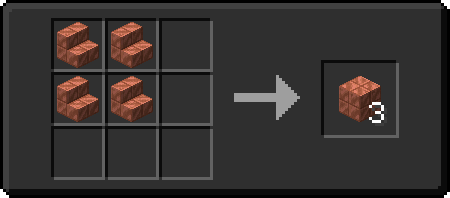
To craft stairs back to blocks, place them in a 2x2 square pattern in the crafting and you'll get 3 corresponding blocks.
Slabs
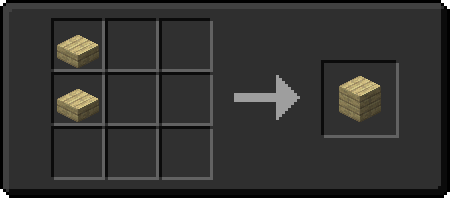
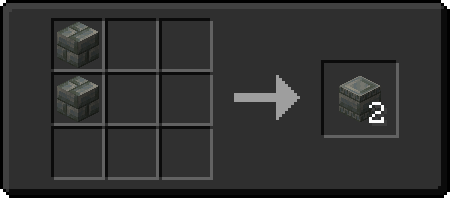
To craft slabs back to blocks, place them in a 2x1 rectangle pattern in the crafting and you'll get a corresponding block.
Snow
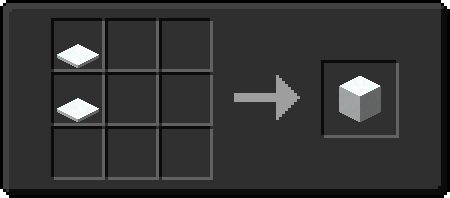
To craft snow layers back to snow blocks, place them in a 2x1 rectangle pattern in the crafting - similar to slabs - and you'll get a snow block.
Carpets
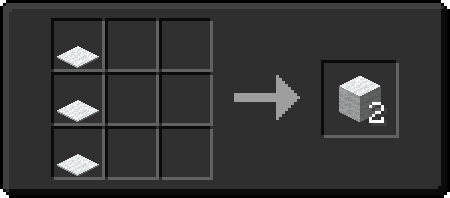
To craft carpets (including moss carpets) back to blocks, place them in 3x1 rectangle pattern in the crafting and you'll get a wool or moss block.
Walls
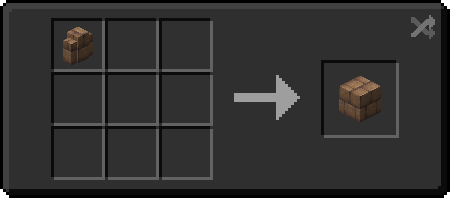
To craft walls back to blocks, place a wall in any slot of the crafting and you'll get a corresponding block.
Conflicts
To avoid any conflicts with existing Minecraft recipes, I had to change the way you craft chiseled blocks. To craft them, replace slabs with blocks, as shown at the image below. The only exception is a chiseled quartz block. To craft it, place quartz blocks in 2x2 square.
Future datapack support
I plan on updating this datapack once new full releases of Minecraft comes out.
Compatibility with Fabric mods
If you want some extra compatibility for blocks introduced with Fabric mods, let me know on Discord and I will release additional add-ons giving compatibility with desired mods!
Installation von Make Me Whole Again
With Millida Launcher
Install Millida Launcher
The launcher is free: download it at millida.net/launcher and sign in with any nickname.
Click “Install” on this page
The launcher opens and installs the data pack for Minecraft 1.21–26.2 automatically.
Launch the game
A profile with it appears in the launcher: click “Play”.
On a server
Archive goes into the server world’s datapacks
The world/datapacks folder on the server; players do not need to install anything.
Reload the data
Type /reload in the server console or restart the server.
Use the “To server” button
On Millida Hosting, the button at the top of the page uploads the file to your server and restarts it for you.
Versionen
Mit Abhängigkeiten
| Minecraft | Loader | Datei | Datum | Aktionen |
|---|---|---|---|---|
| 26.1 | — | 1.4 for MC 26.1 - 26.3-snapshot-8433 KB | ||
| 1.21 | — | a.1.0 for MC 1.21.x81.1 KB |
FAQ
Which Minecraft versions does Make Me Whole Again work on?
There are files for 26.2, 26.1.2, 26.1.1, 26.1, 1.21.1, 1.21. The newest is 26.2.
Does Make Me Whole Again work on a server?
Yes: the data pack goes into the datapacks folder of the server world, and players do not need to install anything.
Bewertungen
Bewerten Sie Make Me Whole Again als Erster


