

Fast Smelt Datenpaket für Minecraft 1.21.1, 1.21
Schmelze Gegenstände im Ofen, Schmelzofen, Räucherofen und Lagerfeuer SCHNELL!
- Downloads
- 4 Downloads
- Aufrufe
- 50 Aufrufe
- Aktualisiert
- Aktualisiert 26.09.2026
- 1.21 — 26.3
 Datenpaket
- Client und Server
Über das Fast Smelt-Datenpaket
I made this because I don't like waiting for a lot of items to smelt, especially when I'm out exploring.
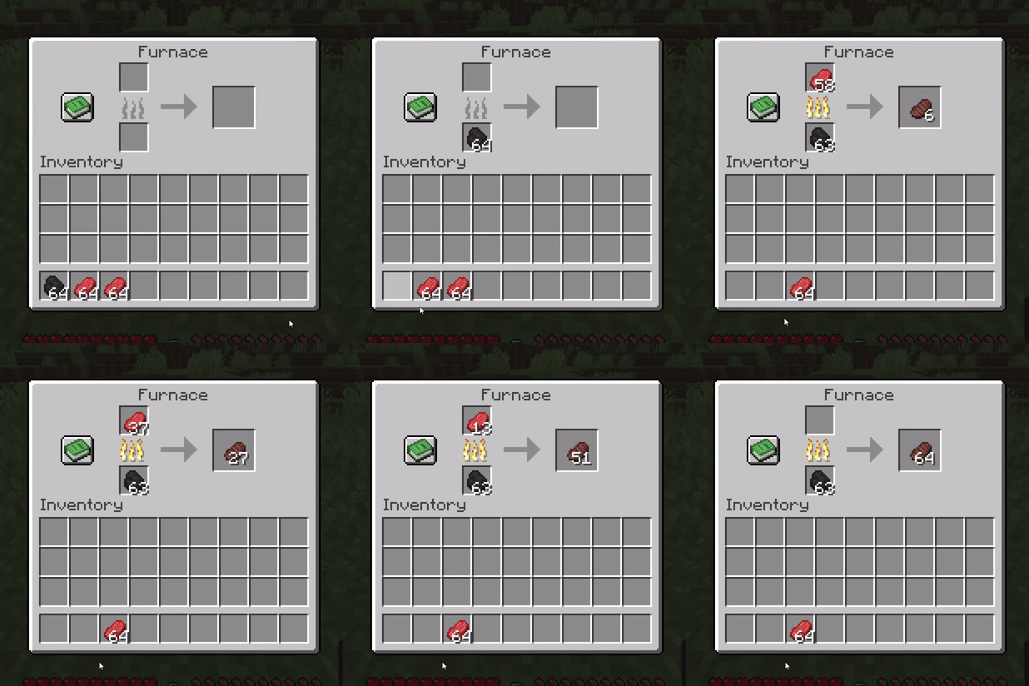
With this datapack/mod, smelting on Furnace, Blast Furnace, Smoker, and Campfire takes only 1 game tick per item. This means Blast Furnace and Smoker are pretty much redundant since regular Furnace now smelt just as fast. And it works with all smeltable items.
📝 NOTES
You only need to download one. Choose either the datapack or the mod version, whichever is more convenient for you.
Fabric/Forge/NeoForge mods all in one JAR file. If you use Fabric Loader, the mod also requires Fabric API. And feel free to use it in your modpack.
- ⚠️ When you load the datapack, it might says "incompatible" but it will still works.
- ⚠️ Minecraft Snapshot support only works on Fabric Loader.

Installation von Fast Smelt
With Millida Launcher
Install Millida Launcher
The launcher is free: download it at millida.net/launcher and sign in with any nickname.
Click “Install” on this page
The launcher opens and installs the data pack for Minecraft 1.21–26.3 automatically.
Launch the game
A profile with it appears in the launcher: click “Play”.
Manually
Download the archive
Pick the file fast-smelt-v1.1.2-26.3.zip (60 KB) for your game version.
New world: “Data Packs”
When creating a world, click “Data Packs”, drag the archive into the window, then move it to “Selected”.
Existing world: the datapacks folder
Put the archive into saves/<world>/datapacks and type /reload in game.
On a server
Archive goes into the server world’s datapacks
The world/datapacks folder on the server; players do not need to install anything.
Reload the data
Type /reload in the server console or restart the server.
Use the “To server” button
On Millida Hosting, the button at the top of the page uploads the file to your server and restarts it for you.
Versionen
Mit Abhängigkeiten
| Minecraft | Loader | Datei | Datum | Aktionen |
|---|---|---|---|---|
| 26.3 | Datenpaket | 26.360.5 KB 2 | ||
| 1.21.11 | Datenpaket | 1.21.1160.2 KB 1 | ||
| 1.21 | Datenpaket | 1.2164 KB | ||
| 26.2 | Datenpaket | 26.260.2 KB 1 | — | |
| 26.1 | Datenpaket | 26.160.2 KB | — |
FAQ
Which Minecraft versions does Fast Smelt work on?
There are files for 1.21–26.3, 10 versions in total. The newest is 26.3.
Does Fast Smelt work on a server?
Yes: the data pack goes into the datapacks folder of the server world, and players do not need to install anything.
Where can I download Fast Smelt safely?
On this page: the file fast-smelt-v1.1.2-26.3.zip (60 KB) is stored on Millida’s server, with no link shorteners. SHA-1 checksum: d298b864289092d1661d1aa609a53e507cce6059.
Bewertungen
Bewerten Sie Fast Smelt als Erster


