

Coordinate Bar Datenpaket für Minecraft 1.21.1, 1.21
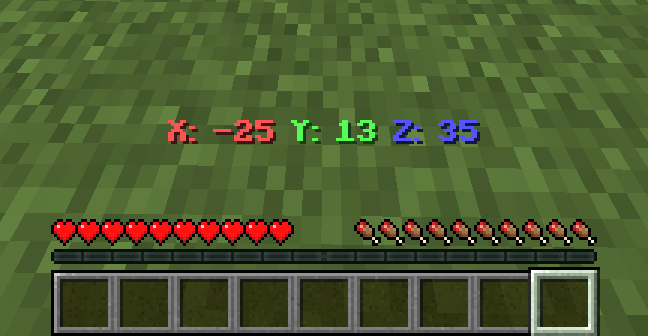
Zeigt deine aktuellen Koordinaten in der Aktionsleiste an.
- Aufrufe
- 42 Aufrufe
- Aktualisiert
- Aktualisiert 20.08.2025
- 1.21 — 26.2
 Datenpaket
- Client und Server
📍 Coordinate Bar
Coordinate Bar is a simple Minecraft datapack that shows your current coordinates (X, Y, Z) in the action bar.
✨ Features
- Shows coordinates in real-time.
- Works in singleplayer and multiplayer.
- Supports Smithed Actionbar Libary.
📦 Optional Library Support – Actionbar
This datapack allows the actionbar to be shared across multiple datapacks on a server, preventing conflicts and ensuring compatibility.
🔗 Download: Smithed – Actionbar Library
- Enable support with the following command: scoreboard players set .library thirstbar 1
- Disable support with the following command: scoreboard players set .library thirstbar 0
📦 Installation
- Download the datapack .zip file.
- Place it in your world's datapacks folder.
- Use /reload after joining the world.
- You're all set! Move around and see your coordinates at the bottom of your screen.
🧱 Compatibility
- Minecraft Java Edition 1.20.2+
- No external resource packs needed
🌐 ITITAN Hosting
💬 Feedback and Request
If you have a request or feedback, please write them in to my discord 3geetr.
Installation von Coordinate Bar
With Millida Launcher
Install Millida Launcher
The launcher is free: download it at millida.net/launcher and sign in with any nickname.
Click “Install” on this page
The launcher opens and installs the data pack for Minecraft 1.21–26.2 automatically.
Launch the game
A profile with it appears in the launcher: click “Play”.
Manually
Download the archive
Pick the file Coordinate Bar.zip (164 KB) for your game version.
New world: “Data Packs”
When creating a world, click “Data Packs”, drag the archive into the window, then move it to “Selected”.
Existing world: the datapacks folder
Put the archive into saves/<world>/datapacks and type /reload in game.
On a server
Archive goes into the server world’s datapacks
The world/datapacks folder on the server; players do not need to install anything.
Reload the data
Type /reload in the server console or restart the server.
Use the “To server” button
On Millida Hosting, the button at the top of the page uploads the file to your server and restarts it for you.
Versionen
Mit Abhängigkeiten
| Minecraft | Loader | Datei | Datum | Aktionen |
|---|---|---|---|---|
| 26.2 | Datenpaket | 26.2164 KB | ||
| 26.1 | Datenpaket | 26.1164 KB |
Bewertungen
Bewerten Sie Coordinate Bar als Erster


