

ATP miner Datenpaket für Minecraft 1.20.1, 1.21.1
Leistungsfähigeres Ketten-Sammeln (Datenpaket) und seine Erweiterung, die Ketten-Sammeln für Blockgruppen, automatisches Nachpflanzen, Sammeln im Umkreis, automatische Beleuchtung und weitere zusätzliche Funktionen unterstützt
- Aufrufe
- 33 Aufrufe
- Aktualisiert
- Aktualisiert 26.09.2026
- 1.18 — 1.21.7
 Datenpaket
- Client und Server
ATPminer
ATP高能连锁 数据包
(Languages adjustable: Chinese or English)
Link:Github MCMOD CurseForge Modrinth
This datapack provides players with convenient chain-mining and tree-felling mechanics, featuring the core functions of most "vein mining" mods while offering additional expansion options and highly customizable configurations. Burn your ATP!
Usage
How to install a datapack?
Link:
MinecraftWiki
MC中文wiki
⚡*Use the following command to open personal settings* (Global settings can be configured on the right side of personal settings, provided you have command permissions)
/trigger ATPminer
⚡*Use the following command to open parameter settings*
/trigger ATPminer_config
*To modify supplementary configuration files (such as adding blocks, joint groups, tools, crops, etc.), please go to file_description.txt*
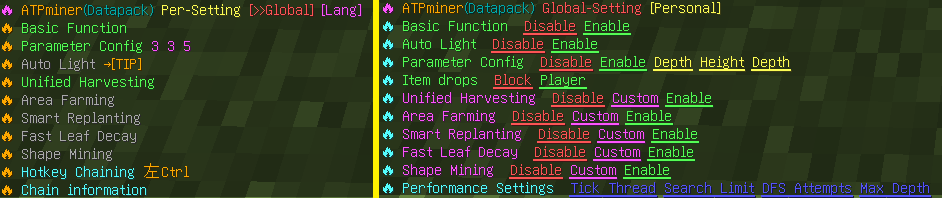
Function
- Chain harvesting is compatible with item components and enchantments like Fortune, Unbreaking, and Silk Touch. When the tool's durability is low, chain harvesting will stop automatically.
- Most blocks require a hotkey to trigger chain reactions (to prevent excessive destruction). When the "Hotkey Chain" enforcement is not enabled, the following blocks automatically chain by default: Ores, (stripped) logs, flowers/plants, corals, fungi, crops, mature cocoa pods, cacti, sugar cane, bamboo, melon stems, mature sweet berry bushes. After 1.21.2, you can use Left Ctrl or Left Shift as hotkeys (When "Hotkey Chaining" is disabled, Shift takes priority. Enable Ctrl for anti-ghost-touch!)
- When a large number of blocks are detected, asynchronous chaining will be enabled (processing a fixed number of blocks per game tick with visible diffusion effects) to prevent lag. The asynchronous chaining will automatically stop if the player: Switches tools, Teleports, or Exits the game.
- After installing the datapack, all features are optional by default—meaning each player can individually choose whether to enable specific expanded functionalities. This behavior can be modified in Global Settings.
- Compatibility Notes: Not supported on some server software (e.g., Folia); Incompatible with some plugins (if they modify command syntax); Not compatible with land protection plugins.
*6. Technical Details: Namespace: vmn; Command Storage: dp_vmn:1; Scoreboard Prefix: dp_vmn.; Entity Tag Prefix: dp_vmn_; Uses 2 trigger scoreboard objectives.*
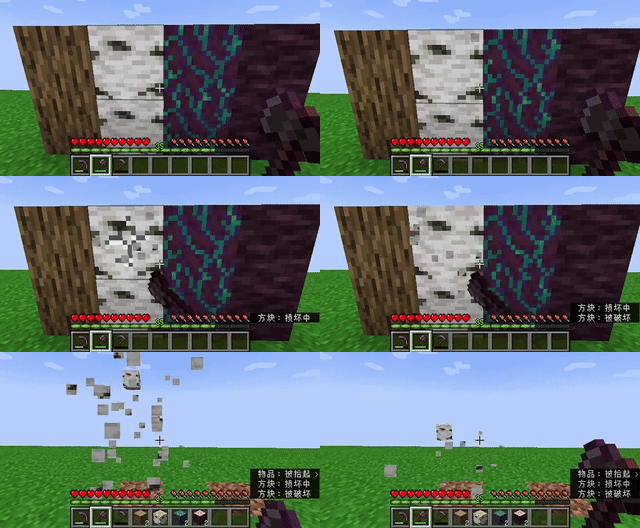
🔥 Unified Harvesting
When enabled, this feature allows mining or harvesting by groups (e.g., all connected ores). The same effect applies to logs, leaves, crops, corals, dyed blocks, sculk, prismarine, and 35 built-in vanilla block groups. For example, you can efficiently clear sculk shriekers, sculk sensors, and convert them into massive amounts of experience orbs.
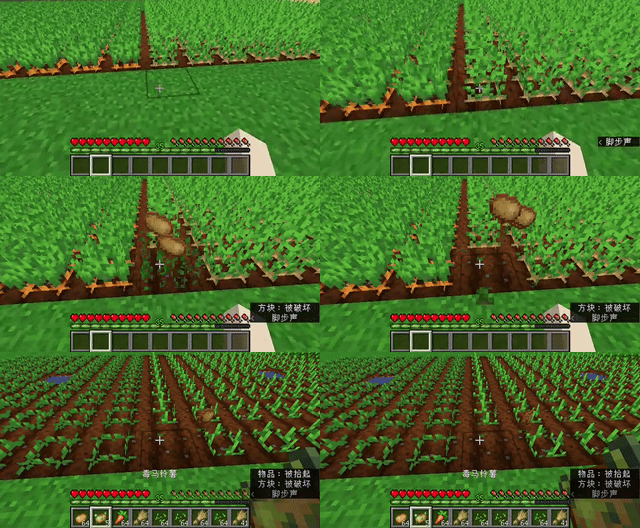
🔥 Smart Replanting
- Automatically replants saplings when chopping trees.
- Automatically replants seeds when harvesting crops.
- Tree replanting requires Unified Harvesting mode to be disabled. It supports thin trees and 2×2 giant trees but does not support mangroves or azalea trees.
- Crop replanting works with Unified Harvesting by detecting dropped seeds and planting them in tilled soil.
Empower your tree farms and crop fields with automation!
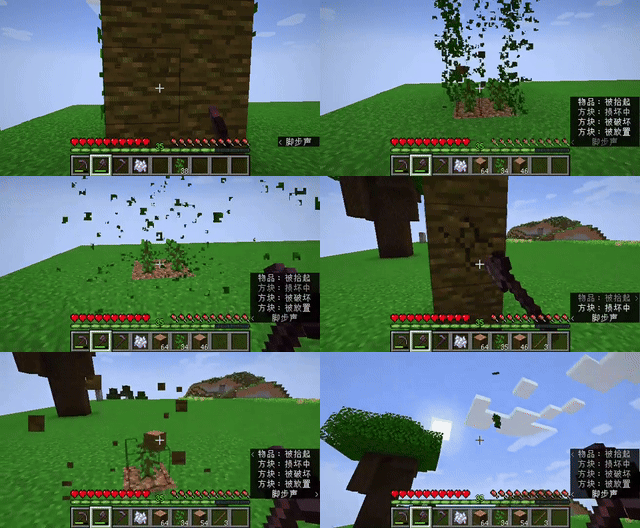
🔥 Fast Leaf Decay
Prevents leaves from awkwardly floating mid-air. This only applies to leaves left behind by chained tree felling and does not interfere with other mechanics (e.g., TNT-based tree farms). (If leaves are not decaying, check if nearby logs are still supporting them. Once all connected logs are removed, all leaves in the area will decay.)
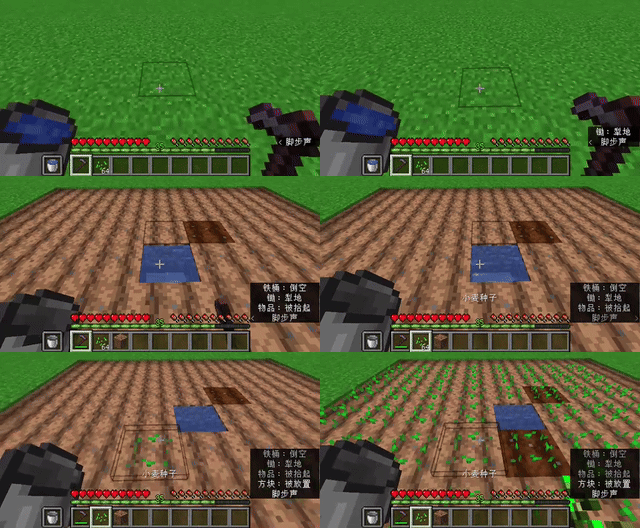
🔥 Area Farming
Turn your hoe into a super hoe! Supports tilling in an adjustable range from 1×1 to 9×9. Players can modify the "width radius" to define the farmland size.
- In "Flat Mode," an offhand water bucket will automatically hydrate the farmland center.
- Supports one-click area crop planting, which works best when combined with Smart Replanting.
- In Creative Mode, this feature does not consume resources or tool durability.
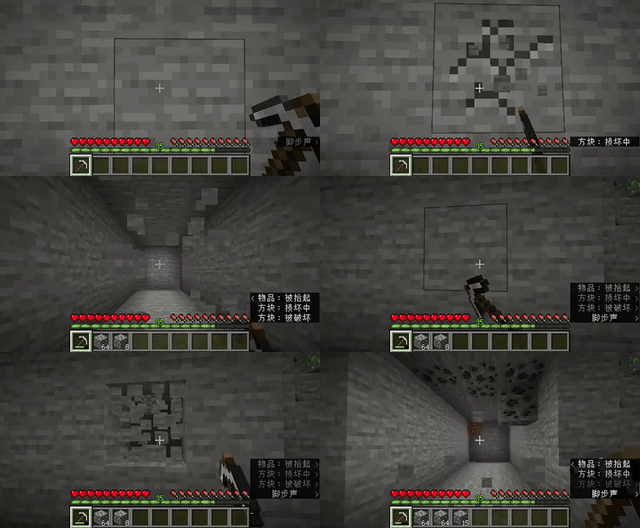
🔥 Shape Mining
Mine in structured cubic shapes! Players can customize width, height, and depth to control the mined cube size. The maximum supported area is 9×9×9, making it ideal for creating underground tunnels, caves, or excavation projects.
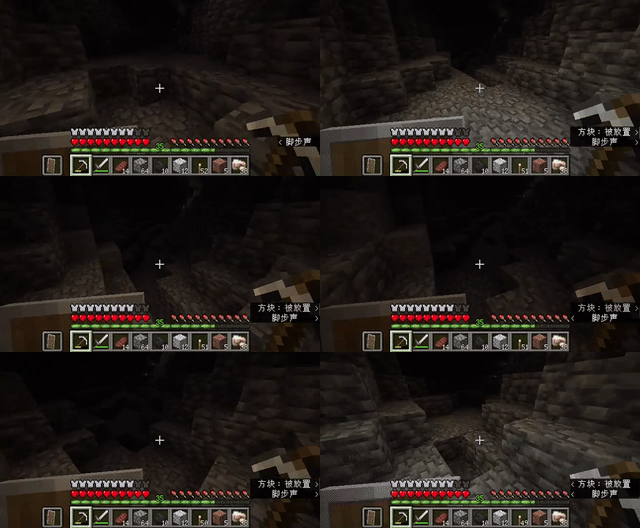
🔥 Auto Lighting
When enabled, torches will automatically be placed in dark areas or at night (if torches are available in the inventory or in Creative Mode). Useful for cave lighting, platform lighting, and hands-free visibility!
Installation von ATP miner
With Millida Launcher
Install Millida Launcher
The launcher is free: download it at millida.net/launcher and sign in with any nickname.
Click “Install” on this page
The launcher opens and installs the data pack for Minecraft 1.18–1.21.7 automatically.
Launch the game
A profile with it appears in the launcher: click “Play”.
Manually
Download the archive
Pick the file ATPminer_1.21+.zip (373 KB) for your game version.
New world: “Data Packs”
When creating a world, click “Data Packs”, drag the archive into the window, then move it to “Selected”.
Existing world: the datapacks folder
Put the archive into saves/<world>/datapacks and type /reload in game.
On a server
Archive goes into the server world’s datapacks
The world/datapacks folder on the server; players do not need to install anything.
Reload the data
Type /reload in the server console or restart the server.
Use the “To server” button
On Millida Hosting, the button at the top of the page uploads the file to your server and restarts it for you.
Versionen
Mit Abhängigkeiten
| Minecraft | Loader | Datei | Datum | Aktionen |
|---|---|---|---|---|
| 1.21.7 | Datenpaket | 1.21.7373 KB | ||
| 1.21.5 | Datenpaket | 1.21.5373 KB | ||
| 1.20.6 | Datenpaket | 1.20.6313 KB | ||
| 1.18.2 | Datenpaket | 1.18.2318 KB |
FAQ
Which Minecraft versions does ATP miner work on?
There are files for 1.18–1.21.7, 23 versions in total. The newest is 1.21.7.
Does ATP miner work on a server?
Yes: the data pack goes into the datapacks folder of the server world, and players do not need to install anything.
Where can I download ATP miner safely?
On this page: the file ATPminer_1.21+.zip (373 KB) is stored on Millida’s server, with no link shorteners. SHA-1 checksum: ad38dd588939bc5e5e82e781b3c9412d8d803eaf.
Bewertungen
Bewerten Sie ATP miner als Erster


