

Minecraft 26.2-এর জন্য Restore Block Lines রিসোর্স প্যাক
রঙিন ব্লক করা লাইনগুলোকে আবার স্বাভাবিক রঙে ফিরিয়ে আনে
- ডাউনলোড
- ৩০ ডাউনলোড
- ভিউ
- ১৬৬ ভিউ
- আপডেট করা হয়েছে
- আপডেট করা হয়েছে 06.05.2026
- 1.21.6 — 26.2
 ভ্যানিলা গেম
- ক্লায়েন্ট
Restore Block Lines রিসোর্স প্যাক সম্পর্কে
Get a server today and play with your friends! Click HERE or below banner & Use Code GAMERPOTION to get 25 off!

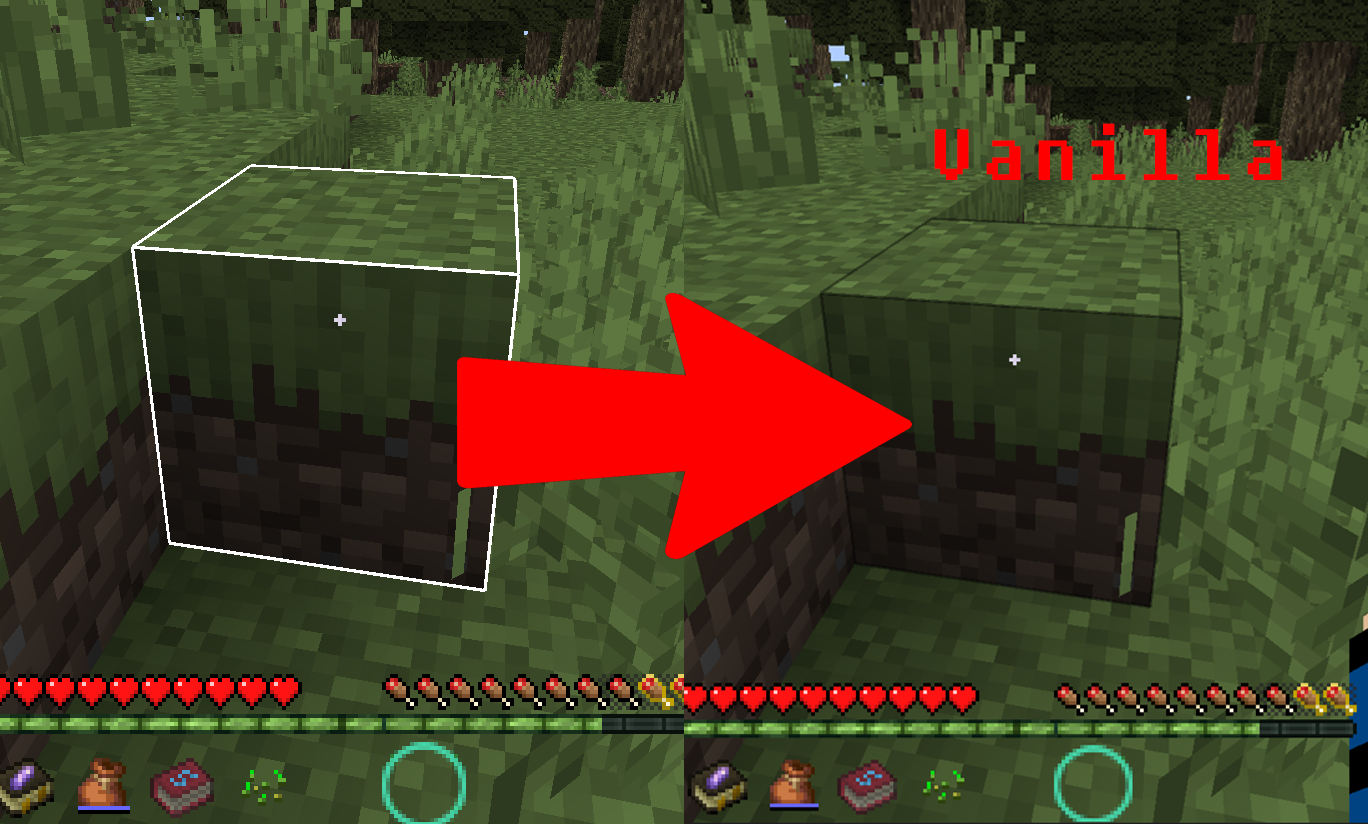
Restore Block Lines
Reverses the block lines color back to normal
Features
(Your vanilla experience will be further enhanced thanks to these features)
This was built for the DarkRPG modpack and the RPG PVP Tools and Armor resource pack, and this restores any colored block lines back to the default vanilla color.
Permission - Feel free to use in your modpacks.
Click the banner below to get your server today! or go to BisectHosting.com and make sure to use the code 'gamerpotion' to get your 25% off.

Restore Block Lines কীভাবে ইনস্টল করবেন
With Millida Launcher
Install Millida Launcher
The launcher is free: download it at millida.net/launcher and sign in with any nickname.
Click “Install” on this page
The launcher opens and installs the resource pack for Minecraft 1.21.6–26.2 automatically.
Launch the game
A profile with it appears in the launcher: click “Play”.
Manually
Download the archive
Pick the file Restore Block Lines.zip (40 KB) for your game version. No need to unpack it.
Put it in the resourcepacks folder
The easiest way: “Options”, then “Resource Packs”, then “Open Pack Folder”, and drag the archive there.
Enable the pack
In the same window, move the pack to the right-hand “Selected” column and click “Done”.
ভার্সন
ডিপেন্ডেন্সিসহ
| Minecraft | লোডার | ফাইল | তারিখ | অ্যাকশন |
|---|---|---|---|---|
| 26.2 | — | 26.240.4 KB ১৯ |
রিভিউ
Restore Block Lines-এ প্রথম রেটিং দিন


