

 Fabric
 NeoForge
 Forge
Sodium Options Mod Compat মড সম্পর্কে

Sodium Options Mod Compat বিভিন্ন মডের জন্য Sodium ভিডিও সেটিংস যোগ করে যেগুলোতে এগুলো নেই।
বর্তমানে, নিচের মডগুলোতে সামঞ্জস্য রয়েছে:
- Entity Texture Features
- Entity Model Features
- DynamicFPS
- Continuity (Fabric-এ নেটিভভাবে এবং Forge-এ Connector-এর মাধ্যমে)
এই মডটি আংশিকভাবে EmbeddiumUI-এর একটি পোর্ট, অতিরিক্ত মড সাপোর্টসহ, এবং ক্রস-প্ল্যাটফর্ম Sodium Options API ব্যবহার করার জন্য পোর্ট করা হয়েছে যাতে নিচের ভার্সনগুলো সাপোর্ট করা যায়:
- Forge-এ Embeddium
- 1.20.1-এ Fabric Sodium 0.5
- 1.21.1-এ Fabric/NeoForge Sodium 0.6
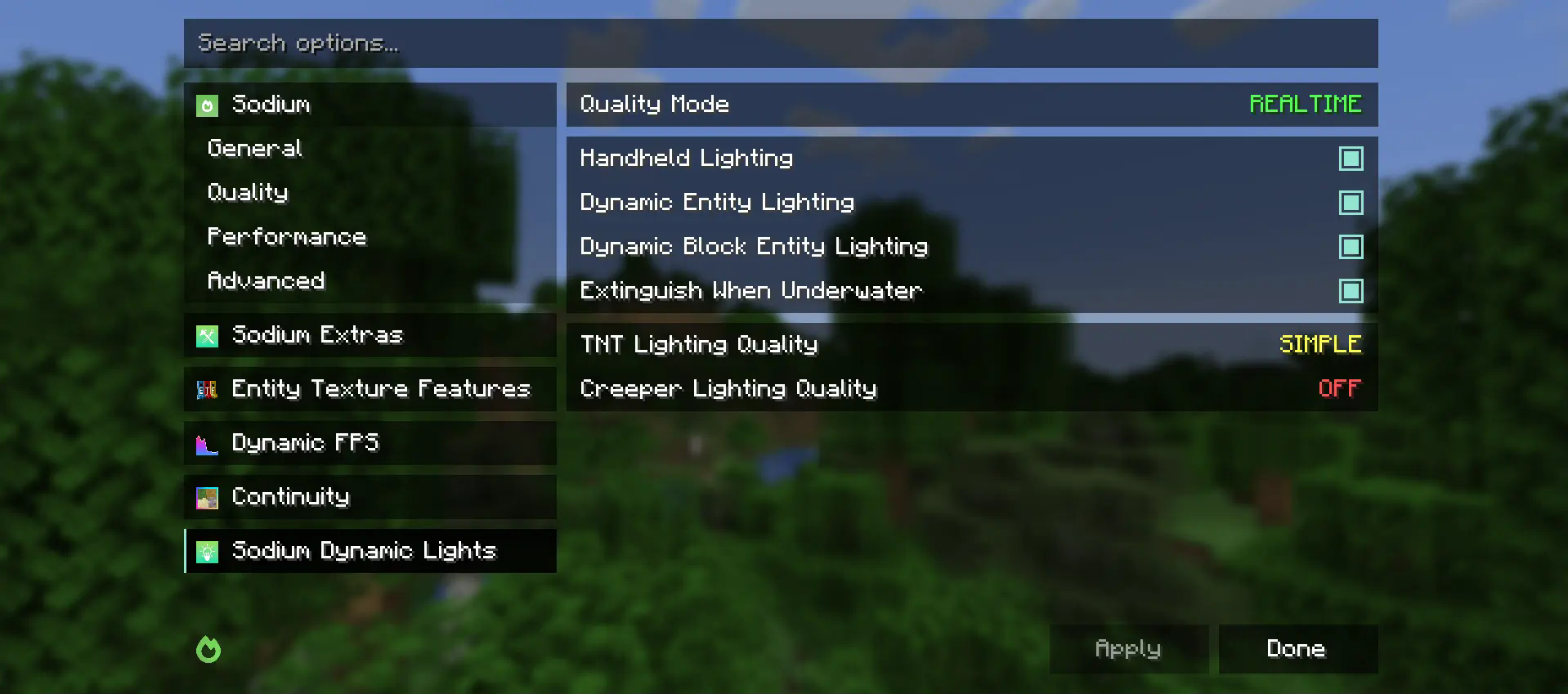
যদি আপনার কোনো রেন্ডারিং-সম্পর্কিত মড যোগ করার পরামর্শ থাকে যা আপনি Sodium ভিডিও সেটিংসে দেখতে চান, তাহলে অনুগ্রহ করে একটি ফিচার রিকোয়েস্টের জন্য Github Issue খুলুন।
Sodium Options Mod Compat কীভাবে ইনস্টল করবেন
With Millida Launcher
Install Millida Launcher
The launcher is free: download it at millida.net/launcher and sign in with any nickname.
Click “Install” on this page
The launcher opens and installs the mod for Minecraft 1.20–1.21.4 on Fabric, Forge or NeoForge automatically, together with its dependencies: Sodium Options API, Fabric API.
Launch the game
A profile with it appears in the launcher: click “Play”.
Manually
Install Fabric, Forge or NeoForge
The loader must match the game version of the mod file, for example Minecraft 1.21.4. After installing it, a separate profile appears in your launcher.
Download the file for your version
In the version list above, pick the file sodiumoptionsmodcompat-fabric-1.0.0-1.21.4.jar (846 KB) for your game version and loader.
Put it in the mods folder
The folder is inside .minecraft (Windows: %appdata%\.minecraft\mods). If it does not exist, create it. Required dependencies go there too: Sodium Options API, Fabric API.
Launch the loader profile
Open “Mods” in the main menu: Sodium Options Mod Compat should be in the list.
Sodium Options Mod Compat works on the player’s side only: there is no need to install it on a server.
Minecraft 1.21.4 runs on Java 21: with a different Java version the game may close right after launch.
ভার্সন
ডিপেন্ডেন্সিসহ
| Minecraft | লোডার | ফাইল | তারিখ | অ্যাকশন |
|---|---|---|---|---|
| 1.21.1 | Fabric | 1.21.1832 KB ৪ | ||
| 1.20.1 | Fabric | 1.20.1591 KB ১ | ||
| 1.21.1 | NeoForge | 1.21.1176 KB ৪৪ | ||
| 1.20.1 | Forge | 1.20.1177 KB ৫০ | ||
| 1.21.4 | Fabric | 1.21.4846 KB ৯ | ||
| 1.21.1 | NeoForge | 1.21.1177 KB ২ | ||
| 1.20.1 | Fabric | 1.20.1592 KB | ||
| 1.21.4 | NeoForge | 1.21.4177 KB ১ |
চালাতে যা প্রয়োজন
- Sodium Options APIআবশ্যক
- Fabric APIআবশ্যক
FAQ
Which Minecraft versions does Sodium Options Mod Compat work on?
There are files for 1.21.4, 1.21.1, 1.20.1, 1.20. The newest is 1.21.4.
Is Sodium Options Mod Compat for Forge or Fabric?
There are files for Fabric: 1.20–1.21.4, for Forge: 1.20–1.20.1 and for NeoForge: 1.21.1–1.21.4.
What does Sodium Options Mod Compat need to work?
Required: Sodium Options API, Fabric API. Without them the mod will not start: dependencies go into the same mods folder.
Do I need to install Sodium Options Mod Compat on a server?
No. Sodium Options Mod Compat works on the player’s side only: there is no need to install it on a server.
Which Java does Sodium Options Mod Compat need?
Minecraft 1.21.4 runs on Java 21. If the game closes right after launch, the usual cause is the wrong Java version in the profile settings.
Where can I download Sodium Options Mod Compat safely?
On this page: the file sodiumoptionsmodcompat-fabric-1.0.0-1.21.4.jar (846 KB) is stored on Millida’s server, with no link shorteners. SHA-1 checksum: 9c5ab3b6ba0e096567b60b0c5c74b8e570205da9.
রিভিউ
Sodium Options Mod Compat-এ প্রথম রেটিং দিন


