
Minecraft 1.20.1, 26.3-এর জন্য Scarecrows মড
ভূতুড়ে পাখি যোগ করে যা দানবদের (এবং চাইলে প্রাণীদেরও) আপনার লন থেকে দূরে রাখে।
 Fabric
 Quilt
Quilt NeoForge
 Forge
ForgeScarecrows মড সম্পর্কে
This mod was made during the MMD SpookyJam 2018!
Functionality
Scarecrows adds, as the name suggests, scarecrows. There are 3 tiers of scarecrows, each having 2 variants. Every tier will scare monsters in an increasingly larger area given that monster can see the scarecrow (details below). The first variant of each tier will only scare monsters, the second one of each tier will additionally scare animals. The respective mobs are also unable to spawn in the area affected by a scarecrow. When a mob is scared by a scarecrow, it will run away from the scarecrow, crying for help by making tons of noise (except for creepers, because they're super quiet).
Scarecrows are built in a similar manner to iron or snow golems, placing a (carved) pumpkin last. Placing a Jack o' Lantern last will make the scarecrow emit light. You'll also notice, that every scarecrow has arms (the sticky things on their side). Those arms are placed by rightclicking a block with a stick. Arms can only be placed on the side of a block. How exactly you build each type is shown in the images below.
To remove a scarecrow, break the block it's placed on. You'll get back all the blocks and items the scarecrow was made of. 1.13+ only: If you do not place the pumpkin last, rightclick it to build the scarecrow. Only Carved Pumpkins and Jack o' Lanterns work.
Types
Tier 1
Size: 2 blocks tall Affected Area: 10 blocks
Variant 1 Name: Spoopy Scarecrow Blocks (from top to bottom): Pumpkin/Jack o' Lantern, Clay, Sticks on the sides.
Variant 2 Name: Super Spoopy Scarecrow Blocks (from top to bottom): Pumpkin/Jack o' Lantern, Chiseled Stone Bricks, Sticks on the sides.
Note: This mod is balanced, because it has clay in it.
Tier 2
Size: 3 blocks tall Affected Area: 25 blocks
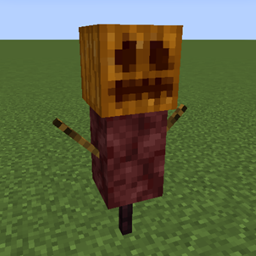
Variant 1 Name: Spooky Scarecrow Blocks (from top to bottom): Pumpkin/Jack o' Lantern, Netherrack, Sticks on the sides, Nether Brick Fence.
(Hey, you know this guy from the logo!)
Variant 2 Name: Super Spooky Scarecrow Blocks (from top to bottom): Pumpkin/Jack o' Lantern, Quartz Pillar, Sticks on the sides, Nether Brick Fence.
Note: The Spooky Scarecrow is pretty full of himself because he's featured in the logo. Note: That's a Nether Brick Fence, no other fence works.
Tier 3
Size: 4 blocks tall Affected Area: 50 blocks
Variant 1 Name: Scary Scarecrow Blocks (from top to bottom): Pumpkin/Jack o' Lantern, End Stone, Sticks on the sides, End Rod (facing down), End Rod (facing up).
Variant 2 Name: Super Scary Scarecrow Blocks (from top to bottom): Pumpkin/Jack o' Lantern, Purpur Pillar, Sticks on the sides, End Rod (facing down), End Rod (facing up).
Note: The placing of the end rods matters.
Config
This mod has a configuration file, in which you can define the ranges of each scarecrow type as well as whether it scares animals or not. The options are sorted into sections based on the scarecrow name, which you can find above each picture.
You are allowed to use this mod in any modpack.
Come join me on Discord! https://discord.gg/kgZUAxK
Follow me on Twitter for mod updates and other shenanigans! https://twitter.com/bl4ckscor3
Scarecrows কীভাবে ইনস্টল করবেন
With Millida Launcher
Install Millida Launcher
The launcher is free: download it at millida.net/launcher and sign in with any nickname.
Click “Install” on this page
The launcher opens and installs the mod for Minecraft 1.20–26.3 on Fabric, Forge, NeoForge or Quilt automatically.
Launch the game
A profile with it appears in the launcher: click “Play”.
Manually
Install Fabric, Forge, NeoForge or Quilt
The loader must match the game version of the mod file, for example Minecraft 26.3. After installing it, a separate profile appears in your launcher.
Download the file for your version
In the version list above, pick the file scarecrows-fabric-26.3-1.2.jar (202 KB) for your game version and loader.
Put it in the mods folder
The folder is inside .minecraft (Windows: %appdata%\.minecraft\mods). If it does not exist, create it.
Launch the loader profile
Open “Mods” in the main menu: Scarecrows should be in the list.
ভার্সন
ডিপেন্ডেন্সিসহ
| Minecraft | লোডার | ফাইল | তারিখ | অ্যাকশন |
|---|---|---|---|---|
| 26.3 | Fabric, Quilt | scarecrows-fabric-26.3-1.2.jar202 KB | ||
| 26.3 | NeoForge | scarecrows-neoforge-26.3-1.2.jar199 KB | ||
| 1.20.1 | Forge | scarecrows-1.20.1-1.0.14.jar75.2 KB |
FAQ
Which Minecraft versions does Scarecrows work on?
There are files for 26.3, 1.20.1, 1.20. The newest is 26.3.
Is Scarecrows for Forge or Fabric?
There are files for Fabric: 26.3, for Forge: 1.20–1.20.1, for NeoForge: 26.3 and for Quilt: 26.3.
Does Scarecrows need other mods?
The author lists no required dependencies: the Fabric, Forge, NeoForge or Quilt loader is enough.
Where can I download Scarecrows safely?
On this page: the file scarecrows-fabric-26.3-1.2.jar (202 KB) is stored on Millida’s server, with no link shorteners. SHA-1 checksum: 4354c53b8920ba9ee9011cc4e27ff3aafba9622f.
রিভিউ
Scarecrows-এ প্রথম রেটিং দিন


