
 NeoForge
 Forge
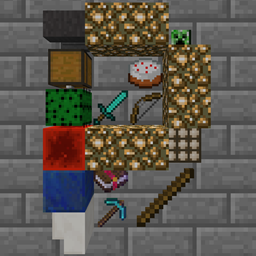
ForgePlonk মড সম্পর্কে
1.7.10, 1.12.2, 1.14.4, 1.15.2, 1.16.5, 1.18.2, 1.19.2, 1.19.4, 1.20.1, 1.21.1, 26.1.x-এ উপলব্ধ (Files (উপরে) > View All > Game Version)। সমর্থিত সংস্করণগুলো বোল্ড করা আছে (তবে আমি যুক্তিসঙ্গত সীমার মধ্যে অন্য সংস্করণগুলোও সমর্থন করার চেষ্টা করব)।
একটি ব্লকের দিকে তাকিয়ে P চাপলে আইটেম নিচে রাখা যায়। Sneak + P দিয়ে সব ঘোরান। Sneak + Use দিয়ে আইটেম ঘোরান। (খালি হাত প্রয়োজন)
- নোট (1.16.4+ এর জন্য): Plonk যে P কী ব্যবহার করে তা Social Interactions Screen কী-এর সাথে সংঘর্ষ করে, তাই একটি বা অন্যটি পরিবর্তন করতে হবে!
যেকোনো মডপ্যাকে এই মডটি ব্যবহার করতে আপনি স্বাধীন (জিজ্ঞাসা করার প্রয়োজন নেই!)।
Place Item কী (ডিফল্ট P) ব্যবহার করে যেকোনো ব্লকের পাশে সর্বোচ্চ 4 স্ট্যাক আইটেম রাখুন। (প্রতিটি স্ট্যাকের সর্বোচ্চ আকার কনফিগারযোগ্য এবং StackUp সমর্থন করে!)
আইটেমগুলো আলাদাভাবে 16টি ভিন্ন দিকে ঘোরানো যায় (খালি হাতে Sneak + Right Click)।
আইটেমের পুরো টাইলটি একসাথে 4টি ভিন্ন দিকে ঘোরানো যায় (খালি হাতে Sneak + Place Item কী)।
অটোমেশন দ্বারা আইটেম বের করা যায় কিন্তু ঢোকানো যায় না।
আর তরল দ্বারা ভেসে যেতে পারে না। রাখা আইটেম তরল দ্বারা ভেসে যেতে পারে। Waterlogged করা যায় (MC1.16.3+ থেকে)।
কনফিগ config/plonk.cfg-এ (mc 1.13 এর আগে) বা [save folder]/serverconfig/plonk-server.toml-এ (mc 1.13 এর পরে)
রাখা আইটেমের চেহারা এবং কার্যপ্রণালী বর্তমানে পরিবর্তনযোগ্য।
এই ভিডিওটি খুব পুরনো
জানা বাগ:
Third person camera ব্লকের সাথে সংঘর্ষ করে (শুধু 1.7.10 এবং 1.12.2)। কীভাবে minecraft-কে বলব যেন third person ray trace ভেতর দিয়ে যেতে পারে তা নিশ্চিত নই (1.13+ এ RayTraceContext.Visual আছে)। Translucent আইটেম (যেমন Stained Glass) তাদের পেছনের অন্য translucent জিনিসগুলোকে ঠিকভাবে রেন্ডার হতে দেয় না। (mc 1.16 এর আগে)
Plonk কীভাবে ইনস্টল করবেন
With Millida Launcher
Install Millida Launcher
The launcher is free: download it at millida.net/launcher and sign in with any nickname.
Click “Install” on this page
The launcher opens and installs the mod for Minecraft 1.18–26.1.2 on Forge or NeoForge automatically.
Launch the game
A profile with it appears in the launcher: click “Play”.
Manually
Install Forge or NeoForge
The loader must match the game version of the mod file, for example Minecraft 26.1.2. After installing it, a separate profile appears in your launcher.
Download the file for your version
In the version list above, pick the file plonk-26.1.2-10.0.10-neo.jar (162 KB) for your game version and loader.
Put it in the mods folder
The folder is inside .minecraft (Windows: %appdata%\.minecraft\mods). If it does not exist, create it.
Launch the loader profile
Open “Mods” in the main menu: Plonk should be in the list.
ভার্সন
ডিপেন্ডেন্সিসহ
| Minecraft | লোডার | ফাইল | তারিখ | অ্যাকশন |
|---|---|---|---|---|
| 26.1 | NeoForge | plonk-26.1.2-10.0.10-neo.jar162 KB | ||
| 26.1 | NeoForge | plonk-26.1.1-10.0.8-neo.jar162 KB | ||
| 1.20.1 | NeoForge, Forge | plonk-1.20.1-10.0.5-forge.jar148 KB | ||
| 1.18.1 | Forge | plonk-1.18.1-10.0.1.jar147 KB |
FAQ
Which Minecraft versions does Plonk work on?
There are files for 1.18–26.1.2, 7 versions in total. The newest is 26.1.2.
Is Plonk for Forge or Fabric?
There are files for Forge: 1.18–1.20.1 and for NeoForge: 1.20–26.1.2. There are no files for Fabric: a mod for another loader will not start.
Does Plonk need other mods?
The author lists no required dependencies: the Forge or NeoForge loader is enough.
Where can I download Plonk safely?
On this page: the file plonk-26.1.2-10.0.10-neo.jar (162 KB) is stored on Millida’s server, with no link shorteners. SHA-1 checksum: 4c8d57969618899ad01a7f182a680245070bcd7d.
রিভিউ
Plonk-এ প্রথম রেটিং দিন


