
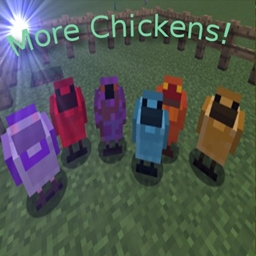
Minecraft 1.12.2-এর জন্য More Chickens মড
Chickens অ্যাড-অন যা মডেড মুরগি যোগ করে
More Chickens মড সম্পর্কে
এটি SetyCz - Chickens Mod-এর একটি অ্যাড-অন ও নির্ভরশীল মড, যা তার মডকে সম্প্রসারিত করে মডেড Minecraft-এর জন্য সমর্থন যোগ করে।
আপডেট করার সময় আপনার পুরনো কনফিগ ফাইলগুলো মুছে ফেলা ভালো (যতক্ষণ না আপনি নিজে কনফিগগুলো সম্পাদনা করেছেন)। এই মডে কিছু পরিবর্তন হয়েছে এবং পুরনো কনফিগ সেটিংস সমস্যা সৃষ্টি করতে পারে।
মড সাপোর্ট নতুন চিকেন যোগ করে এগুলোর জন্য:
- Tinkers Construct
- Ardite
- Cobalt
- Manyullyn
- Pig Iron
- Knight slime
- Coagulated Blood
- Purple, Magma, Blue Slime
- Draconic Evolution mod
- Draconium
- Awaken Draconium
- Botania
- ManaSteel
- TerraSteel
- Elementium
- Base Materials(Ore Dictionary, works with other mods)
- Copper
- Brass
- Cupronickel
- Electrum
- Invar
- Bronze
- Lead
- Nickel
- Platinum
- Silver
- Tin
- Zinc
- Steel
- Silicon
- Aluminium
- Sulfur
- Saltpeter
- Mekanism
- Osmium
- More to come
- Immersive Engineering
- Uranium
- Constantan
- Extreme Reactors
- Yellorium
- Cyanite
- Blutonium
- Graphite
- Ludicrite (Not yet)
- Ender IO
- Electrical Steel
- Energetic Alloy
- Vibarant Alloy
- Redstone Alloy
- Conductive Iron
- Pulsating Iron
- Dark Steel
- Soularium
- Thermal Foundation
- Basalz Rod
- Blitz Rod
- Blizz Rod
- Cinnabar
- Enderium
- Iridium
- Lumium
- Mithril
- Signalum
- Rich Slag
- Slag
- More Chickens
- XP Chicken
- Prismarine Shard
- Prismarine Crystal
- Soul Sand Chicken (Spawn in Nether)
- Obsidian Chicken
এর সাথে কিছু পরিচিত সমস্যা হলো মাঝে মাঝে নির্দিষ্ট কিছু প্যারেন্ট টাইপ কাজ করে না। তাই যখন আপনি কনফিগ সম্পাদনা করবেন তখন জেনে রাখুন যে মাঝে মাঝে প্যারেন্ট কম্বিনেশন কাজ নাও করতে পারে। JEI-তে চিকেনগুলোর কোনো প্যারেন্ট টাইপ থাকবে না এবং চিকেনগুলো waila-তে tier 1 হিসেবে দেখাবে।
৫৯টি নতুন চিকেন যোগ করে, সবগুলোই প্রজননের জন্য প্যারেন্ট সহ পূর্বনির্ধারিত।
আমি আরও অনেক বেস মেটাল যোগ করব যেমন tin, copper ইত্যাদি ইত্যাদি। << ADDED ALREADY 1.0.6v
উপভোগ করুন।
আমি শুধু ভ্যানিলার উপর ভিত্তি করে নতুন চিকেনও যোগ করব। আপনার যদি আইডিয়া থাকে তবে এখানে পোস্টে জানান।
কোনো প্রশ্ন থাকলে আমার Curse Community লিংকে যোগ দিন
More Chickens কীভাবে ইনস্টল করবেন
With Millida Launcher
Install Millida Launcher
The launcher is free: download it at millida.net/launcher and sign in with any nickname.
Click “Install” on this page
The launcher opens and installs the mod for Minecraft 1.12.1–1.12.2 automatically.
Launch the game
A profile with it appears in the launcher: click “Play”.
Manually
Download the file for your version
In the version list above, pick the file morechickens-1.12.2-3.2.0.jar (219 KB) for your game version.
Put it in the mods folder
The folder is inside .minecraft (Windows: %appdata%\.minecraft\mods). If it does not exist, create it.
Launch the loader profile
Open “Mods” in the main menu: More Chickens should be in the list.
Minecraft 1.12.2 runs on Java 8: with a different Java version the game may close right after launch.
ভার্সন
ডিপেন্ডেন্সিসহ
| Minecraft | লোডার | ফাইল | তারিখ | অ্যাকশন |
|---|---|---|---|---|
| 1.12.2 | — | More Chickens v3.2.0 (1.12.2)219 KB | ||
| 1.12.2 | — | More Chickens v3.1.0 (1.12.2)220 KB | ||
| 1.12.1 | — | More Chickens v3.0.0 (1.12.2)204 KB |
FAQ
Which Minecraft versions does More Chickens work on?
There are files for 1.12.2, 1.12.1. The newest is 1.12.2.
Which Java does More Chickens need?
Minecraft 1.12.2 runs on Java 8. If the game closes right after launch, the usual cause is the wrong Java version in the profile settings.
Where can I download More Chickens safely?
On this page: the file morechickens-1.12.2-3.2.0.jar (219 KB) is stored on Millida’s server, with no link shorteners. SHA-1 checksum: 7489d019cb544781cbb4b91810b9c50c402a464a.
রিভিউ
More Chickens-এ প্রথম রেটিং দিন


