
Minecraft 1.20.1, 1.21.1-এর জন্য Create: Ultimate Factory মড
Create মডের একটি অ্যাডন যা অটোমেশনের সম্ভাবনা বাড়ানোর জন্য তৈরি, গেমে ৩০টি (মোটামুটি) ব্যালেন্সড রেসিপি যোগ করে।
 Fabric
 NeoForge
 Forge
Forge Quilt
QuiltCreate: Ultimate Factory মড সম্পর্কে
1.18.2 এবং তার আগের ভার্সনের জন্য, ডেটাপ্যাক ভার্সন দেখুন
সম্পর্কে
Create: Ultimate Factory হলো একটি সহজ Create অ্যাডঅন যা নতুন অটোমেশন সম্ভাবনা নিয়ে আসে। ৩০টি নতুন (মোটামুটি) ব্যালেন্সড রেসিপির মাধ্যমে, এই মডটি মূলত ডজনখানেক Minecraft রিসোর্সকে নবায়নযোগ্য করে তোলে।
উদাহরণস্বরূপ, Tuff এখন নবায়নযোগ্য, যা খেলোয়াড়দের Ore-এর একটি নির্ভরযোগ্য উৎস দেয়। Lapis Lazuli, Amethyst, Redstone... প্রায় সব রিসোর্সই এখন অটোমেট করা যায়। এর মধ্যে বিরল আইটেম এবং লুটও অন্তর্ভুক্ত, তবে অনেক কম হারে।
কখনো Diamond বা Netherite অটোমেট করার স্বপ্ন দেখেছেন? এখন তা সম্ভব!
মিডিয়া
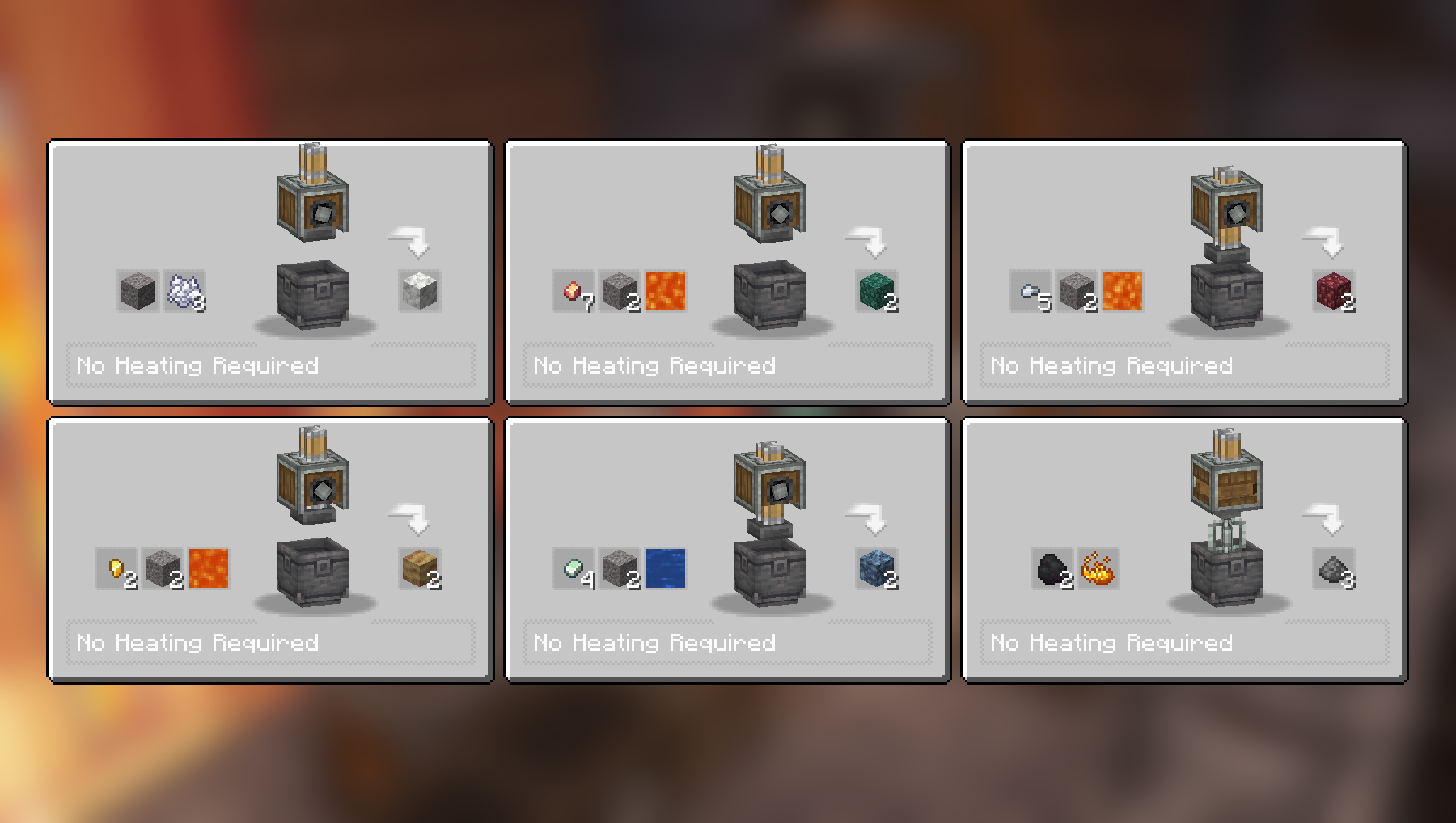
Compacting এবং Mixing রেসিপি:
আরও Compacting এবং Mixing রেসিপি:
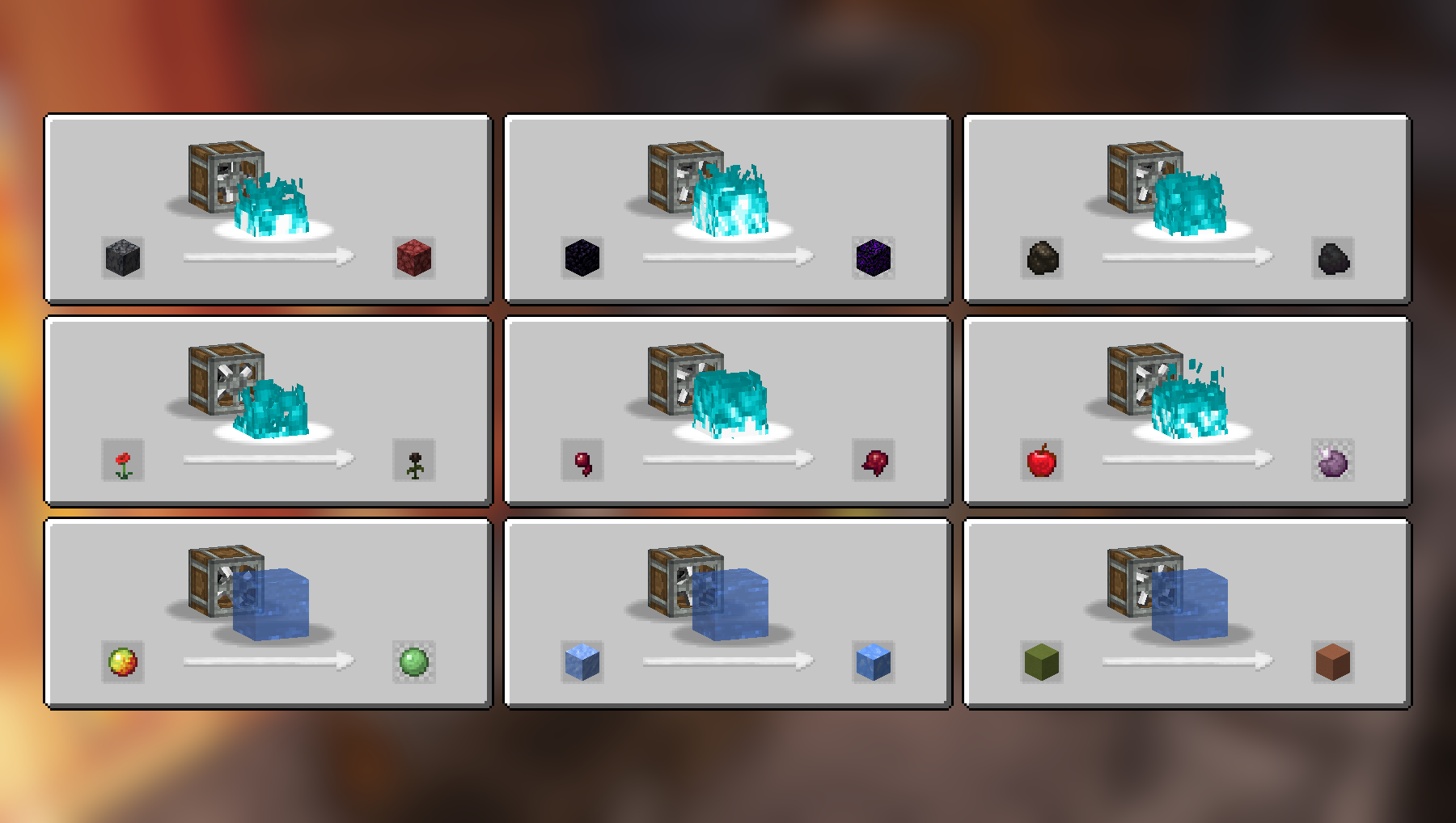
Haunting এবং Splashing রেসিপি:
Crushing রেসিপি:
আরও Crushing রেসিপি:
সম্পূর্ণ রেসিপি তালিকা (2.2.4)
Compacting
- Cobblestone এবং Lava থেকে Tuff
- Stone এবং Lava থেকে Deepslate
- Coal Blocks এবং Lava থেকে Diamond (একটি সক্রিয় Blaze Burner দ্বারা উত্তপ্ত হতে হবে)
- Gravel এবং Bone Meal থেকে Calcite
- Zinc Nuggets, Gravel এবং Water থেকে Asurine
- Iron Nuggets, Gravel এবং Lava থেকে Crimsite
- Gold Nuggets, Gravel এবং Lava থেকে Ochrum
- Copper Nuggets, Gravel এবং Lava থেকে Veridium
- Blaze Powder থেকে Blaze Rod
Mixing
- Netherrack, Flint এবং Lava থেকে Redstone
- Calcite এবং Water থেকে Dripstone
- Coal এবং Blaze Powder থেকে Gunpowder
Haunting
- Basalt থেকে Netherrack
- Obsidian থেকে Crying Obsidian
- Charcoal থেকে Coal
- Poppy থেকে Wither Rose
- Spider Eye থেকে Fermented Spider Eye
- Apple থেকে Chorus Fruit
Splashing
- Packed Ice থেকে Blue Ice
- Magma Cream থেকে Slime Ball
- Colored Terracotta থেকে Terracotta
Crushing
- Blackstone থেকে Wither Skull (বিরল), মাঝে মাঝে Blackstone ফেরত দেয়
- Scoria থেকে Blaze Powder
- Nether Bricks থেকে Nether Brick এবং Netherite Scraps (অত্যন্ত বিরল)
- Soul Sand থেকে Glowstone Dust
- Limestone থেকে Quartz এবং Lapis Lazuli
- Red Sandstone থেকে Red Sand এবং Nautilus Shell (অত্যন্ত বিরল)
- Crying Obsidian থেকে Powdered Obsidian এবং Amethyst Shard
- Corals থেকে Heart of the Sea (অত্যন্ত বিরল)
- Dead Corals থেকে Bone Meal
- Red Mushroom Blocks থেকে Red Mushrooms
- Brown Mushroom Blocks থেকে Brown Mushrooms
- Endstone থেকে Ender Pearl (বিরল), মাঝে মাঝে Endstone ফেরত দেয়
ভিডিও
নির্ভরতা
উপরের রেসিপিগুলো কাজ করার জন্য শুধুমাত্র বেস Create মড প্রয়োজন।
JEI সুপারিশ করা হয় তবে বাধ্যতামূলক নয়।
ইনস্টলেশন
আপনার mods ফোল্ডারে .jar মড ফাইলটি যোগ করুন।
বিকল্পভাবে, আপনি CurseForge লঞ্চারে মডটি ব্রাউজ করতে পারেন (যদি না দেখায়, তাহলে লেখকের নাম টাইপ করে দেখুন)। খুঁজে পেলে, আপনার মডপ্যাকে যোগ করতে "Install" ক্লিক করুন।
অনুমতি
আপনি যেকোনো মডপ্যাকে, পাবলিক বা প্রাইভেট, এই মডটি অন্তর্ভুক্ত করতে স্বাধীন।
আমার কাজ সমর্থন করুন
CurseForge-এ আমার প্রজেক্টগুলো ডাউনলোড করুন
Modrinth-এ আমার প্রজেক্টগুলো ডাউনলোড করুন
Paypal-এ দান করুন
Create: Ultimate Factory কীভাবে ইনস্টল করবেন
With Millida Launcher
Install Millida Launcher
The launcher is free: download it at millida.net/launcher and sign in with any nickname.
Click “Install” on this page
The launcher opens and installs the mod for Minecraft 1.20–26.2 on Fabric, Forge, NeoForge or Quilt automatically.
Launch the game
A profile with it appears in the launcher: click “Play”.
Manually
Install Fabric, Forge, NeoForge or Quilt
The loader must match the game version of the mod file, for example Minecraft 26.2. After installing it, a separate profile appears in your launcher.
Download the file for your version
In the version list above, pick the file create_ultimate_factory-2.2.4-fabric-26.2.jar (259 KB) for your game version and loader.
Put it in the mods folder
The folder is inside .minecraft (Windows: %appdata%\.minecraft\mods). If it does not exist, create it.
Launch the loader profile
Open “Mods” in the main menu: Create: Ultimate Factory should be in the list.
ভার্সন
ডিপেন্ডেন্সিসহ
| Minecraft | লোডার | ফাইল | তারিখ | অ্যাকশন |
|---|---|---|---|---|
| 26.2 | Fabric | create_ultimate_factory-2.2.4-fabric-26.2.jar259 KB ৫১ | ||
| 1.21 | NeoForge | create_ultimate_factory-2.2.4-neoforge-1.21.1.jar230 KB ৩৩৯ | ||
| 1.20.1 | Forge, NeoForge | create_ultimate_factory-2.2.4-forge-1.20.1.jar229 KB ১১৯ | ||
| 1.21 | NeoForge | create_ultimate_factory-2.2.3-neoforge-1.21.1.jar229 KB | ||
| 1.20.1 | Forge, NeoForge | create_ultimate_factory-2.2.3-forge-1.20.1.jar228 KB | ||
| 1.20.1 | Fabric, Quilt | create_ultimate_factory-2.0.0-fabric-1.20.1.jar222 KB ৪৬ |
FAQ
Which Minecraft versions does Create: Ultimate Factory work on?
There are files for 26.2, 1.21.1, 1.21, 1.20.1, 1.20. The newest is 26.2.
Is Create: Ultimate Factory for Forge or Fabric?
There are files for Fabric: 1.20–26.2, for Forge: 1.20–1.20.1, for NeoForge: 1.20–1.21.1 and for Quilt: 1.20–1.20.1.
Does Create: Ultimate Factory need other mods?
The author lists no required dependencies: the Fabric, Forge, NeoForge or Quilt loader is enough.
Where can I download Create: Ultimate Factory safely?
On this page: the file create_ultimate_factory-2.2.4-fabric-26.2.jar (259 KB) is stored on Millida’s server, with no link shorteners. SHA-1 checksum: dad0d63849a485082727b80af6fe758db530792c.
রিভিউ
Create: Ultimate Factory-এ প্রথম রেটিং দিন


