
Minecraft 1.20.1, 1.21.1-এর জন্য Create: Netherless ((Neo)Forge) মড
🚫নেদারে কখনো যাওয়ার প্রয়োজন ছাড়াই নেদার রিসোর্স সংগ্রহ এবং অটোমেট করুন
 NeoForge
 Forge
Create: Netherless ((Neo)Forge) মড সম্পর্কে
আপনি যদি fabric সংস্করণ চান, এখানে ক্লিক করুন
Create: Netherless হলো Create Mod-এর একটি অ্যাডঅন;
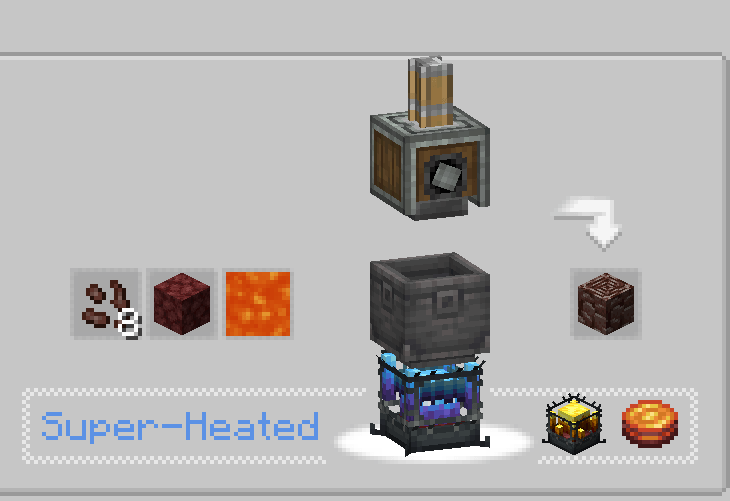
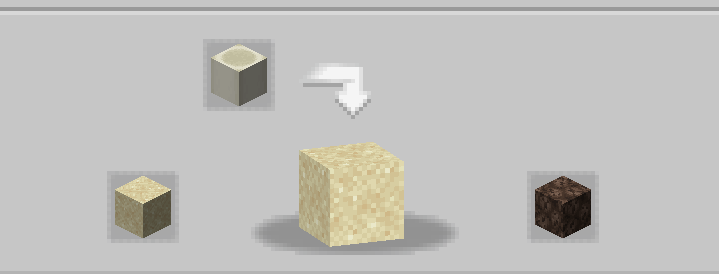
এই মডের লক্ষ্য হলো খেলোয়াড়দের নেদার-এ প্রবেশাধিকার ছাড়াই নেদারের বেশিরভাগ সম্পদ তৈরি ও স্বয়ংক্রিয় করার সুযোগ দেওয়া! এর মধ্যে রয়েছে Blazes, Netherite, Netherrack, বা নেদারের পেছনে লুকানো অন্য যেকোনো কিছু যা আপনার মনে আসে। যদি আপনার মনে হয় কিছু রেসিপি অসামঞ্জস্যপূর্ণ/কাজ করছে না/অনুপস্থিত, তাহলে কমেন্ট সেকশনে আমাকে জানান💬!
সাধারণ জিজ্ঞাসা (FAQ):
▶প্রশ্ন: আমি কীভাবে রেসিপিগুলো দেখব? উত্তর: আপনি JEI বা EMI-এর মতো রেসিপি-দেখার মড ব্যবহার করতে পারেন।
▶প্রশ্ন: বিদ্যমান কোনো ওয়ার্ল্ডে এই অ্যাডঅন সরানো/যোগ করলে সমস্যা হবে কি? উত্তর: আপনি কোনো সমস্যা ছাড়াই যেকোনো ওয়ার্ল্ড থেকে এই মড নিরাপদে মুছে ফেলতে/যোগ করতে পারেন।
▶প্রশ্ন: এই মড কি কখনো fabric-এ আসবে? উত্তর: আসবে! শুধু এখানে ক্লিক করুন!
▶প্রশ্ন: এই অ্যাডঅন কি 6.0.x-এর জন্য পাওয়া যায়? উত্তর: হ্যাঁ, পাওয়া যায়!
▶প্রশ্ন: এই মডের পরবর্তী পরিকল্পনা কী? উত্তর: আমরা অন্য প্রকল্প নিয়ে কাজ করছি বলে অ্যাডঅনটি বর্তমানে বিরতিতে আছে। নতুন কনটেন্ট ও ব্যালান্সিংয়ের পরিকল্পনা আছে, যেমন ectoplasm-এর প্রবর্তন, তবে আপাতত আপনাকে অপেক্ষা করতে হবে!
▶আরও কোনো প্রশ্ন আছে? আপনি Honeycomb Studio-এর Discord Server-এ যোগ দিয়ে সেখানে জিজ্ঞাসা করতে পারেন!
আমি ভুল করলে দুঃখিত, আমি ফরাসি.. যদি বানান ভুল দেখেন, তাহলে আমাকে জানান!
এই মড নেদার নিষ্ক্রিয় করে না!
Create: Netherless ((Neo)Forge) কীভাবে ইনস্টল করবেন
With Millida Launcher
Install Millida Launcher
The launcher is free: download it at millida.net/launcher and sign in with any nickname.
Click “Install” on this page
The launcher opens and installs the mod for Minecraft 1.19.2–1.21.1 on Forge or NeoForge automatically.
Launch the game
A profile with it appears in the launcher: click “Play”.
Manually
Install Forge or NeoForge
The loader must match the game version of the mod file, for example Minecraft 1.21.1. After installing it, a separate profile appears in your launcher.
Download the file for your version
In the version list above, pick the file create_netherless-2.0.0-1.21.1.jar (30 KB) for your game version and loader.
Put it in the mods folder
The folder is inside .minecraft (Windows: %appdata%\.minecraft\mods). If it does not exist, create it.
Launch the loader profile
Open “Mods” in the main menu: Create: Netherless ((Neo)Forge) should be in the list.
Minecraft 1.21.1 runs on Java 21: with a different Java version the game may close right after launch.
ভার্সন
ডিপেন্ডেন্সিসহ
| Minecraft | লোডার | ফাইল | তারিখ | অ্যাকশন |
|---|---|---|---|---|
| 1.21.1 | NeoForge | create_netherless-2.0.0-1.21.1.jar30.2 KB ৬৫ | ||
| 1.20.1 | Forge | create_netherless-2.0.0-1.20.1.jar30.1 KB ১৯ | ||
| 1.19.2 | Forge | Create: Netherless 1.19.2-1.137.6 KB ১ |
FAQ
Which Minecraft versions does Create: Netherless ((Neo)Forge) work on?
There are files for 1.21.1, 1.20.1, 1.19.2. The newest is 1.21.1.
Does Create: Netherless ((Neo)Forge) need other mods?
The author lists no required dependencies: the Forge or NeoForge loader is enough.
Which Java does Create: Netherless ((Neo)Forge) need?
Minecraft 1.21.1 runs on Java 21. If the game closes right after launch, the usual cause is the wrong Java version in the profile settings.
Where can I download Create: Netherless ((Neo)Forge) safely?
On this page: the file create_netherless-2.0.0-1.21.1.jar (30 KB) is stored on Millida’s server, with no link shorteners. SHA-1 checksum: 2d3499b77c8bcbe8c7a301750271c3d2a0b35cbe.
রিভিউ
Create: Netherless ((Neo)Forge)-এ প্রথম রেটিং দিন


