

Minecraft 1.20.1, 1.19.2-এর জন্য Upgradable Backpack ডেটা প্যাক
ডাই-যোগ্য, নাম পরিবর্তনযোগ্য, পরিধানযোগ্য এবং আপগ্রেডযোগ্য ব্যাকপ্যাক (9-স্লট, 18-স্লট, 26-স্লট)
- ডাউনলোড
- ৩ ডাউনলোড
- ভিউ
- ৯৩ ভিউ
- আপডেট করা হয়েছে
- আপডেট করা হয়েছে 26.09.2026
- 1.17 — 1.21.10
 ডেটা প্যাক
- ক্লায়েন্ট ও সার্ভার
Upgradable Backpack ডেটা প্যাক সম্পর্কে
I made the backpack, which is
- Dyeable through the crafting table.
- Easily renamable using an anvil.
- Wearable in your chest slot.
- Upgradable to get more slots (9 -> 18 -> 26 slots)

Demo Video
How to Use Backpacks
- To store or retrieve items, simply drop the backpack on the ground. It will transform into a barrel, allowing you to manage your items. Click the "Exit" button slot to revert it to a backpack item.

Crafting Recipes
- Craft a Small Backpack:
(4 wools, 4 leathers, and a barrel)
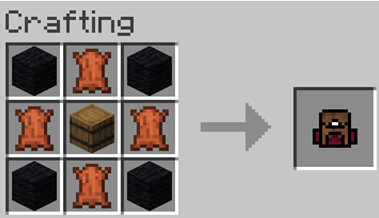
- Craft a Backpack Upgrader:
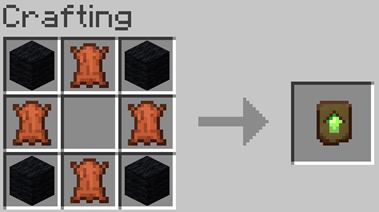
- Upgrading to a 26-Slot Backpack:
Place the upgrader into your backpack block.
Upgradable Backpack কীভাবে ইনস্টল করবেন
With Millida Launcher
Install Millida Launcher
The launcher is free: download it at millida.net/launcher and sign in with any nickname.
Click “Install” on this page
The launcher opens and installs the data pack for Minecraft 1.17–1.21.10 automatically, together with its dependencies: Dependency.
Launch the game
A profile with it appears in the launcher: click “Play”.
Manually
Download the archive
Pick the file Upgradable Backpack v11.3.zip (98 KB) for your game version.
New world: “Data Packs”
When creating a world, click “Data Packs”, drag the archive into the window, then move it to “Selected”.
Existing world: the datapacks folder
Put the archive into saves/<world>/datapacks and type /reload in game.
On a server
Archive goes into the server world’s datapacks
The world/datapacks folder on the server; players do not need to install anything.
Reload the data
Type /reload in the server console or restart the server.
Use the “To server” button
On Millida Hosting, the button at the top of the page uploads the file to your server and restarts it for you.
ভার্সন
ডিপেন্ডেন্সিসহ
| Minecraft | লোডার | ফাইল | তারিখ | অ্যাকশন |
|---|---|---|---|---|
| 1.21.10 | ডেটা প্যাক | 1.21.1098.3 KB ১ | ||
| 1.21.10 | ডেটা প্যাক | 1.21.1098.3 KB ১ | ||
| 1.21.10 | ডেটা প্যাক | 1.21.1098 KB | ||
| 1.20.1 | ডেটা প্যাক | 1.20.1115 KB ১ | ||
| 1.17.1 | ডেটা প্যাক | 1.17.1115 KB | ||
| 1.19.2 | ডেটা প্যাক | 1.19.2115 KB | — | |
| 1.18.2 | ডেটা প্যাক | 1.18.2115 KB | — |
চালাতে যা প্রয়োজন
- Dependencyআবশ্যক
রিভিউ
Upgradable Backpack-এ প্রথম রেটিং দিন


