
FontStyle+ حزمة موارد لماينكرافت 1.20.1, 1.21
حزمة خطوط قابلة للتخصيص تضيف خطين جديدين—Minecraft Five وSmoother Font—باستخدام حزم فرعية. بدّل الأنماط بسهولة لتناسب تفضيلك لمظهر نصي ريترو أو أنظف داخل اللعبة.
حول حزمة موارد FontStyle+
🔷 About FontStyle+
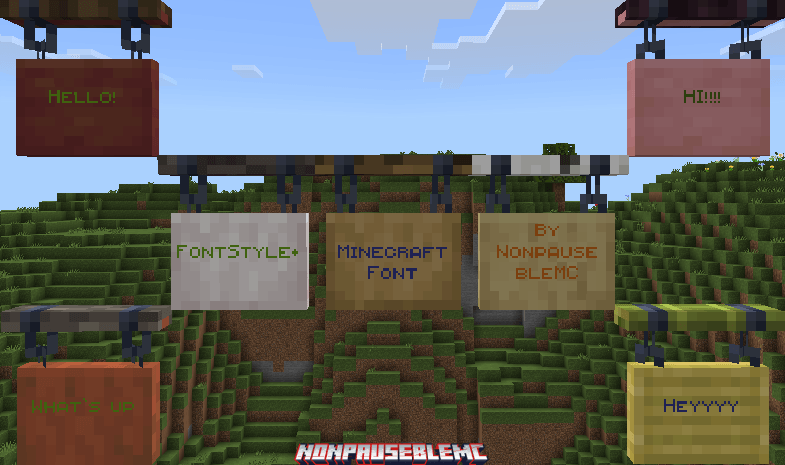
Built for players who want to personalize their Minecraft experience, FontStyle+ lets you choose from a variety of unique font styles using simple built-in subpacks.
🔷 What Sets FontStyle+ Apart?
8 Unique Font Styles:
- Minecraft Five - A bold, retro-inspired font with a distinct pixel style.
- Smoother Font - A cleaner, more polished take on the default font for easier reading.
- Anti-Alias Font - A finely smoothed font that reduces pixelation for a softer, modern look.
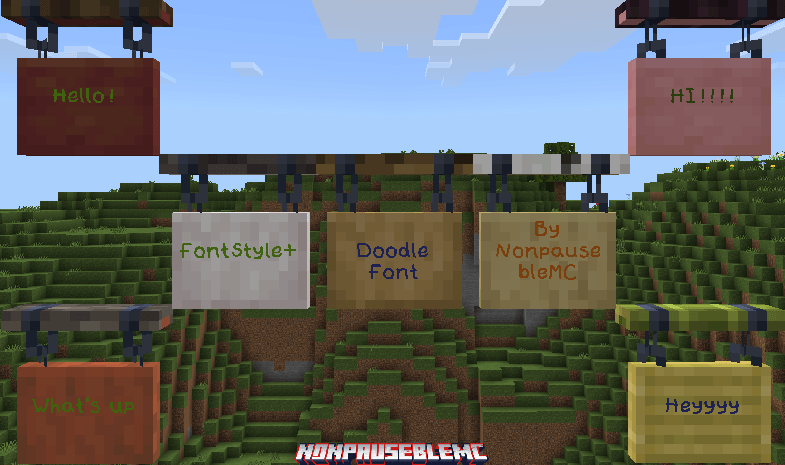
- Doodle Font - A playful, hand-drawn style that adds a casual, creative vibe.
- Blocky Font - A chunky, heavy-weight font for a strong, eye-catching presence.
- Square Font - A geometric, grid-based style for a modern, structured look.
- Small Caps Font - A font using only capital letters with smaller uppercase for a classic, uniform feel.
- Shaded Font - A clean, shadowed font style that improves readability with a bold, polished appearance.
Also try Truly Bedrock+, a resource pack that adds Quality of life features such as Ore borders, etc
كيفية تثبيت FontStyle+
With Millida Launcher
Install Millida Launcher
The launcher is free: download it at millida.net/launcher and sign in with any nickname.
Click “Install” on this page
The launcher opens and installs the resource pack for Minecraft 1.20–26.30 automatically.
Launch the game
A profile with it appears in the launcher: click “Play”.
Manually
Download the archive
Pick the file FontStyle+ v1.0.4.mcpack (111 KB) for your game version. No need to unpack it.
Put it in the resourcepacks folder
The easiest way: “Options”, then “Resource Packs”, then “Open Pack Folder”, and drag the archive there.
Enable the pack
In the same window, move the pack to the right-hand “Selected” column and click “Done”.
الإصدارات
مع المتطلبات
| Minecraft | المشغّل | الملف | التاريخ | الإجراءات |
|---|---|---|---|---|
| 1.20.40 | — | FontStyle+ v1.0.4.mcpack111 KB |
الأسئلة الشائعة
Which Minecraft versions does FontStyle+ work on?
There are files for 1.20–26.30, 52 versions in total. The newest is 26.30.
Where can I download FontStyle+ safely?
On this page: the file FontStyle+ v1.0.4.mcpack (111 KB) is stored on Millida’s server, with no link shorteners. SHA-1 checksum: ef41ed329ed45b05a7cae23ec63fb094939d7b9b.
التقييمات
كن أول من يقيّم FontStyle+



