
AMAZON WATER حزمة موارد لماينكرافت 26.30
يغيّر هذا الشيدر مظهر الماء لديك ليبدو كمياه نهر الأمازون.
حول حزمة موارد AMAZON WATER
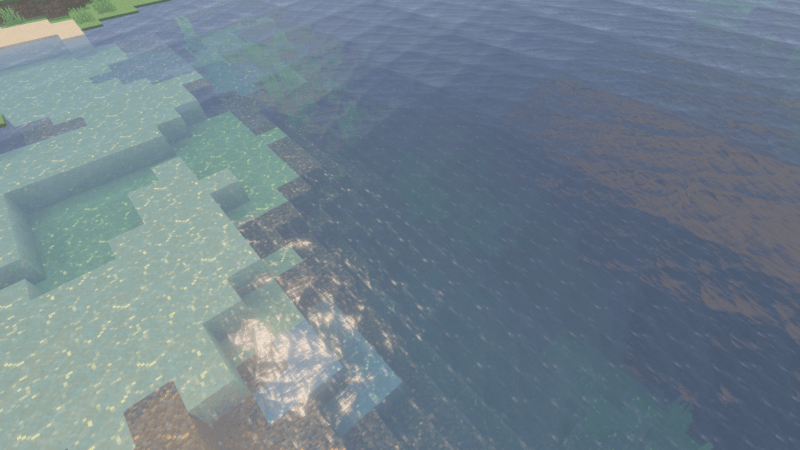
Amazon Water makes the water in your Minecraft world look murky, like it’s covered in algae, and makes underwater visuals very cloudy and foggy. This shader is designed to make your gameplay more challenging.
You can see in-game screenshots showing how this addon’s features look in your game.
كيفية تثبيت AMAZON WATER
With Millida Launcher
Install Millida Launcher
The launcher is free: download it at millida.net/launcher and sign in with any nickname.
Click “Install” on this page
The launcher opens and installs the resource pack for Minecraft 26.20–26.30 automatically.
Launch the game
A profile with it appears in the launcher: click “Play”.
Manually
Download the archive
Pick the file amazon water 1.5.mcpack (151 KB) for your game version. No need to unpack it.
Put it in the resourcepacks folder
The easiest way: “Options”, then “Resource Packs”, then “Open Pack Folder”, and drag the archive there.
Enable the pack
In the same window, move the pack to the right-hand “Selected” column and click “Done”.
الإصدارات
مع المتطلبات
| Minecraft | المشغّل | الملف | التاريخ | الإجراءات |
|---|---|---|---|---|
| 26.20 | — | amazon water 1.5151 KB |
الأسئلة الشائعة
Which Minecraft versions does AMAZON WATER work on?
There are files for 26.30, 26.20. The newest is 26.30.
Where can I download AMAZON WATER safely?
On this page: the file amazon water 1.5.mcpack (151 KB) is stored on Millida’s server, with no link shorteners. SHA-1 checksum: 693685419494da18e2dc54de822d563c83b76203.
التقييمات
كن أول من يقيّم AMAZON WATER


