

A&S Tools حزمة موارد لماينكرافت 1.21
تعديل الأدوات للحصول على مظهر أكثر حداثة وتناسقًا.
A&S Tools ⚔️
This texture pack refreshes the tool designs in Minecraft Bedrock while maintaining the standard 16x resolution. The goal is to provide a more detailed and polished look while preserving the game's original Vanilla aesthetic.
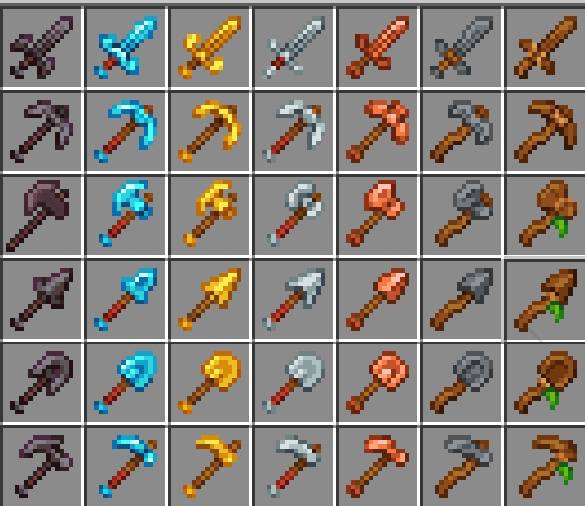
Compatibility 🪢
This pack is fully compatible with the Actions & Stuff addon in its Vanilla version, ensuring that the textures align perfectly with the animations without any visual glitches.
Installation 📥
Download the .mcpack file.
Open the file to automatically import it into Minecraft.
Activate the pack under Settings > Global Resources.
كيفية تثبيت A&S Tools
With Millida Launcher
Install Millida Launcher
The launcher is free: download it at millida.net/launcher and sign in with any nickname.
Click “Install” on this page
The launcher opens and installs the resource pack for Minecraft 1.21 automatically.
Launch the game
A profile with it appears in the launcher: click “Play”.
Manually
Download the archive
Pick the file AS Tools.mcpack (30 KB) for your game version. No need to unpack it.
Put it in the resourcepacks folder
The easiest way: “Options”, then “Resource Packs”, then “Open Pack Folder”, and drag the archive there.
Enable the pack
In the same window, move the pack to the right-hand “Selected” column and click “Done”.
الإصدارات
مع المتطلبات
| Minecraft | المشغّل | الملف | التاريخ | الإجراءات |
|---|---|---|---|---|
| 1.21 | — | A&S Tools 1.030.3 KB 1 |
التقييمات
كن أول من يقيّم A&S Tools



