
Individual Signs Plus إضافة لماينكرافت 1.8.1
Individual Signs Plus
حول إضافة Individual Signs Plus البرمجية
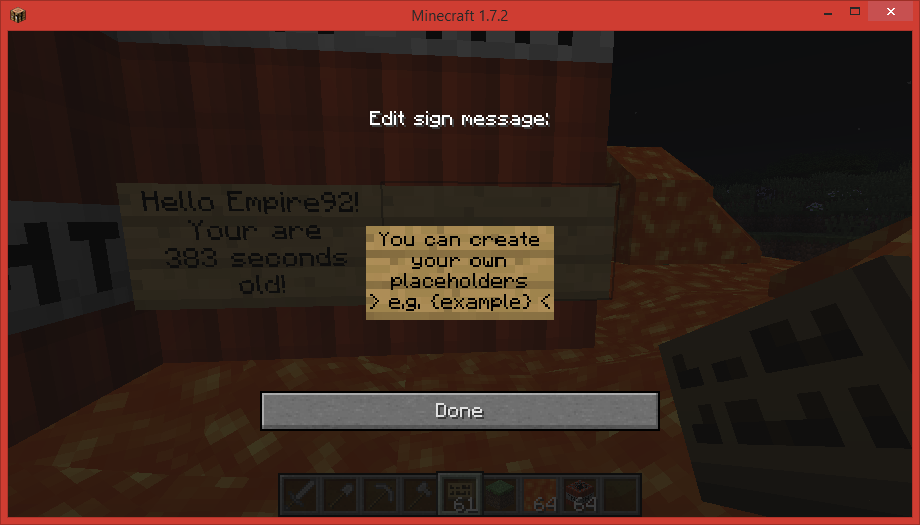
Signs can now display updating , user specific sign messages (such as your money). Choose from 100+ placeholders or make your own! This plugin was originally an addon for InSigns by blablubbabc. He's made some other really neat plugins which you should definitely check out.
[Overview]
- Allows you to display text on a sign that is different for each player looking at it.
- Create signs with custom {placeholders} simply by typing them on the sign.
- For example; {player} will turn into your username.
- Create your own placeholders, or download additional ones.
- Placeholders contain information such as your current balance or the held item.
- Placeholders can be updated automatically (default once per second)
- Alternatively you can right click the sign to update it.
- You can find a list of placeholders below.

[Dependencies]
[Recommended]
- ProtocolLib (More efficient sign updating)
[Optional]
- Vault (Adds permission, economy and chat related placeholders)
- Enjin (Adds enjin tags)
- Factions (Adds faction related tags)
- Essentials (Used for getting offlineplayer DisplayName)
[Commands]
Command Description Permission
/isp setline <index> <value> Set a line of a sign insignsplus.setline insignsplus.setline.override
/isp help <placeholder> Describes the function and usage of the placeholder
/isp list <page> Lists the placeholders for this plugin
/isp save Saves the plugin data insignsplus.save
/isp reload Reloads all configuration insignsplus.reload
/isp enable Enable a disabled placeholder insignsplus.enable
/isp disable Disables a placeholder insignsplus.disable
[Permissions]
- insignsplus.create - allows you to use all non whitelisted placeholders
- insignsplus.create.* - allows you to use everything
- insignsplus.create.<placeholder> - allows you to use a specific placeholder.
[Placeholders]
- {player}
- {world}
- {x}
- {y}
- {z}
- {lvl}
- {exp}
- {money}
- Click here for a detailed list.
[Scripting]
- Custom placeholders go in the folder ".../plugins/InSignsPlus/scripts/"
- Any additional placeholders will go there.
- To add your own copy the default template "example.yml"
- The placeholder for "example.yml" would be {example}
script: - if {hasperm:hello} - return &1Hello! - else - return &4Bye!
- Please visit the scripting page for more info.
[API]
Want to display per user, updating statistics for your minigame plugin? The API allows you to have auto-updating per user sign messages without having to worry about all the protocol stuff:
- Click here for the developer API
[Performance]
- The plugin only updates packets when the server has a high tickrate.
- The updates occur on a separate thread.
- Only certain whitelisted placeholders are updated.
- You can configure how many signs can be updated at one time (default 1000).
- You may change the update interval (default 1 second).
- You can also simply disable auto-updating if you don't think it's necessary.
[Configuration]
- All configuration can be done through the config.yml
autoupdate: updates-per-milli: 1 #How many signs should be updated per millisecond enabled: true #Wether auto-updating should be enabled interval: 1 #How often should the signs be updated buffer: 1000 #The maximum number of signs to update per interval whitelist: # A list of placeholders to update (you can add your own) - dead - sleeping - etc...
To get a placeholder to autoupdate, simply add it to the "whitelist" in the config.yml
[Images/Video]
[Videos]
English
Russian
Other
https://www.youtube.com/watch?v=kauA79nH8NQ
كيفية تثبيت Individual Signs Plus
A server on Paper or Spigot
The plugin runs on the server core for Minecraft 1.7.2–1.8.1; players do not need to install anything.
File goes into the plugins folder
Download the file InSignsPlus.jar (257 KB) and put it into the server’s plugins folder.
Restart the server
On startup the plugin creates its own settings folder in plugins.
Use the “To server” button
On Millida Hosting, the button at the top of the page uploads the file to your server and restarts it for you.
Minecraft 1.8.1 runs on Java 8: with a different Java version the game may close right after launch.
الإصدارات
مع المتطلبات
| Minecraft | المشغّل | الملف | التاريخ | الإجراءات |
|---|---|---|---|---|
| 1.8.1 | — | v2.0.1257 KB | ||
| 1.7.2 | — | v0.9.2221 KB |
الأسئلة الشائعة
Which Minecraft versions does Individual Signs Plus work on?
There are files for 1.8.1, 1.7.4, 1.7.2. The newest is 1.8.1.
Do players need to install Individual Signs Plus?
No, the plugin goes only on the server, into the plugins folder: players do not need to download anything.
Which Java does Individual Signs Plus need?
Minecraft 1.8.1 runs on Java 8. If the game closes right after launch, the usual cause is the wrong Java version in the profile settings.
Where can I download Individual Signs Plus safely?
On this page: the file InSignsPlus.jar (257 KB) is stored on Millida’s server, with no link shorteners. SHA-1 checksum: 0208effdfdb2c44de46644e4acdb6fdc30c748d7.
التقييمات
كن أول من يقيّم Individual Signs Plus



