
Dynmap-Mobs إضافة لماينكرافت 1.9
أضف عرضًا فوريًا للكائنات على خرائط Dynmap
حول إضافة Dynmap-Mobs البرمجية
Downloads: All stable and unstable builds Source Code IRC: irc.esper.net #dynmap
Supported versions: Dynmap v1.9 or later
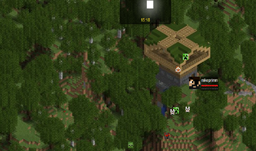
This plugin provides the option to make mobs visible, real-time, on the maps presented by Dynmap. It also serves as a simple example of the Dynmap Marker API, which may be of interest to other plugin developers for publishing their information on Dynmap.
To install, simply download the ZIP containing the plugin, unzip it into your plugins directory, and reload your server. Obviously, you will need Dynmap present and configured, as well - the current version of Dynmap-Mobs is compatible with Dynmap v1.6 or later.
After its first run, there will be a configuration file in the 'plugins/dynmap-mobs' directory, config.yml, which can be used to tailor which mobs are visible, control the display of the 'layer' on the dynmap maps for the mobs, and control visibility of the mobs.
In addition, the visibility of the mob icons can be controlled using the 'minzoom' setting. When non-zero, this specifies a minimum zoom-in level before mob icons are displayed (0=top zoom, so mobs are always shown). Also, the 'nolabels' option can be used to avoid setting labels for the icons.
Disclosure This plugin utilizes Hidendra's plugin metrics system, which means that the following information is collected and sent to mcstats.org:
- A unique identifier
- The server's version of Java
- Whether the server is in offline or online mode
- The plugin's version
- The server's version
- The OS version/name and architecture
- The core count for the CPU
- The number of players online
- The Metrics version
كيفية تثبيت Dynmap-Mobs
A server on Paper or Spigot
The plugin runs on the server core for Minecraft 1.8.1–1.9; players do not need to install anything.
File goes into the plugins folder
Download the file dynmap-mobs-1.3.jar (326 KB) and put it into the server’s plugins folder.
Restart the server
On startup the plugin creates its own settings folder in plugins.
Use the “To server” button
On Millida Hosting, the button at the top of the page uploads the file to your server and restarts it for you.
Minecraft 1.9 runs on Java 8: with a different Java version the game may close right after launch.
الإصدارات
مع المتطلبات
| Minecraft | المشغّل | الملف | التاريخ | الإجراءات |
|---|---|---|---|---|
| 1.9 | — | v1.3326 KB |
الأسئلة الشائعة
Which Minecraft versions does Dynmap-Mobs work on?
There are files for 1.9, 1.8.1. The newest is 1.9.
Do players need to install Dynmap-Mobs?
No, the plugin goes only on the server, into the plugins folder: players do not need to download anything.
Which Java does Dynmap-Mobs need?
Minecraft 1.9 runs on Java 8. If the game closes right after launch, the usual cause is the wrong Java version in the profile settings.
Where can I download Dynmap-Mobs safely?
On this page: the file dynmap-mobs-1.3.jar (326 KB) is stored on Millida’s server, with no link shorteners. SHA-1 checksum: 7537b84ea725d4767bd02854d15cb726a1b185da.
التقييمات
كن أول من يقيّم Dynmap-Mobs



