
Wall-Jump! [FORGE] مود لماينكرافت 1.16.5, 1.18.2
اقفز من جدار إلى جدار! قفز على الجدران، قفز مزدوج، قفز سريع، قفز على الأسوار، إلخ.
- تنزيلات
- 4 تنزيلات
- مشاهدة
- 36 مشاهدة
- محدّث
- محدّث 17.10.2026
- 1.16.4 — 1.18.2
 Forge
Forge
حول مود Wall-Jump! [FORGE]
Wall-Jump TXF لماين كرافت 1.19-1.21.4
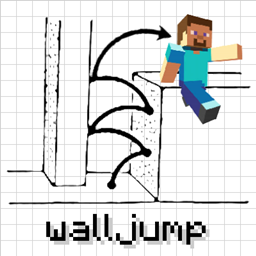
منصة من جدار إلى جدار في ماين كرافت! يضيف هذا المود القفز على الجدران والقفز المزدوج إلى اللعبة.
التشبث بالجدار: اقفز نحو جدار واستمر في الضغط على مفتاح القفز على الجدار (LSHIFT). ثم...
القفز على الجدار: أثناء التشبث بالجدار، استمر في الضغط على W واترك LSHIFT للقفز على الجدار.
القفز المزدوج: قفزة اختيارية في منتصف الهواء يمكنك استخدامها لصالحك.
إذا صنعت خريطة أو فيديو لمود Wall-Jump وتريد إدراجه هنا، فلا تتردد في مراسلتي!
بعض خيارات الإعدادات:
- مفتاح القفز على الجدار (LSHIFT افتراضيًا، لكن SPACE يعمل جيدًا أيضًا)
- الارتفاع والمسافة المقذوفة أثناء القفز على الجدار
- القفز المزدوج (معطل افتراضيًا، لكنه ميزة ممتعة حقًا)
- القفز على جدار واحد (التسلق للأعلى باستخدام جدار واحد فقط)
- الحد الأدنى للمسافة لضرر السقوط (السقطات الصغيرة لن تبطئك)
- تعزيز السرعة أثناء الركض على الأرض وعند الانزلاق
- تعويذات للقفز على الجدران والقفز المزدوج وتعزيز السرعة
(السيرفرات التي تحتوي على المود مثبتًا ستجبر العملاء على استخدام إعدادات السيرفر) استخدم مود Configured لإعداد المود داخل اللعبة!
ألقِ نظرة على هذه المودات الرائعة القائمة على الحركة...
Elenai Dodge: يضيف آلية مراوغة متعددة الاتجاهات إلى اللعبة! Elenai Dodge 2: يضيف آليات مراوغة أفضل إلى اللعبة! GoProne: يضيف اختصار لوحة مفاتيح لدخول وضع الزحف عند الطلب! Move Plus: يضيف التعلق بالحواف والمراوغة والزحف!
كيفية تثبيت Wall-Jump! [FORGE]
With Millida Launcher
Install Millida Launcher
The launcher is free: download it at millida.net/launcher and sign in with any nickname.
Click “Install” on this page
The launcher opens and installs the mod for Minecraft 1.16.4–1.18.2 on Forge automatically.
Launch the game
A profile with it appears in the launcher: click “Play”.
Manually
Install Forge
The loader must match the game version of the mod file, for example Minecraft 1.18.2. After installing it, a separate profile appears in your launcher.
Download the file for your version
In the version list above, pick the file walljump-forge-1.18.1-1.3.7.jar (81 KB) for your game version.
Put it in the mods folder
The folder is inside .minecraft (Windows: %appdata%\.minecraft\mods). If it does not exist, create it.
Launch the loader profile
Open “Mods” in the main menu: Wall-Jump! [FORGE] should be in the list.
Minecraft 1.18.2 runs on Java 17: with a different Java version the game may close right after launch.
الإصدارات
مع المتطلبات
| Minecraft | المشغّل | الملف | التاريخ | الإجراءات |
|---|---|---|---|---|
| 1.18.1 | Forge | walljump-forge-1.18.1-1.3.7.jar81.2 KB 2 | ||
| 1.16.5 | — | walljump-forge-1.16.4-1.3.7.jar82.5 KB 2 |
الأسئلة الشائعة
Which Minecraft versions does Wall-Jump! [FORGE] work on?
There are files for 1.18.2, 1.18.1, 1.18, 1.16.5, 1.16.4. The newest is 1.18.2.
Is Wall-Jump! [FORGE] for Forge or Fabric?
Only for Forge: 1.18–1.18.2. There are no files for Fabric or NeoForge: a mod for another loader will not start.
Does Wall-Jump! [FORGE] need other mods?
The author lists no required dependencies: the Forge loader is enough.
Which Java does Wall-Jump! [FORGE] need?
Minecraft 1.18.2 runs on Java 17. If the game closes right after launch, the usual cause is the wrong Java version in the profile settings.
Where can I download Wall-Jump! [FORGE] safely?
On this page: the file walljump-forge-1.18.1-1.3.7.jar (81 KB) is stored on Millida’s server, with no link shorteners. SHA-1 checksum: 8d2baf2c28043815b2b1cdb66d6d9b1ef721e2c4.
التقييمات
كن أول من يقيّم Wall-Jump! [FORGE]


