
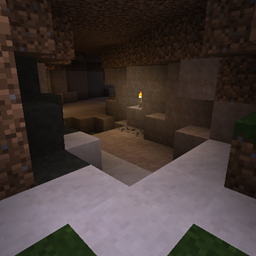
Underground Biomes مود لماينكرافت 1.21.1, 1.12.2
يضيف 24 نوعًا مختلفًا من الحجر
 NeoForge
 Forge
Forgeحول مود Underground Biomes
الوصف السابق
هذا نقل لمود UndergroundBiomesConstructs إلى الإصدار 1.12.2
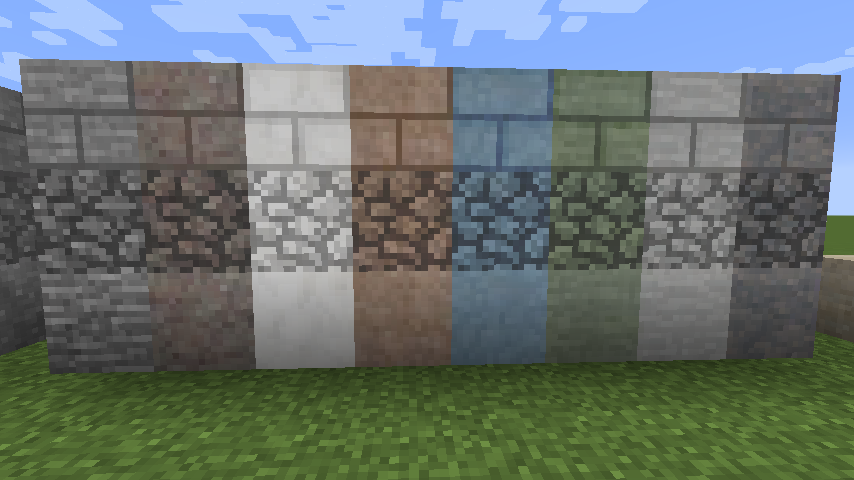
يضيف
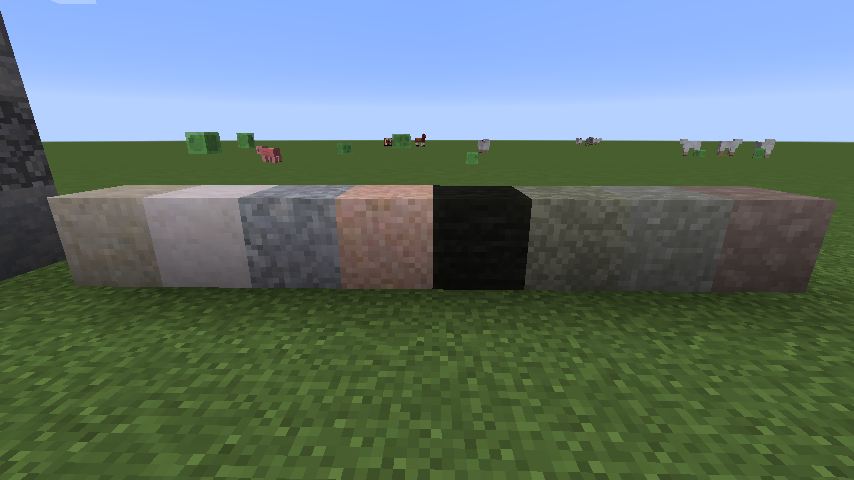
- 24 نوعاً من الحجر
- 24 تنويعاً من الحصى
- 24 نوعاً من الرمل
- 16 نوعاً من حجر الكوبل
- الطوب
- الألواح
- الجدران
- الدرج
- الأزرار
- أحجار BOP المتشابكة
- حجر الكوبل الطحلبي
- بيض الوحوش
- خامات ماينكرافت والمودات مدمجة (أو يمكن دمجها) لتتوافق مع الحجر المحيط.
قد تجد بعض المساعدة حول إضافة الخامات من المودات هنا.
ملاحظة حول الإصدار 1.14.x: تلك الإصدارات هي ألفا مبكرة. من المتوقع وجود أخطاء... يرجى الإبلاغ عنها في متتبع المشاكل على Github! إذا كنت ترقّي إلى الإصدار 32 من إصدار أقدم، يرجى حذف مجلد config/undergroundbiomes الخاص بك!
هذا نقل لمود UndergroundBiomesConstructs إلى الإصدار 1.12.2 وما بعده.
يضيف هذا المود تنوعاً كبيراً إلى عالمك السفلي،
- يضيف 24 نوعاً جديداً مختلفاً من الأحجار بأسلوب متحول وناري ورسوبي.
- يتم أيضاً تحويل الخامات والهياكل مثل القرى من الفانيليا والمودات الأخرى إلى نوع الحجر المحلي أثناء توليد العالم.
- تلك 24 تنويعاً تظهر أيضاً في حجر الكوبل والحصى والرمل والحجر الرملي والطين وبيض الوحوش والحجر المتشابك والطوب والطوب الطحلبي وحجر الكوبل والألواح والجدران والدرج والأزرار.
- المود مستوحى من العالم الحقيقي، مما يضيف تنوعاً أكبر: الأحجار النارية مثل الجرانيت أصعب قليلاً في الكسر، ويمكن استخدام الليغنيت كفحم رخيص، ولا يوجد حجر كوبل رسوبي، ويمكن العثور على الحفريات أثناء التعدين، إلخ.
- العديد من خامات المودات مدعومة بالفعل بشكل أصلي.
- كما أن Speleothem من quark مدعومة أيضاً.
- تتيح لك إعدادات بسيطة لكن شاملة إضافة خامات جديدة من مودات أخرى عبر إعدادات json بسيطة (انظر الويكي)، وتعطيل تنويعات كتل محددة، إلخ.
إذا كنت تريد إعداد سيرفر باستخدام مود Underground Biomes بدون أي جهد، احصل على سيرفر من BisectHosting واحصل على خصم 25% على شهرك الأول كعميل جديد باستخدام الكود kreezxil
كيفية تثبيت Underground Biomes
With Millida Launcher
Install Millida Launcher
The launcher is free: download it at millida.net/launcher and sign in with any nickname.
Click “Install” on this page
The launcher opens and installs the mod for Minecraft 1.12.2–1.21.1 on Forge or NeoForge automatically.
Launch the game
A profile with it appears in the launcher: click “Play”.
Manually
Install Forge or NeoForge
The loader must match the game version of the mod file, for example Minecraft 1.21.1. After installing it, a separate profile appears in your launcher.
Download the file for your version
In the version list above, pick the file undergroundbiomes-1.21-1.4.0.jar (3.0 MB) for your game version and loader.
Put it in the mods folder
The folder is inside .minecraft (Windows: %appdata%\.minecraft\mods). If it does not exist, create it.
Launch the loader profile
Open “Mods” in the main menu: Underground Biomes should be in the list.
Minecraft 1.21.1 runs on Java 21: with a different Java version the game may close right after launch.
الإصدارات
مع المتطلبات
| Minecraft | المشغّل | الملف | التاريخ | الإجراءات |
|---|---|---|---|---|
| 1.21.1 | NeoForge | 1.21-1.4.03 ميغابايت 1 | ||
| 1.12.2 | Forge | 1.12-1.3.141.3 ميغابايت 2 | ||
| 1.14.4 | Forge | 1.14.4-1.0-53986 KB |
الأسئلة الشائعة
Which Minecraft versions does Underground Biomes work on?
There are files for 1.21.1, 1.14.4, 1.12.2. The newest is 1.21.1.
Is Underground Biomes for Forge or Fabric?
There are files for Forge: 1.12.2–1.14.4 and for NeoForge: 1.21.1. There are no files for Fabric: a mod for another loader will not start.
Does Underground Biomes need other mods?
The author lists no required dependencies: the Forge or NeoForge loader is enough.
Which Java does Underground Biomes need?
Minecraft 1.21.1 runs on Java 21. If the game closes right after launch, the usual cause is the wrong Java version in the profile settings.
Where can I download Underground Biomes safely?
On this page: the file undergroundbiomes-1.21-1.4.0.jar (3.0 MB) is stored on Millida’s server, with no link shorteners. SHA-1 checksum: 95f400153a4146b872f4ae355546600bc11cd1fd.
التقييمات
كن أول من يقيّم Underground Biomes


