

Tips مود لماينكرافت 1.20.1, 1.12.2
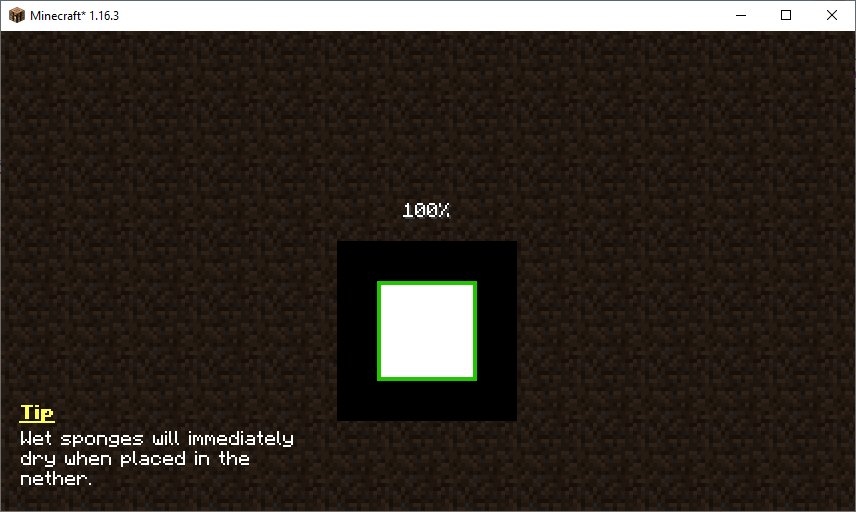
يضيف هذا المود نصائح إلى قوائم التحميل. كما يسمح لحزم المودات والمودات بإضافة نصائحها الخاصة!
 Fabric
 Forge
Forgeحول مود Tips
سيعرض هذا المود نصائح مفيدة على بعض شاشات اللعبة مثل شاشة تحميل العالم. سيتم تبديل النصيحة المعروضة كل خمس ثوانٍ. يمكن توسيع مجموعة النصائح بواسطة حزم الموارد والمودات الأخرى وحتى مودبكات. يمكنك معرفة المزيد عن إعداد النصائح هنا.
هل أعجبك المود وتريد دعمي؟
- تابعني على Twitter
- انضم إلى Discord الخاص بي
- ادعمني على Patreon
- تفقد موقعي الإلكتروني
هذا المشروع برعاية Nodecraft. استخدم الرمز DARKHAX للحصول على خصم 30% على شهرك الأول من الخدمة!
شعار المشروع من Delapouite على Game Icons ومرخص تحت CC By 3.0.

كيفية تثبيت Tips
With Millida Launcher
Install Millida Launcher
The launcher is free: download it at millida.net/launcher and sign in with any nickname.
Click “Install” on this page
The launcher opens and installs the mod for Minecraft 1.12–1.20.1 on Fabric or Forge automatically, together with its dependencies: Fabric API, Bookshelf.
Launch the game
A profile with it appears in the launcher: click “Play”.
Manually
Install Fabric or Forge
The loader must match the game version of the mod file, for example Minecraft 1.20.1. After installing it, a separate profile appears in your launcher.
Download the file for your version
In the version list above, pick the file Tips-Fabric-1.20.1-12.1.9.jar (111 KB) for your game version and loader.
Put it in the mods folder
The folder is inside .minecraft (Windows: %appdata%\.minecraft\mods). If it does not exist, create it. Required dependencies go there too: Fabric API, Bookshelf.
Launch the loader profile
Open “Mods” in the main menu: Tips should be in the list.
On a server
A server on Fabric or Forge
The mod only works on a server with the same loader and game version, for example 1.20.1.
File goes into the server’s mods folder
Stop the server, put the mod file into the mods folder and start the server again.
Use the “To server” button
On Millida Hosting, the button at the top of the page uploads the file to your server and restarts it for you.
Minecraft 1.20.1 runs on Java 17: with a different Java version the game may close right after launch.
الإصدارات
مع المتطلبات
| Minecraft | المشغّل | الملف | الإجراءات |
|---|---|---|---|
| 1.20.1 | Fabric | 1.20.1111 KB | |
| 1.19.2 | Forge | 1.19.2125 KB | |
| 1.18.2 | Forge | 1.18.288.2 KB 1 | |
| 1.16.5 | Forge | 1.16.570.1 KB | |
| 1.12.2 | Forge | 1.12.220.1 KB |
ما يلزم لتشغيله
- Fabric APIمطلوب
- Bookshelfمطلوب
الأسئلة الشائعة
Which Minecraft versions does Tips work on?
There are files for 1.20.1, 1.19.2, 1.18.2, 1.16.5, 1.12.2, 1.12. The newest is 1.20.1.
Is Tips for Forge or Fabric?
There are files for Fabric: 1.20.1 and for Forge: 1.12–1.19.2. There are no files for NeoForge: a mod for another loader will not start.
What does Tips need to work?
Required: Fabric API, Bookshelf. Without them the mod will not start: dependencies go into the same mods folder.
Does Tips work on a server?
Yes. Tips works both in singleplayer and on a server.
Which Java does Tips need?
Minecraft 1.20.1 runs on Java 17. If the game closes right after launch, the usual cause is the wrong Java version in the profile settings.
Where can I download Tips safely?
On this page: the file Tips-Fabric-1.20.1-12.1.9.jar (111 KB) is stored on Millida’s server, with no link shorteners. SHA-1 checksum: 7863604f7655ce1a65c08b5abc332e6ee065065a.
التقييمات
كن أول من يقيّم Tips


