
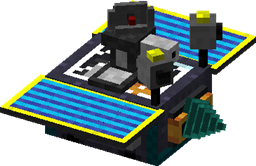
Steve's Carts 2 مود لماينكرافت 1.7.10
نقدّم عربات معيارية إلى Minecraft. دع عرباتك تعدّن وتزرع وتُشغَّل بضوء الشمس وتطلق النار على الكائنات وتصنع العناصر والمزيد.
حول مود Steve's Carts 2
لا تتردد في استخدام Steve's Carts 2 على خادمك وفي حزم المودات الخاصة بك (عامة أو خاصة) طالما أنك تنسب الفضل إليّ عن المود ولا تبيع العناصر داخل اللعبة مقابل أموال حقيقية.
كيفية تثبيت Steve's Carts 2
With Millida Launcher
Install Millida Launcher
The launcher is free: download it at millida.net/launcher and sign in with any nickname.
Click “Install” on this page
The launcher opens and installs the mod for Minecraft 1.7.10 automatically.
Launch the game
A profile with it appears in the launcher: click “Play”.
Manually
Download the file for your version
In the version list above, pick the file StevesCarts2.0.0.b18.jar (2.4 MB) for your game version.
Put it in the mods folder
The folder is inside .minecraft (Windows: %appdata%\.minecraft\mods). If it does not exist, create it.
Launch the loader profile
Open “Mods” in the main menu: Steve's Carts 2 should be in the list.
Minecraft 1.7.10 runs on Java 8: with a different Java version the game may close right after launch.
الإصدارات
مع المتطلبات
| Minecraft | المشغّل | الملف | التاريخ | الإجراءات |
|---|---|---|---|---|
| 1.7.10 | — | StevesCarts2.0.0.b18.jar2.4 ميغابايت |
الأسئلة الشائعة
Which Minecraft versions does Steve's Carts 2 work on?
Only Minecraft 1.7.10: there are no files for other versions.
Which Java does Steve's Carts 2 need?
Minecraft 1.7.10 runs on Java 8. If the game closes right after launch, the usual cause is the wrong Java version in the profile settings.
Where can I download Steve's Carts 2 safely?
On this page: the file StevesCarts2.0.0.b18.jar (2.4 MB) is stored on Millida’s server, with no link shorteners. SHA-1 checksum: 8cef6d96120bbb8f90e7e111207b74b38df79af9.
التقييمات
كن أول من يقيّم Steve's Carts 2


