

Status Effect Bars مود لماينكرافت 26.2
يضيف أشرطة قابلة للتخصيص إلى واجهة تأثيرات الحالة لعرض المدة المتبقية للتأثيرات.
 Fabric
 Quilt
Quiltحول مود Status Effect Bars
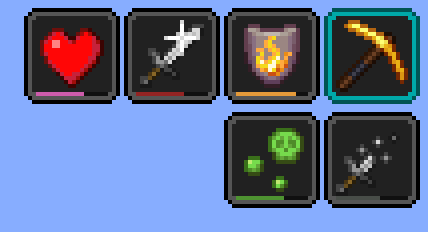
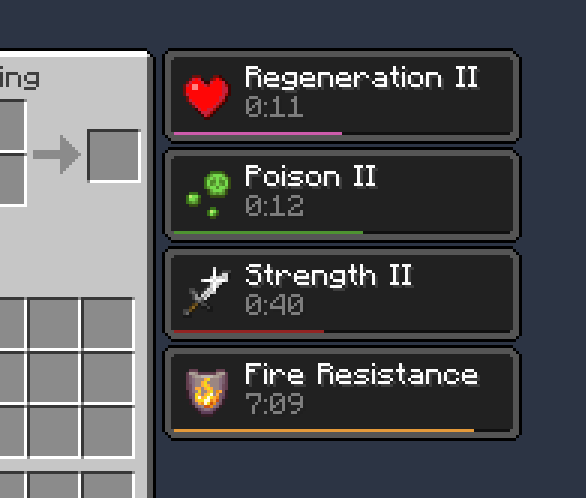
مود Fabric من جهة العميل يضيف أشرطة صغيرة قابلة للتخصيص إلى تراكب تأثيرات الحالة وفي المخزون لعرض المدة المتبقية للتأثيرات.
الميزات:

- أشرطة صغيرة لطيفة
- شاشة إعدادات لتعديل الألوان ومواضع الأشرطة
- يمكن إخفاء الأشرطة تلقائيًا في بعض الحالات المحددة لتقليل الفوضى (مثل تأثيرات المنارة والتأثيرات ذات المدد الطويلة جدًا)
يتطلب [Cloth Config]. يمكن الوصول إلى شاشة الإعدادات باستخدام Mod Menu.
الشكر والتقدير
- مستوحى على الأرجح من واجهة التأثيرات النشطة في SkyUI
- شاشة الإعدادات مدعومة بواسطة [Cloth Config]
- ترجمة ptbr بواسطة FITFC
الروابط: CurseForge · GitHub · Modrinth
[Cloth Config]: https://modrinth.com/mod/cloth-config

كيفية تثبيت Status Effect Bars
With Millida Launcher
Install Millida Launcher
The launcher is free: download it at millida.net/launcher and sign in with any nickname.
Click “Install” on this page
The launcher opens and installs the mod for Minecraft 1.21.11–26.2 on Fabric or Quilt automatically.
Launch the game
A profile with it appears in the launcher: click “Play”.
Manually
Install Fabric or Quilt
The loader must match the game version of the mod file, for example Minecraft 26.2. After installing it, a separate profile appears in your launcher.
Download the file for your version
In the version list above, pick the file status-effect-bars-1.0.12.jar (44 KB) for your game version and loader.
Put it in the mods folder
The folder is inside .minecraft (Windows: %appdata%\.minecraft\mods). If it does not exist, create it.
Launch the loader profile
Open “Mods” in the main menu: Status Effect Bars should be in the list.
Status Effect Bars works on the player’s side only: there is no need to install it on a server.
الإصدارات
مع المتطلبات
| Minecraft | المشغّل | الملف | الإجراءات |
|---|---|---|---|
| 26.2 | Fabric, Quilt | 26.243.9 KB 18 | |
| 26.1 | Fabric, Quilt | 26.147.4 KB 7 | |
| 1.21.11 | Fabric, Quilt | 1.21.1146.6 KB 62 |
الأسئلة الشائعة
Which Minecraft versions does Status Effect Bars work on?
There are files for 26.2, 26.1.2, 26.1.1, 26.1, 1.21.11. The newest is 26.2.
Is Status Effect Bars for Forge or Fabric?
There are files for Fabric: 1.21.11–26.2 and for Quilt: 1.21.11–26.2. There are no files for Forge or NeoForge: a mod for another loader will not start.
Does Status Effect Bars need other mods?
The author lists no required dependencies: the Fabric or Quilt loader is enough.
Do I need to install Status Effect Bars on a server?
No. Status Effect Bars works on the player’s side only: there is no need to install it on a server.
Where can I download Status Effect Bars safely?
On this page: the file status-effect-bars-1.0.12.jar (44 KB) is stored on Millida’s server, with no link shorteners. SHA-1 checksum: f29719c3101ebe009dae76bca5215cf7482f8b9c.
التقييمات
كن أول من يقيّم Status Effect Bars


