

Sounds مود لماينكرافت 1.20.1, 1.21.1
إنه كما هو مكتوب على العلبة. ترقية كاملة لمؤثرات ماينكرافت الصوتية مع أكثر من 170 مؤثرًا صوتيًا جديدًا لواجهات المستخدم والعناصر والكتل والمزيد.
 NeoForge
 Fabric
إنه كما هو مكتوب على العلبة.
Sounds هو مود يضيف مجموعة متنوعة من المؤثرات الصوتية الجديدة إلى اللعبة، مع تحسين المؤثرات الموجودة التي لم تكن مناسبة تمامًا. إنه يغير قواعد اللعبة، ويجعل النسخة الأصلية تبدو ناقصة بالمقارنة.
المود هو أيضًا استمرار روحي لـ ExtraSounds وAuditory وQualitySounds؛ تم توسيع معظم الميزات من هذه المودات لتكون قابلة للتخصيص بشكل كبير.
يتطلب MRU وYet Another Config Lib

الميزات
- يتضمن أكثر من 170 تحسينًا للمؤثرات الصوتية تمتد عبر اللعبة بأكملها، مثل واجهة المستخدم ورسائل الدردشة والإجراءات داخل اللعبة وأصوات الكتل.
- مؤثرات صوتية عالية الجودة مصدرها Zapsplat ومعدلة يدويًا للحصول على أفضل تجربة مؤثرات صوتية.
- يعمل من جانب العميل فقط بالكامل، لا حاجة لتثبيته على الخادم!
- قابل للتخصيص بشكل كبير، يمكنك تغيير أحداث الأصوات المستخدمة، وحتى تعديل الأصوات الديناميكية للكتل والعناصر عبر حزم الموارد، وهو مفيد بشكل خاص لإنشاء إضافات لمودات المحتوى.'
الإصدارات المدعومة
يتم دعم فقط أحدث إصدار مستقر لـ Fabric وNeoForge (26.1) وأحدث إصدار تجريبي لـ Fabric (26.3).
الإعدادات
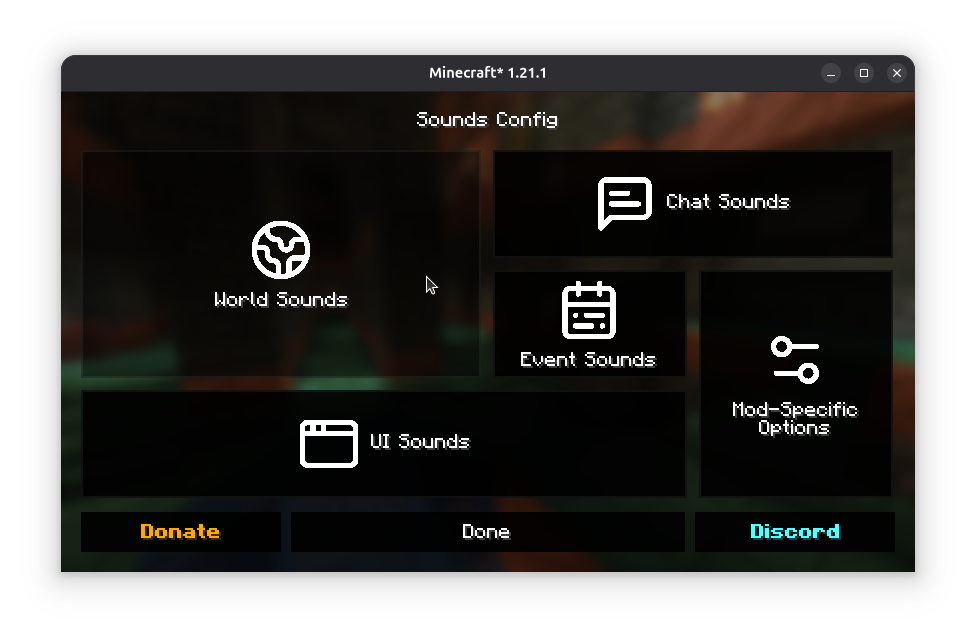
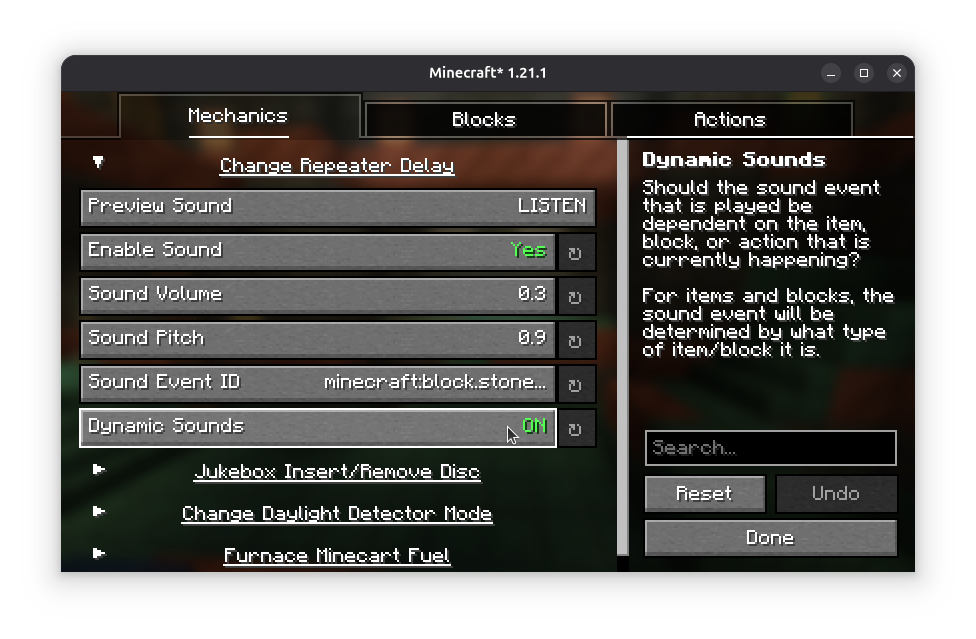
كما ذُكر، فإن Sounds قابل للتخصيص بشكل كبير - يمكن تعديل المؤثرات البسيطة إما عبر الإعدادات الموجودة في مجلد config/sounds/ في نسخة لعبتك، أو عبر شاشة الإعدادات.
يتطلب Mod Menu للوصول إلى شاشة الإعدادات في إصدار Fabric من المود.
إضافة دعم للمحتوى المعدل
راجع Sounds Documentation لمزيد من المعلومات حول إنشاء تعريفات الأصوات الديناميكية للعناصر والشاشات والكتل.
مؤثرات صوتية مخصصة تم الحصول عليها من Zapsplat بموجب ترخيص ZapSplat Standard License لأعضاء Gold.
باستخدامك لموداتي، فإنك توافق على اتفاقية ترخيص المستخدم النهائي. أنت حر في استخدام هذا المود ضمن حزم مودات Modrinth وCurseForge الخاصة بك طالما يتم احترام اتفاقية EULA.
كيفية تثبيت Sounds
With Millida Launcher
Install Millida Launcher
The launcher is free: download it at millida.net/launcher and sign in with any nickname.
Click “Install” on this page
The launcher opens and installs the mod for Minecraft 1.20–26.3 on Fabric or NeoForge automatically, together with its dependencies: YetAnotherConfigLib (YACL), Fabric API, MRU.
Launch the game
A profile with it appears in the launcher: click “Play”.
Manually
Install Fabric or NeoForge
The loader must match the game version of the mod file, for example Minecraft 26.3. After installing it, a separate profile appears in your launcher.
Download the file for your version
In the version list above, pick the file sounds-2.6.0+26.3-neoforge.jar (7.7 MB) for your game version and loader.
Put it in the mods folder
The folder is inside .minecraft (Windows: %appdata%\.minecraft\mods). If it does not exist, create it. Required dependencies go there too: YetAnotherConfigLib (YACL), Fabric API, MRU.
Launch the loader profile
Open “Mods” in the main menu: Sounds should be in the list.
Sounds works on the player’s side only: there is no need to install it on a server.
الإصدارات
مع المتطلبات
| Minecraft | المشغّل | الملف | التاريخ | الإجراءات |
|---|---|---|---|---|
| 26.3 | NeoForge | 26.37.7 ميغابايت 6 | ||
| 26.3 | Fabric | 26.37.8 ميغابايت 195 | ||
| 26.1.2 | Fabric | 26.1.27.8 ميغابايت 17 | ||
| 26.1.2 | NeoForge | 26.1.27.7 ميغابايت 1 | ||
| 26.3 | Fabric | 26.37.8 ميغابايت 2 | ||
| 26.1.2 | NeoForge | 26.1.27.7 ميغابايت | ||
| 26.1.2 | Fabric | 26.1.27.8 ميغابايت 10 | ||
| 26.2 | Fabric | 26.27.8 ميغابايت 97 | — |
ما يلزم لتشغيله
- YetAnotherConfigLib (YACL)مطلوب
- Fabric APIمطلوب
- Dependencyاختياري
- MRUمطلوب
محتوى يتطلبه
الأسئلة الشائعة
Which Minecraft versions does Sounds work on?
There are files for 1.20–26.3, 10 versions in total. The newest is 26.3.
Is Sounds for Forge or Fabric?
There are files for Fabric: 1.20–26.3 and for NeoForge: 26.1–26.3. There are no files for Forge: a mod for another loader will not start.
What does Sounds need to work?
Required: YetAnotherConfigLib (YACL), Fabric API, MRU. Without them the mod will not start: dependencies go into the same mods folder. Optional: Dependency.
Do I need to install Sounds on a server?
No. Sounds works on the player’s side only: there is no need to install it on a server.
Where can I download Sounds safely?
On this page: the file sounds-2.6.0+26.3-neoforge.jar (7.7 MB) is stored on Millida’s server, with no link shorteners. SHA-1 checksum: 4d36f480ce5706c83516c7b44ff9b8534b2bbdd7.
التقييمات
كن أول من يقيّم Sounds


