
Shadow Mounts مود لماينكرافت 26.3
🐎 SpookyJam 2024: حوّل الخيول إلى نسختها الظلية عبر سرج فريد!
 Fabric
 Forge
 NeoForge
 Quilt
حول مود Shadow Mounts
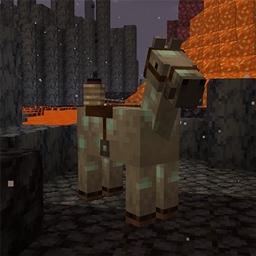
Shadow Mounts is a mod made for SpookyJam 2024, which adds the Shadow Saddle item. This unique saddle can be put on any horse, and it will transform it into its shadow form. The texture will darken and markings will take on soul fire blue. When ridden, it will show particle effects!
At the moment the effect is purely visual, but I plan on adding more features in the future.
All available config options:
darkenHorseTexture default true Whether the horse's texture should be darkened when equiped with a shadow saddle.
showShadowHorseParticles default true Whether the particles should be shown for shadow mounts.
onlyShowParticlesWhenRiding default true If enabled, shadow mount particles are only shown when a player is riding them.
The recipe to create a Shadow Saddle:
A Shadow Mount will output special particle effects: Some when standing still, and lots when moving!
The new saddle transforms any horse into its shadow variant:
You may freely use this mod in any modpack, as long as the download remains hosted within the CurseForge or Modrinth ecosystem.
Serilum.com contains an overview and more information on all mods available.
Comments are disabled as I'm unable to keep track of them across so many separate mod pages. For issues, ideas, suggestions or anything else there is the Github repo. Thanks!
كيفية تثبيت Shadow Mounts
With Millida Launcher
Install Millida Launcher
The launcher is free: download it at millida.net/launcher and sign in with any nickname.
Click “Install” on this page
The launcher opens and installs the mod for Minecraft 26.3 on Fabric, Forge, NeoForge or Quilt automatically.
Launch the game
A profile with it appears in the launcher: click “Play”.
Manually
Install Fabric, Forge, NeoForge or Quilt
The loader must match the game version of the mod file, for example Minecraft 26.3. After installing it, a separate profile appears in your launcher.
Download the file for your version
In the version list above, pick the file shadowmounts-26.3.0-1.4.jar (85 KB) for your game version and loader.
Put it in the mods folder
The folder is inside .minecraft (Windows: %appdata%\.minecraft\mods). If it does not exist, create it.
Launch the loader profile
Open “Mods” in the main menu: Shadow Mounts should be in the list.
الإصدارات
مع المتطلبات
| Minecraft | المشغّل | الملف | التاريخ | الإجراءات |
|---|---|---|---|---|
| 26.3 | Fabric, Forge, NeoForge, Quilt | [Fabric/Forge/Neo] 26.3.0-1.4 | Shadow Mounts84.8 KB 1 |
الأسئلة الشائعة
Which Minecraft versions does Shadow Mounts work on?
Only Minecraft 26.3: there are no files for other versions.
Is Shadow Mounts for Forge or Fabric?
There are files for Fabric: 26.3, for Forge: 26.3, for NeoForge: 26.3 and for Quilt: 26.3.
Does Shadow Mounts need other mods?
The author lists no required dependencies: the Fabric, Forge, NeoForge or Quilt loader is enough.
Where can I download Shadow Mounts safely?
On this page: the file shadowmounts-26.3.0-1.4.jar (85 KB) is stored on Millida’s server, with no link shorteners. SHA-1 checksum: dbd063998fa6388b55e545879122179c8411f18e.
التقييمات
كن أول من يقيّم Shadow Mounts


