

Server Tab Info مود لماينكرافت 1.20.1, 1.12.2
مود للعميل و/أو الخادم يوفر طريقة رائعة لعرض متوسط وقت التيك والتيكات في الثانية (TPS) للعبة
 NeoForge
 Forge
Forgeحول مود Server Tab Info
يجب أن يسمى فعليًا Tab Info، لأنه يعمل الآن أيضًا في وضع اللاعب الفردي!
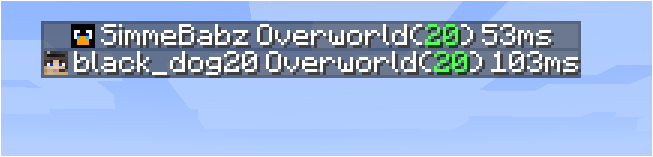
مقدمة
هذا مود يمكن تثبيته على كل من العميل والخادم دون التسبب في أخطاء المودات المفقودة للعملاء الذين لا يملكون المود أو الخوادم التي لا تملك المود. عند الاتصال بخادم، يعمل المود فقط عندما يكون الخادم أيضًا يملك المود. لا تحتاج النسخة الموجودة على الخادم إلى مطابقة النسخة الموجودة على العميل، ولكن إذا اتصل العميل بخادم بنسخة قديمة جدًا، فستكون بعض الميزات مفقودة.
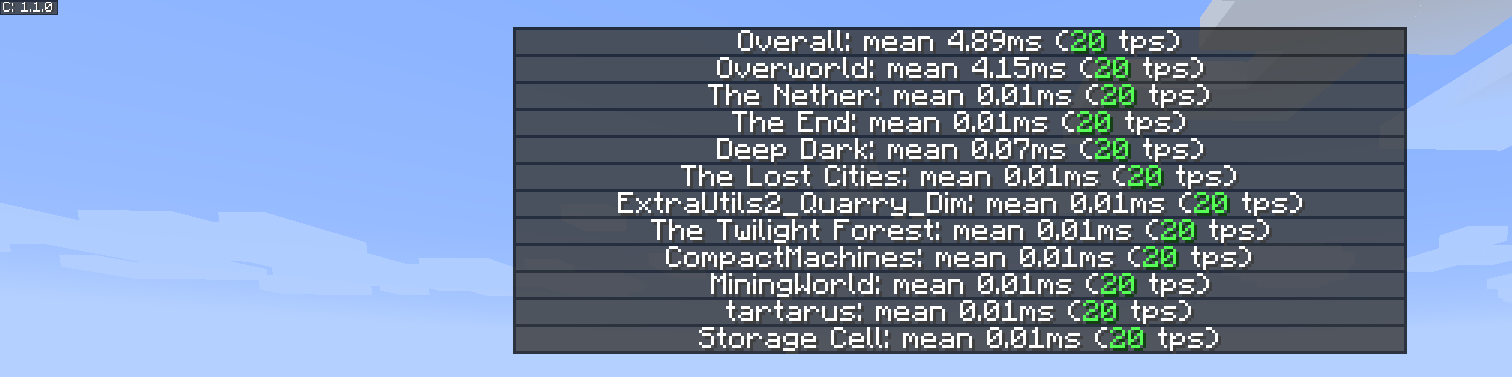
عرض الميزات
قائمة tps الجديدة والمحسّنة للأبعاد
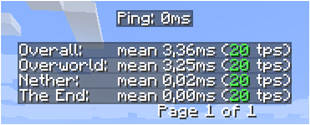
قائمة اللاعبين الجديدة

الإلهام
استند إلهام المود والعرض التقديمي إلى ميزة صغيرة من MineTogether، حيث إذا كان مود اختياري مثبتًا على الخادم وكانت ميزة الاستعلام نشطة، يمكنك عرض معلومات مثل tps والكيانات في العالم. كان يعرض هذه المعلومات مثل قائمة تبويب اللاعبين، عند الضغط على Tab + Ctrl.
كانت الشرارة بالنسبة لي هي أنه توقف عن العمل، لذلك صنعت هذا المود الصغير لعرض tps لجميع الأبعاد.
لتفعيل الواجهة اضغط على Tab + Ctrl (قياسي ولكن قابل للتهيئة في تعيينات المفاتيح) ثم تُعرض لك tps الإجمالية للخادم ولكل بُعد.
المشاكل المعروفة
- إذا كان MineTogether مثبتًا وكان تكامل siv مفعّلًا وكان ServerInfoProvider غير مثبت، فقد تواجه مشاكل في الأداء عند استخدام تعيين المفاتيح لصفحة tps، لأنها تستخدم نفس تعيينات المفاتيح.
لإصلاح هذه المشكلة، إما عطّل تكامل siv ضمن MineTogether أو غيّر تعيين المفاتيح لصفحة tps.
كيفية تثبيت Server Tab Info
With Millida Launcher
Install Millida Launcher
The launcher is free: download it at millida.net/launcher and sign in with any nickname.
Click “Install” on this page
The launcher opens and installs the mod for Minecraft 1.12–1.20.4 on Forge or NeoForge automatically.
Launch the game
A profile with it appears in the launcher: click “Play”.
Manually
Install Forge or NeoForge
The loader must match the game version of the mod file, for example Minecraft 1.20.4. After installing it, a separate profile appears in your launcher.
Download the file for your version
In the version list above, pick the file ServerTabInfo-1.20.4-1.3.8.jar (109 KB) for your game version and loader.
Put it in the mods folder
The folder is inside .minecraft (Windows: %appdata%\.minecraft\mods). If it does not exist, create it.
Launch the loader profile
Open “Mods” in the main menu: Server Tab Info should be in the list.
Minecraft 1.20.4 runs on Java 17: with a different Java version the game may close right after launch.
الإصدارات
مع المتطلبات
| Minecraft | المشغّل | الملف | التاريخ | الإجراءات |
|---|---|---|---|---|
| 1.20.4 | NeoForge | ServerTabInfo-1.20.4-1.3.8.jar109 KB | ||
| 1.20.1 | Forge | ServerTabInfo-1.20-1.3.8.jar101 KB | ||
| 1.17.1 | Forge | ServerTabInfo-1.17.1-1.3.4-b2.jar102 KB | ||
| 1.16.1 | Forge | ServerTabInfo-1.16.1-1.2.7-alpha.jar71.3 KB | ||
| 1.12.1 | — | ServerTabInfo-1.12.2-1.2.6.jar53.5 KB | ||
| 1.13.2 | — | ServerTabInfo-1.13.2-1.2.4-beta.jar51.5 KB |
الأسئلة الشائعة
Which Minecraft versions does Server Tab Info work on?
There are files for 1.12–1.20.4, 9 versions in total. The newest is 1.20.4.
Is Server Tab Info for Forge or Fabric?
There are files for Forge: 1.16.1–1.20.1 and for NeoForge: 1.20.4. There are no files for Fabric: a mod for another loader will not start.
Does Server Tab Info need other mods?
The author lists no required dependencies: the Forge or NeoForge loader is enough.
Which Java does Server Tab Info need?
Minecraft 1.20.4 runs on Java 17. If the game closes right after launch, the usual cause is the wrong Java version in the profile settings.
Where can I download Server Tab Info safely?
On this page: the file ServerTabInfo-1.20.4-1.3.8.jar (109 KB) is stored on Millida’s server, with no link shorteners. SHA-1 checksum: 10b7839c442bfb1d3ba61870a11344b0db072e3e.
التقييمات
كن أول من يقيّم Server Tab Info


