

Productive Trees مود لماينكرافت 1.20.1, 1.21.1
أنواع أشجار قابلة للتكاثر
 NeoForge
 Forge
Forgeحول مود Productive Trees
نقدّم لكم مود 'Productive Trees' لماينكرافت، الخلف الروحي للعبة المصغّرة لتهجين الأشجار من Forestry. مع هذا المود، يمكنك الآن ممارسة فن تهجين الأشجار، ما يتيح لك تلقيح أنواع الأشجار المختلفة وزراعة أصناف هجينة فريدة. ولّت أيام البناء بالخشب من أشجار الفانيلا القديمة المملة، مع مجموعة تضم أكثر من 160 طقم خشب فريد جديد.
مع Productive Trees، لديك القدرة على تهجين الأشجار بشكل استراتيجي لإنتاج أنواع خشب جميلة. جرّب تركيبات مختلفة لتكتشف وتفتح عددًا كبيرًا من الاحتمالات المثيرة. تخيّل حصاد شجرة لا توفر خشبًا نادرًا فحسب، بل تحمل أيضًا فواكه أو مكسرات لذيذة!
طوّر مهاراتك في الغابات، وأنشئ أنواع أشجارك الفريدة، وحوّل عالمك داخل اللعبة إلى نظام بيئي مزدهر من العجائب المزروعة المخصصة. حمّل مود Productive Trees اليوم وابدأ رحلة من الابتكار الشجري في المناظر البكسلية الواسعة لماينكرافت.
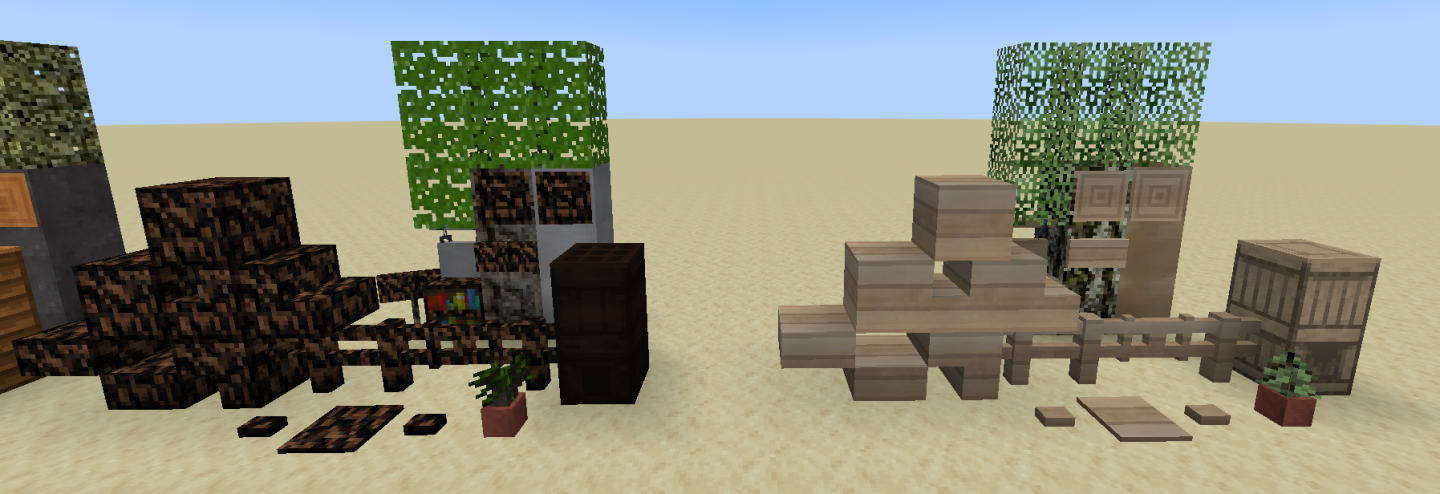
هذا المود في مرحلة البيتا وليس مكتملًا بعد. من الأمور الملحوظة المفقودة ميزات الأشجار (كيف تبدو عند نموها).
هناك سيرفر ديسكورد إذا كنت بحاجة إلى بعض المساعدة أو أردت المرور وإطراء الملامس.
"خشب كثير لدرجة أنك ستبحث عن رعاية طبية" - مجهول
كيفية تثبيت Productive Trees
With Millida Launcher
Install Millida Launcher
The launcher is free: download it at millida.net/launcher and sign in with any nickname.
Click “Install” on this page
The launcher opens and installs the mod for Minecraft 1.20.1–1.21.1 on Forge or NeoForge automatically.
Launch the game
A profile with it appears in the launcher: click “Play”.
Manually
Install Forge or NeoForge
The loader must match the game version of the mod file, for example Minecraft 1.21.1. After installing it, a separate profile appears in your launcher.
Download the file for your version
In the version list above, pick the file productivetrees-1.21.1-1.1.1.jar (13 MB) for your game version and loader.
Put it in the mods folder
The folder is inside .minecraft (Windows: %appdata%\.minecraft\mods). If it does not exist, create it.
Launch the loader profile
Open “Mods” in the main menu: Productive Trees should be in the list.
Minecraft 1.21.1 runs on Java 21: with a different Java version the game may close right after launch.
الإصدارات
مع المتطلبات
| Minecraft | المشغّل | الملف | التاريخ | الإجراءات |
|---|---|---|---|---|
| 1.21.1 | NeoForge | productivetrees-1.21.1-1.1.1.jar13.4 ميغابايت 2 | ||
| 1.21.1 | NeoForge | productivetrees-1.21.1-0.6.0.jar3.2 ميغابايت | ||
| 1.20.1 | NeoForge, Forge | productivetrees-1.20.1-0.2.6.jar14 ميغابايت | ||
| 1.20.1 | NeoForge, Forge | productivetrees-1.20.1-0.1.0.jar13.3 ميغابايت |
الأسئلة الشائعة
Which Minecraft versions does Productive Trees work on?
There are files for 1.21.1, 1.20.1. The newest is 1.21.1.
Is Productive Trees for Forge or Fabric?
There are files for Forge: 1.20.1 and for NeoForge: 1.20.1–1.21.1. There are no files for Fabric: a mod for another loader will not start.
Does Productive Trees need other mods?
The author lists no required dependencies: the Forge or NeoForge loader is enough.
Which Java does Productive Trees need?
Minecraft 1.21.1 runs on Java 21. If the game closes right after launch, the usual cause is the wrong Java version in the profile settings.
Where can I download Productive Trees safely?
On this page: the file productivetrees-1.21.1-1.1.1.jar (13 MB) is stored on Millida’s server, with no link shorteners. SHA-1 checksum: 33b7f304e4e13297fdbbef4822f8b178d73868cc.
التقييمات
كن أول من يقيّم Productive Trees


