

PlayerEx مود لماينكرافت 1.16.5, 1.19.2
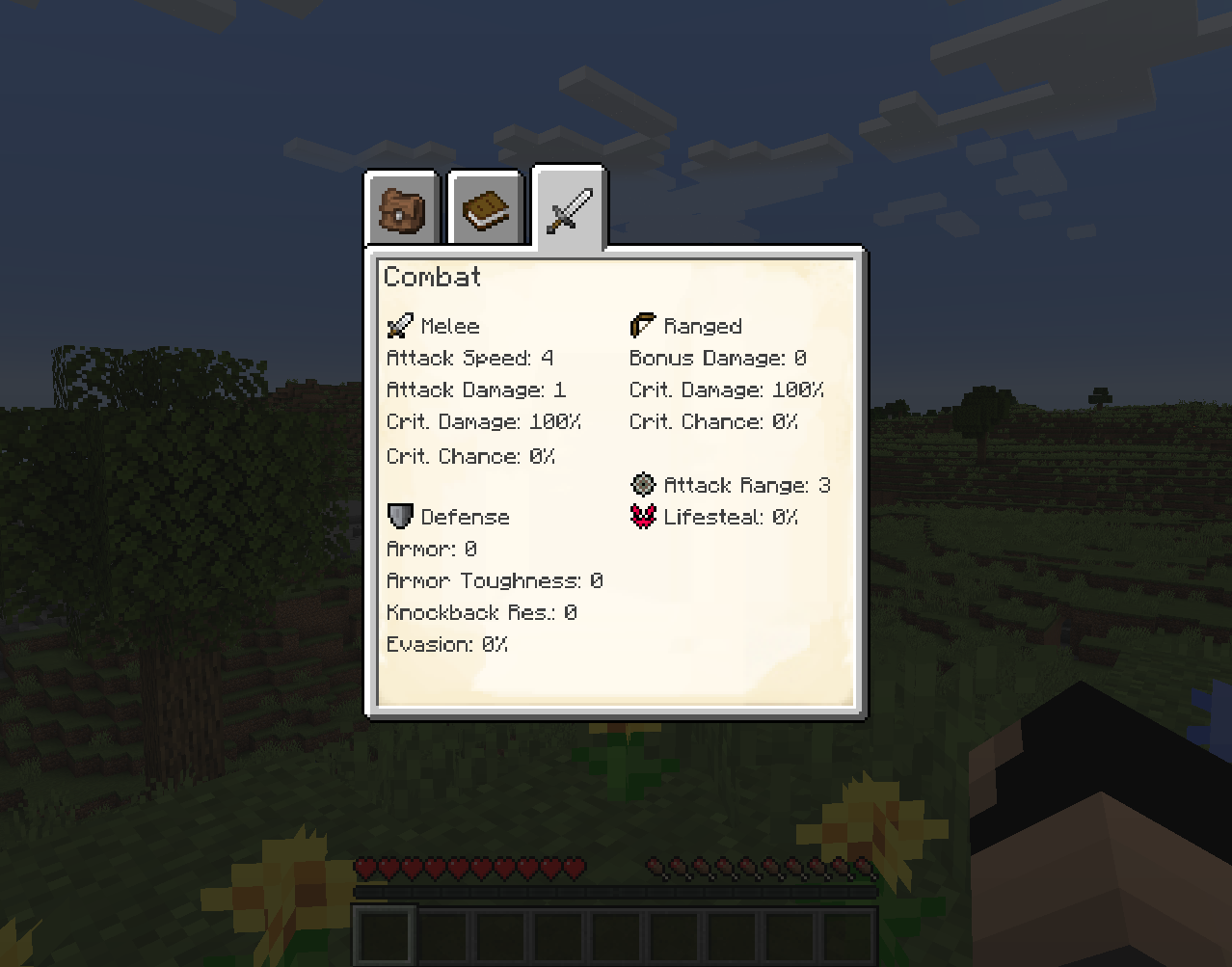
يضيف السمات والمستويات ونقاط المهارات. بطابع RPG.
 Fabric
 Forge
حول مود PlayerEx
11 أغسطس 2023: سأخذ استراحة من التعديل. سأعود، لكنني لست متأكدًا متى. سأظل أحاول الرد على التعليقات عندما أستطيع. يرجى ملاحظة أن الدعم سيُقدَّم للإصدار الأحدث فقط. علاوة على ذلك، لم أعد أطوّر لـ Forge؛ هذا المود يستخدم الآن Fabric.
الوصف

يسجّل PlayerEx سمات كاملة الوظائف بطابع RPG في اللعبة، ويضيفها إلى اللاعب افتراضيًا (يمكن إضافة هذه السمات إلى كائنات حية أخرى). كما يضيف المستويات ونقاط المهارات ورفع المستوى القابل للتهيئة. الإصدار الأحدث مدعوم بـ Data Attributes، ومن هنا يأتي الجزء الأكبر من قابلية التهيئة - يرجى التعرف عليه قبل القدوم إلى هنا للسؤال عن كيفية تهيئة الأشياء.
للحصول على توثيق أكثر تفصيلًا حول المحتوى والآليات المقدمة، من بين أمور أخرى، يرجى قراءة الويكي.
تبحث عن واجهة HUD القديمة؟ أصبحت الآن متاحة كمود مستقل هنا.
يتوفر أيضًا مود إضافة: RelicEx؛ يقدم هذا المود بعض عناصر التوسعة لسمات PlayerEx. بعض الفيديوهات التي تستعرض PlayerEx مشكورة:
- بواسطة Mischief of Mice (Forge)
- بواسطة bstylia14 (Forge)
- بواسطة AsianHalfSquat (Fabric)
ملاحظات وإرشادات
- آخر إصدار صدر لـ Forge كان v1.1.8.
- يرجى استخدام الإصدار الأحدث دائمًا.
- يرجى حذف ملفات الإعدادات قبل التحديث إلى إصدار آخر، لأن ملفات الإعدادات تميل إلى التغير بين الإصدارات الرئيسية مع تنفيذ المزيد من قابلية التهيئة.
- لا مشكلة في مودبكات.
- يأتي هذا المود مرفقًا مع (jar-in-jar) Cardinal Components (وحدات Base وEntity وChunk)، وTextPlaceholderAPI، وOfflinePlayerCache، وexp4j (مع الإشارة إلى حقوقهم).
كيفية تثبيت PlayerEx
With Millida Launcher
Install Millida Launcher
The launcher is free: download it at millida.net/launcher and sign in with any nickname.
Click “Install” on this page
The launcher opens and installs the mod for Minecraft 1.16.4–1.19.2 on Fabric or Forge automatically.
Launch the game
A profile with it appears in the launcher: click “Play”.
Manually
Install Fabric or Forge
The loader must match the game version of the mod file, for example Minecraft 1.19.2. After installing it, a separate profile appears in your launcher.
Download the file for your version
In the version list above, pick the file playerex-3.5.4+1.19.2.jar (607 KB) for your game version and loader.
Put it in the mods folder
The folder is inside .minecraft (Windows: %appdata%\.minecraft\mods). If it does not exist, create it.
Launch the loader profile
Open “Mods” in the main menu: PlayerEx should be in the list.
Minecraft 1.19.2 runs on Java 17: with a different Java version the game may close right after launch.
الإصدارات
مع المتطلبات
| Minecraft | المشغّل | الملف | التاريخ | الإجراءات |
|---|---|---|---|---|
| 1.19.2 | Fabric | 3.5.4+1.19.2607 KB 1 | ||
| 1.16.5 | Forge | playerex-1.1.8-1.16.5.jar131 KB 3 |
الأسئلة الشائعة
Which Minecraft versions does PlayerEx work on?
There are files for 1.19.2, 1.16.5, 1.16.4. The newest is 1.19.2.
Is PlayerEx for Forge or Fabric?
There are files for Fabric: 1.19.2 and for Forge: 1.16.4–1.16.5. There are no files for NeoForge: a mod for another loader will not start.
Does PlayerEx need other mods?
The author lists no required dependencies: the Fabric or Forge loader is enough.
Which Java does PlayerEx need?
Minecraft 1.19.2 runs on Java 17. If the game closes right after launch, the usual cause is the wrong Java version in the profile settings.
Where can I download PlayerEx safely?
On this page: the file playerex-3.5.4+1.19.2.jar (607 KB) is stored on Millida’s server, with no link shorteners. SHA-1 checksum: 48e9ef1dc6aafb45e9aa7c5d9ab2fe588f297d7c.
التقييمات
كن أول من يقيّم PlayerEx


