

Particle Effects مود لماينكرافت 1.20.1, 1.21.1
مود بصري يضيف جزيئات ذات مظهر فريد لكل تأثير في ماينكرافت الفانيلا!
 NeoForge
 Fabric
 Forge
Forge💬 الوصف
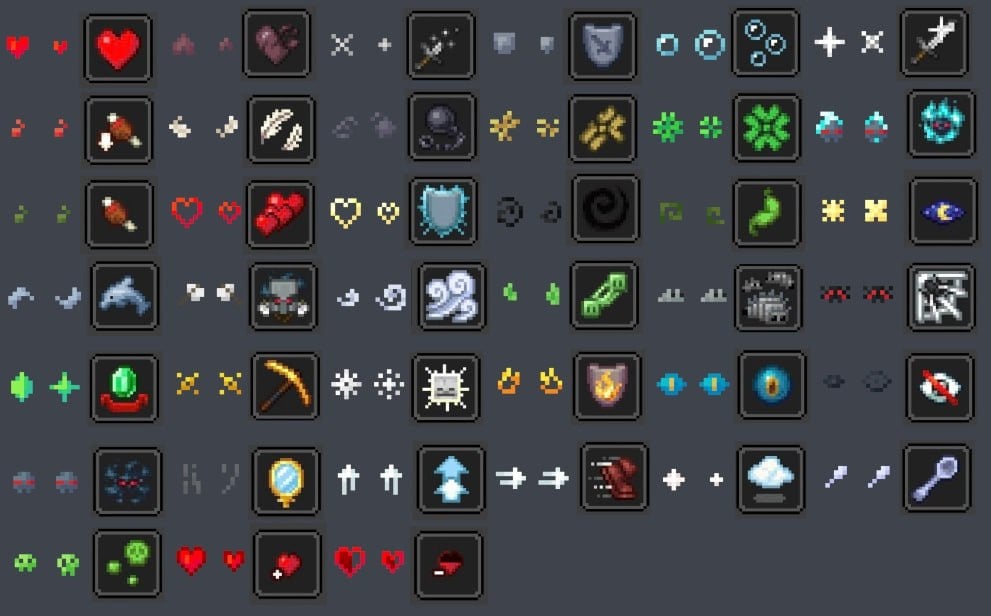
Particle Effects هو مود مرئي بسيط من جهة العميل يضيف جزيئات منسوجة فريدة لكل تأثير في ماينكرافت الأصلية! يعمل أيضًا في اللعب الجماعي ^^

✨ الجزيئات
هنا يمكنك رؤية جميع الجزيئات الفريدة لكل تأثير:
🌟 حزم الموارد
هناك أيضًا بعض حزم الموارد التي تغير قليلًا مظهر الجزيئات عن المود الأصلي.
- Particles Updated by zed1ker
- Updated Particles by Timofeii7547
- Bare Bones x Particle Effects by Dezert3

كيفية تثبيت Particle Effects
With Millida Launcher
Install Millida Launcher
The launcher is free: download it at millida.net/launcher and sign in with any nickname.
Click “Install” on this page
The launcher opens and installs the mod for Minecraft 1.20.1–26.3 on Fabric, Forge or NeoForge automatically, together with its dependencies: Fabric API.
Launch the game
A profile with it appears in the launcher: click “Play”.
Manually
Install Fabric, Forge or NeoForge
The loader must match the game version of the mod file, for example Minecraft 26.3. After installing it, a separate profile appears in your launcher.
Download the file for your version
In the version list above, pick the file ParticleEffects-1.6.0+26.3+neoforge.jar (304 KB) for your game version and loader.
Put it in the mods folder
The folder is inside .minecraft (Windows: %appdata%\.minecraft\mods). If it does not exist, create it. Required dependencies go there too: Fabric API.
Launch the loader profile
Open “Mods” in the main menu: Particle Effects should be in the list.
Particle Effects works on the player’s side only: there is no need to install it on a server.
الإصدارات
مع المتطلبات
| Minecraft | المشغّل | الملف | التاريخ | الإجراءات |
|---|---|---|---|---|
| 1.20.1 | Forge | 1.20.1491 KB 27 | ||
| 26.3 | NeoForge | 26.3304 KB 3 | ||
| 26.2 | NeoForge | 26.2304 KB 1 | ||
| 26.2 | NeoForge | 26.2304 KB 3 | ||
| 1.21.11 | NeoForge | 1.21.11304 KB 6 | ||
| 1.21.1 | NeoForge | 1.21.1303 KB 34 | ||
| 26.3 | Fabric | 26.3307 KB 130 | ||
| 26.2 | Fabric | 26.2308 KB 50 |
ما يلزم لتشغيله
- YetAnotherConfigLib (YACL)اختياري
- Fabric APIمطلوب
- Mod Menuاختياري
الأسئلة الشائعة
Which Minecraft versions does Particle Effects work on?
There are files for 1.20.1–26.3, 8 versions in total. The newest is 26.3.
Is Particle Effects for Forge or Fabric?
There are files for Fabric: 26.2–26.3, for Forge: 1.20.1 and for NeoForge: 1.21.1–26.3.
What does Particle Effects need to work?
Required: Fabric API. Without it the mod will not start: dependencies go into the same mods folder. Optional: YetAnotherConfigLib (YACL), Mod Menu.
Do I need to install Particle Effects on a server?
No. Particle Effects works on the player’s side only: there is no need to install it on a server.
Where can I download Particle Effects safely?
On this page: the file ParticleEffects-1.6.0+26.3+neoforge.jar (304 KB) is stored on Millida’s server, with no link shorteners. SHA-1 checksum: 02c8dc2c2a3ae5761513b10d02526a3b940f6dc3.
التقييمات
كن أول من يقيّم Particle Effects


