
Multi-Piston مود لماينكرافت 1.20.1, 1.21.1
كتلة مكبس متعددة الاتجاهات
 NeoForge
 Forge
Forgeحول مود Multi-Piston
Multi-piston هو مود من إنشاء فريق Ldt-team الذي ينشئ ويصون أيضًا minecolonies وstructurize وblockout وarmory.
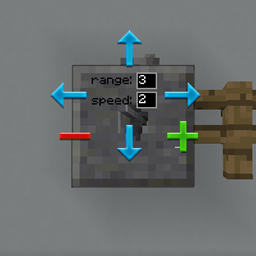
يضيف Multi-piston كتلة multipiston إلى اللعبة تتيح لك سحب أي كتلة من اتجاه محدد ودفعها إلى أي اتجاه بسرعة ومدى قابلين للتحديد
الوصفة:
أفقي:
عمودي:
جسر:
الإعدادات:
الأسئلة الشائعة:
كيف تعمل واجهة الرسوميات؟
- انقر بزر الفأرة الأيمن على الكتلة لفتح واجهة الرسوميات.
- انقر بزر الفأرة الأيمن على اتجاه الإدخال وانقر بزر الفأرة الأيسر على اتجاه الإخراج
- عدّل المدى والسرعة، ثم اخرج من واجهة الرسوميات عبر زر escape.
كيف يمكنني زيادة المدى؟
- الحد الأقصى للمدى هو 10، حتى يصل إلى نوع مختلف من الكتل
هل يمكنني زيادة السرعة؟
- حتى 3 فقط، وقد يُدعم أكثر في المستقبل.
هل يمكنني تغيير الصوت؟
- قد يُضاف في المستقبل أيضًا.
هل يعمل مع الريدستون؟
- نعم، يعمل مع الأزرار والروافع وأي إدخال ريدستون مثل المكابس العادية.
كيفية تثبيت Multi-Piston
With Millida Launcher
Install Millida Launcher
The launcher is free: download it at millida.net/launcher and sign in with any nickname.
Click “Install” on this page
The launcher opens and installs the mod for Minecraft 1.18.2–1.21.1 on Forge or NeoForge automatically.
Launch the game
A profile with it appears in the launcher: click “Play”.
Manually
Install Forge or NeoForge
The loader must match the game version of the mod file, for example Minecraft 1.21.1. After installing it, a separate profile appears in your launcher.
Download the file for your version
In the version list above, pick the file multipiston-1.2.58-1.21.1.jar (33 KB) for your game version and loader.
Put it in the mods folder
The folder is inside .minecraft (Windows: %appdata%\.minecraft\mods). If it does not exist, create it.
Launch the loader profile
Open “Mods” in the main menu: Multi-Piston should be in the list.
Minecraft 1.21.1 runs on Java 21: with a different Java version the game may close right after launch.
الإصدارات
مع المتطلبات
| Minecraft | المشغّل | الملف | التاريخ | الإجراءات |
|---|---|---|---|---|
| 1.20.1 | Forge | multipiston-1.20-0.0.47-snapshot.jar38.6 KB 10 | ||
| 1.21 | NeoForge | multipiston-1.2.58-1.21.1.jar33.3 KB 9 | ||
| 1.21 | NeoForge | multipiston-1.2.55-1.21.1-snapshot.jar32.6 KB | ||
| 1.20.1 | NeoForge, Forge | multipiston-1.20-1.2.43-RELEASE.jar37.8 KB | ||
| 1.20.4 | NeoForge | multipiston-1.20.4-1.2.37-ALPHA-universal.jar33 KB | ||
| 1.20.1 | Forge | multipiston-1.20-1.2.32-ALPHA.jar37.8 KB | ||
| 1.18.2 | — | multi-piston-1.18.2-1.2.13-ALPHA.jar50.1 KB |
الأسئلة الشائعة
Which Minecraft versions does Multi-Piston work on?
There are files for 1.21.1, 1.21, 1.20.4, 1.20.1, 1.20, 1.18.2. The newest is 1.21.1.
Is Multi-Piston for Forge or Fabric?
There are files for Forge: 1.20–1.20.1 and for NeoForge: 1.20–1.21.1. There are no files for Fabric: a mod for another loader will not start.
Does Multi-Piston need other mods?
The author lists no required dependencies: the Forge or NeoForge loader is enough.
Which Java does Multi-Piston need?
Minecraft 1.21.1 runs on Java 21. If the game closes right after launch, the usual cause is the wrong Java version in the profile settings.
Where can I download Multi-Piston safely?
On this page: the file multipiston-1.2.58-1.21.1.jar (33 KB) is stored on Millida’s server, with no link shorteners. SHA-1 checksum: 2b63be739da24247328e4052ec91c928230d0390.
التقييمات
كن أول من يقيّم Multi-Piston


