

MidnightLib مود لماينكرافت 1.20.1, 1.21.1
مكتبة مشتركة توفر نظام إعدادات خفيف الوزن
 NeoForge
 Fabric
 Quilt
Quiltحول مود MidnightLib
MidnightLib هي مكتبة خفيفة الوزن توفر أدوات مساعدة شائعة ونظام إعدادات للـ mods. يُسمح لمطوري الـ mods بل ويُشجَّعون على تضمينها مع الـ mods الخاصة بهم عبر Jar-in-Jar. يمكن تفعيل أو تعطيل كل ميزة من شاشة أو ملف إعدادات المكتبة نفسها.
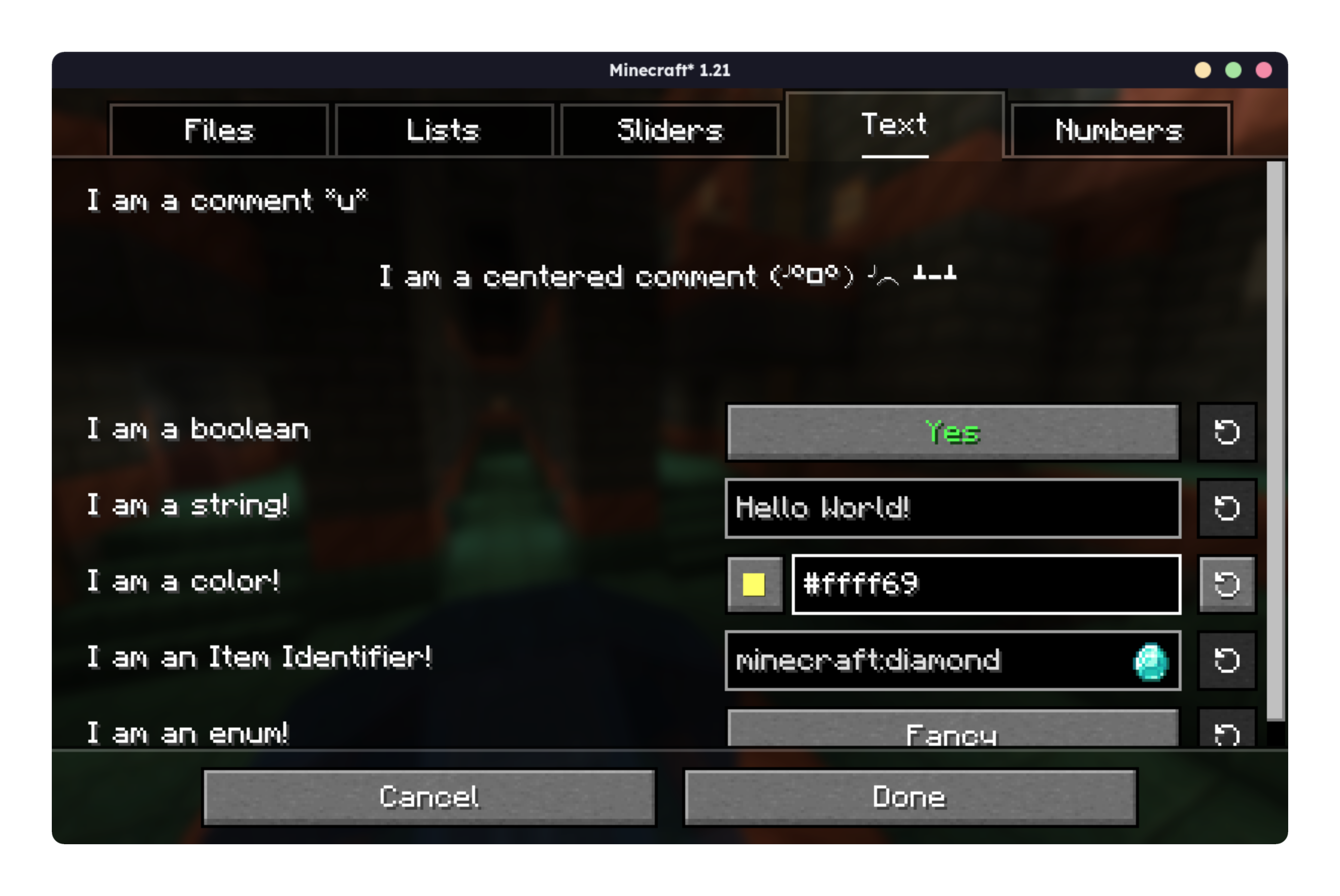
قم بزيارة الويكي الجديد للبدء الآن.

كيفية تثبيت MidnightLib
With Millida Launcher
Install Millida Launcher
The launcher is free: download it at millida.net/launcher and sign in with any nickname.
Click “Install” on this page
The launcher opens and installs the mod for Minecraft 1.17–26.3 on Fabric, NeoForge or Quilt automatically, together with its dependencies: Fabric API.
Launch the game
A profile with it appears in the launcher: click “Play”.
Manually
Install Fabric, NeoForge or Quilt
The loader must match the game version of the mod file, for example Minecraft 26.3. After installing it, a separate profile appears in your launcher.
Download the file for your version
In the version list above, pick the file midnightlib-neoforge-1.10.0+26.3.jar (65 KB) for your game version and loader.
Put it in the mods folder
The folder is inside .minecraft (Windows: %appdata%\.minecraft\mods). If it does not exist, create it. Required dependencies go there too: Fabric API.
Launch the loader profile
Open “Mods” in the main menu: MidnightLib should be in the list.
On a server
A server on Fabric, NeoForge or Quilt
The mod only works on a server with the same loader and game version, for example 26.3.
File goes into the server’s mods folder
Stop the server, put the mod file into the mods folder and start the server again.
Use the “To server” button
On Millida Hosting, the button at the top of the page uploads the file to your server and restarts it for you.
الإصدارات
مع المتطلبات
| Minecraft | المشغّل | الملف | التاريخ | الإجراءات |
|---|---|---|---|---|
| 26.3 | NeoForge | 26.365 KB 8 | ||
| 26.2 | NeoForge | 26.264.8 KB 1 | ||
| 26.3 | Fabric, Quilt | 26.364.4 KB 125 | ||
| 26.2 | Fabric, Quilt | 26.264.3 KB 61 | ||
| 26.1.2 | NeoForge | 26.1.264.6 KB | ||
| 1.21.5 | Fabric, Quilt | 1.21.563.8 KB 16 | ||
| 1.21.5 | NeoForge | 1.21.564.6 KB | ||
| 1.21.8 | NeoForge | 1.21.864.1 KB 2 |
ما يلزم لتشغيله
- Fabric APIمطلوب
الأسئلة الشائعة
Which Minecraft versions does MidnightLib work on?
There are files for 1.17–26.3, 23 versions in total. The newest is 26.3.
Is MidnightLib for Forge or Fabric?
There are files for Fabric: 1.17–26.3, for NeoForge: 1.21.4–26.3 and for Quilt: 1.17–26.3. There are no files for Forge: a mod for another loader will not start.
What does MidnightLib need to work?
Required: Fabric API. Without it the mod will not start: dependencies go into the same mods folder.
Does MidnightLib work on a server?
Yes. MidnightLib works both in singleplayer and on a server.
Where can I download MidnightLib safely?
On this page: the file midnightlib-neoforge-1.10.0+26.3.jar (65 KB) is stored on Millida’s server, with no link shorteners. SHA-1 checksum: 0b6422cde982368367e52ce137ef25948bf5d1f8.
التقييمات
كن أول من يقيّم MidnightLib


