
 NeoForge
 Forge
حول مود Magma Monsters
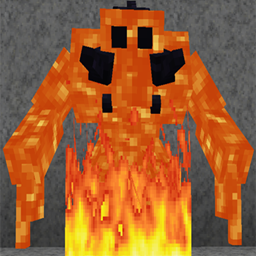
يضيف Magma Monsters قليلاً من الخطر الإضافي إلى Minecraft مع 2 من كائنات الوحوش.
تأتي وحوش Magma بحجمين - 'Magma Monster Grunts' و 'Magma Monsters'
يظهر Magma Monster حول الحمم (اعتباراً من 1.16.3 - في الحمم)، ويمتلك هجمات كرات نارية بعيدة المدى، ويمكنه إشعال الكتل أثناء سيره. سيتحول وحوش Magma إلى Obsidian أو Stone (Grunts) إذا لامسوا الماء ويمكن أن يصبحوا منصهرين مرة أخرى إذا لامسوا الحمم.
ستتحرك النسخ المتصلبة بشكل أبطأ، ولن تكون قادرة على إطلاق كرات نارية، لكن لديها دروع أكثر، ويمكنها إلحاق تأثير البطء على اللاعب.
تعكس إسقاطات الوحوش أيضاً الأشكال المتصلبة والمنصهرة بعناصر مختلفة لكل نوع.
في الإعدادات يمكنك تغيير ما يلي.
التحكم في ما إذا كان وحش Magma يظهر في Overworld أو Nether.
- (اعتباراً من إصدار 1.16.3 توجد أيضاً قائمة أبعاد محظورة).
- التحكم في ارتفاع الظهور.
- التحكم في احتمالية فرصة الظهور في كل من Overworld و Nether.
- التحكم في الحد الأدنى والأقصى لحجم المجموعة في كل من Overworld و Nether.
- التحكم في ما إذا كان Magma Monster يمكنه إشعال الأشياء أثناء سيره.
- ضرر الهجوم والصحة وبعض الخيارات الأخرى قابلة للتكوين أيضاً.
سياسة حزم التعديلات: أنت حر في تضمينه في حزمة التعديلات الخاصة بك. كل ما نطلبه هو ألا تدّعي أن التعديل ملكك وأن تضيف رابطاً يعود إلى هنا إذا كنت قادراً على ذلك.
شكر كبير يذهب إلى Shinoow على أصوات الوحوش.
إذا كنت ترغب في الانضمام إلى مجتمع Discord الخاص بنا. يمكنك أيضاً الحصول على المساعدة والإبلاغ عن المشكلات بشكل أسرع من خلال الانضمام.
إذا كنت ترغب في إظهار دعمك لي ولهذا التعديل.
Patreon: https://www.patreon.com/kashdeya
سياسة حزم التعديلات: أنت حر في تضمينه في حزمة التعديلات الخاصة بك.
كيفية تثبيت Magma Monsters
With Millida Launcher
Install Millida Launcher
The launcher is free: download it at millida.net/launcher and sign in with any nickname.
Click “Install” on this page
The launcher opens and installs the mod for Minecraft 1.12–1.21.1 on Forge or NeoForge automatically.
Launch the game
A profile with it appears in the launcher: click “Play”.
Manually
Install Forge or NeoForge
The loader must match the game version of the mod file, for example Minecraft 1.21.1. After installing it, a separate profile appears in your launcher.
Download the file for your version
In the version list above, pick the file magma_monsters-2.0.0.jar (169 KB) for your game version and loader.
Put it in the mods folder
The folder is inside .minecraft (Windows: %appdata%\.minecraft\mods). If it does not exist, create it.
Launch the loader profile
Open “Mods” in the main menu: Magma Monsters should be in the list.
Minecraft 1.21.1 runs on Java 21: with a different Java version the game may close right after launch.
الإصدارات
مع المتطلبات
| Minecraft | المشغّل | الملف | التاريخ | الإجراءات |
|---|---|---|---|---|
| 1.21.1 | NeoForge | magma_monsters-2.0.0.jar169 KB | ||
| 1.20.1 | NeoForge, Forge | MagmaMonsters-1.0.0.jar170 KB | ||
| 1.19.2 | Forge | MagmaMonsters-0.7.0.jar171 KB | ||
| 1.12.1 | — | MagmaMonsters-0.3.0.jar153 KB |
الأسئلة الشائعة
Which Minecraft versions does Magma Monsters work on?
There are files for 1.21.1, 1.20.1, 1.19.2, 1.12.2, 1.12.1, 1.12. The newest is 1.21.1.
Is Magma Monsters for Forge or Fabric?
There are files for Forge: 1.19.2–1.20.1 and for NeoForge: 1.20.1–1.21.1. There are no files for Fabric: a mod for another loader will not start.
Does Magma Monsters need other mods?
The author lists no required dependencies: the Forge or NeoForge loader is enough.
Which Java does Magma Monsters need?
Minecraft 1.21.1 runs on Java 21. If the game closes right after launch, the usual cause is the wrong Java version in the profile settings.
Where can I download Magma Monsters safely?
On this page: the file magma_monsters-2.0.0.jar (169 KB) is stored on Millida’s server, with no link shorteners. SHA-1 checksum: a5094bd5ff8bbc5a82c5fa2dcbe526bde7f8dca7.
التقييمات
كن أول من يقيّم Magma Monsters


