
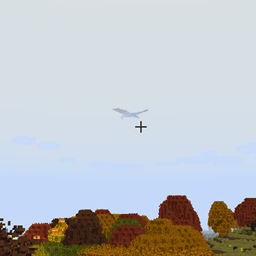
ISeeDragons مود لماينكرافت 1.12.2
يصلح مسافة عرض التنين في RLCraft والإصدارات الأقدم من Ice and Fire
- تنزيلات
- 1 تنزيلات
- مشاهدة
- 13 مشاهدة
- محدّث
- محدّث 18.10.2026
- 1.12.2
 Forge
Forge
حول مود ISeeDragons
حسناً... التنانين في RLCraft صعبة... لكن هل يجب أن يكون لديها جهاز تخفي شخصي يُفعَّل عندما تكون على بعد 64+ بلوك فقط من اللاعب؟!
هذا المود يصلح بعض الأخطاء الرئيسية في Ice and Fire 1.7.1 (نسخة قديمة)، واستخدامه مع Ice and Fire 1.8.x قد يسبب سلوكاً غير محدد (أخطاء، انهيارات، إلخ)! من المفترض استخدامه في مودباك RLCraft!
الميزات:
- يصلح مسافة عرض التنانين في Ice and Fire (قابلة للضبط، وقد تعمل مع كيانات أخرى معدلة)
- يصلح عدم استيقاظ تنانين Ice and Fire عند ضربها
- يصلح قدرة اللاعبين على الهروب من فكي التنين باستخدام shift/النزول
- يصلح إصلاح درع الأفعى البحرية في Ice and Fire
- يصلح Dragonbone Axe
- تقليل الجسيمات الناتجة عن تحطيم التنانين للبلوكات لمنع التأخير (قابل للضبط)
- إعادة إضافة مدخلات OreDictionary لعناصر Ice and Fire (لا يزال Ice and Fire يملأ السجل، TODO: إزالة إزعاج السجل أيضاً)
- يمكن تعيين عناصر إصلاح مخصصة للأدوات التي لا تملك عنصر إصلاح بالفعل (قابل للضبط)
- يمكن إعطاء العناصر ضرراً إضافياً مخصصاً ضد أعداء الأونديد (قابل للضبط)
يجب تثبيت هذا المود على كل من العميل والسيرفر، لكن معظم الإصلاحات ستعمل إذا تم تثبيته على السيرفر فقط (تثبيت العميل ليس شرطاً صارماً).
مودباك RLCraft: https://www.curseforge.com/minecraft/modpacks/rlcraft مود Ice and Fire: https://www.curseforge.com/minecraft/mc-mods/ice-and-fire-dragons
لتثبيت هذا المود، ضع ملف jar في مجلد mods داخل مجلد نسخة Minecraft الخاصة بك. يختلف موقع مجلد نسخة Minecraft حسب المشغل الذي تستخدمه!
الكود المصدري: https://github.com/xcube16/ISeeDragons
كيفية تثبيت ISeeDragons
With Millida Launcher
Install Millida Launcher
The launcher is free: download it at millida.net/launcher and sign in with any nickname.
Click “Install” on this page
The launcher opens and installs the mod for Minecraft 1.12.2 on Forge automatically.
Launch the game
A profile with it appears in the launcher: click “Play”.
Manually
Install Forge
The loader must match the game version of the mod file, for example Minecraft 1.12.2. After installing it, a separate profile appears in your launcher.
Download the file for your version
In the version list above, pick the file ISeeDragons-1.2.1.jar (64 KB) for your game version.
Put it in the mods folder
The folder is inside .minecraft (Windows: %appdata%\.minecraft\mods). If it does not exist, create it.
Launch the loader profile
Open “Mods” in the main menu: ISeeDragons should be in the list.
Minecraft 1.12.2 runs on Java 8: with a different Java version the game may close right after launch.
الإصدارات
مع المتطلبات
| Minecraft | المشغّل | الملف | التاريخ | الإجراءات |
|---|---|---|---|---|
| 1.12.2 | Forge | ISeeDragons-1.2.163.7 KB 1 | ||
| 1.12.2 | Forge | ISeeDragons-0.1224.4 KB | ||
| 1.12.2 | Forge | ISeeDragons6.7 KB |
الأسئلة الشائعة
Which Minecraft versions does ISeeDragons work on?
Only Minecraft 1.12.2: there are no files for other versions.
Is ISeeDragons for Forge or Fabric?
Only for Forge: 1.12.2. There are no files for Fabric or NeoForge: a mod for another loader will not start.
Does ISeeDragons need other mods?
The author lists no required dependencies: the Forge loader is enough.
Which Java does ISeeDragons need?
Minecraft 1.12.2 runs on Java 8. If the game closes right after launch, the usual cause is the wrong Java version in the profile settings.
Where can I download ISeeDragons safely?
On this page: the file ISeeDragons-1.2.1.jar (64 KB) is stored on Millida’s server, with no link shorteners. SHA-1 checksum: 0f8c5fee7eb2b76ab4a01adb08b63147f5a2a2fe.
التقييمات
كن أول من يقيّم ISeeDragons


