

 Fabric
 Forge
 NeoForge
 Quilt
Invis Item Frame Mod
Description
Welcome to the Invis Item Frame mod, where creativity meets functionality in the world of Minecraft! This mod introduces a unique twist to item frames, allowing you to seamlessly integrate them into your builds without compromising aesthetics.
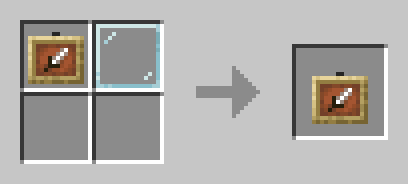
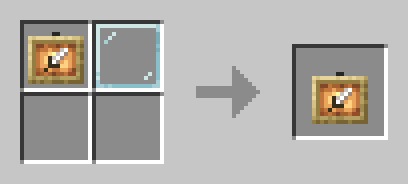
Features
Invisible Elegance: Say goodbye to bulky item frames disrupting your designs. Our mod enables you to make item frames invisible, letting your items take center stage in your builds.
Immersive Display: Create immersive environments by hiding item frames while still maintaining the ability to showcase your favorite items. Perfect for adventure maps, puzzle games, or any scenario where a sleek look is essential.
كيفية تثبيت Invis item frame
With Millida Launcher
Install Millida Launcher
The launcher is free: download it at millida.net/launcher and sign in with any nickname.
Click “Install” on this page
The launcher opens and installs the mod for Minecraft 1.21–1.21.1 on Fabric, Forge, NeoForge or Quilt automatically.
Launch the game
A profile with it appears in the launcher: click “Play”.
Manually
Install Fabric, Forge, NeoForge or Quilt
The loader must match the game version of the mod file, for example Minecraft 1.21.1. After installing it, a separate profile appears in your launcher.
Download the file for your version
In the version list above, pick the file invis-item-frame-2.jar (31 KB) for your game version and loader.
Put it in the mods folder
The folder is inside .minecraft (Windows: %appdata%\.minecraft\mods). If it does not exist, create it.
Launch the loader profile
Open “Mods” in the main menu: Invis item frame should be in the list.
Minecraft 1.21.1 runs on Java 21: with a different Java version the game may close right after launch.
الإصدارات
مع المتطلبات
| Minecraft | المشغّل | الملف | التاريخ | الإجراءات |
|---|---|---|---|---|
| 1.21 | Fabric, Forge, NeoForge, Quilt | Invis item frame (1.21-1.21.1)31.4 KB 5 |
التقييمات
كن أول من يقيّم Invis item frame


