

 Forge
 Fabric
 NeoForge
حول مود InventoryHUD+
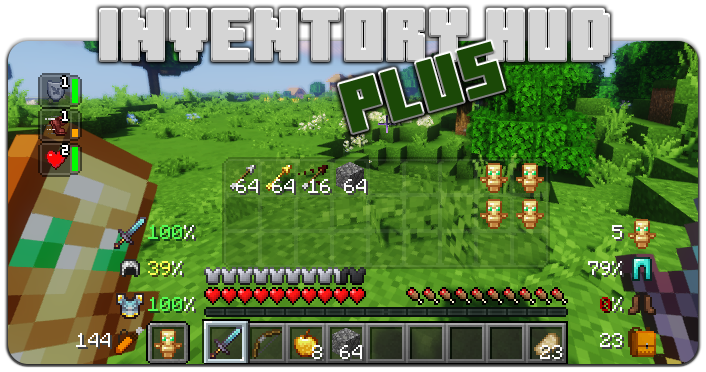
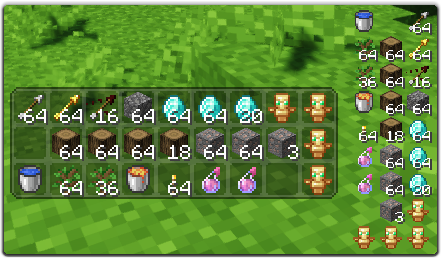
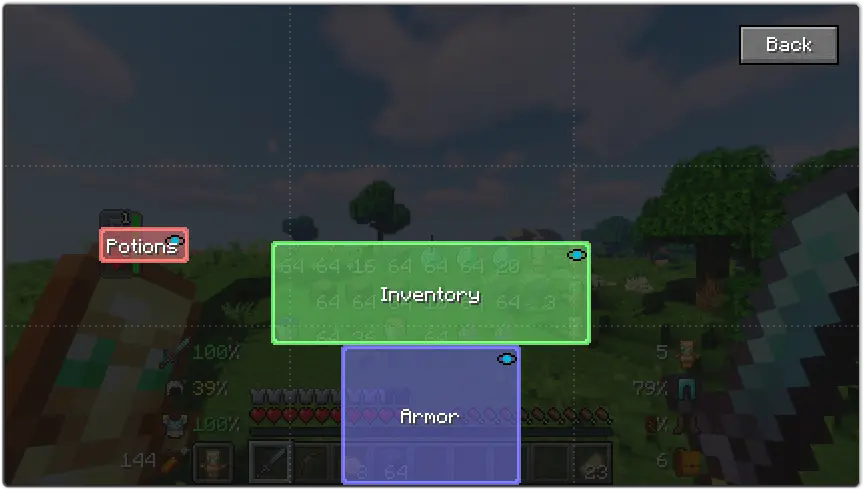
يحتوي هذا المود على بعض الميزات، أولاً وقبل كل شيء - Inventory HUD، يعرض مخزونك أثناء اللعب، ويمكنك التبديل بين الأوضاع (mini/normal و horizontal/vertical)، كما يمكنك تغيير شفافية الخلفية وتشغيل/إيقاف الرسوم المتحركة
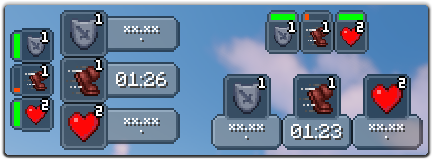
الميزة التالية هي PotionHUD، تعرض تأثيرات الجرعات الخاصة بك مع مؤقت أو شريط مدة إذا كنت تستخدم الوضع المصغر، يمكنك تغيير المسافة بين التأثيرات وشفافية الخلفية في الإعدادات، ويمكنك تفعيل الوضع الأفقي أيضاً
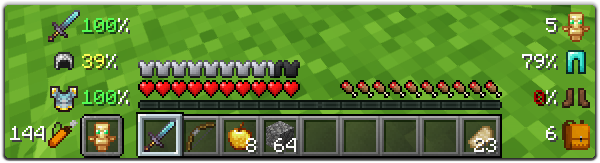
وآخر ميزة وليس آخرها هي ArmorHUD، تعرض متانة دروعك ومعداتك، كما تعرض عدد الخانات الفارغة في مخزونك وعدد السهام التي لديك. هذا الـ HUD قابل للتخصيص بالكامل، يمكنك تغيير الحجم، ونوع مؤشر الضرر، أو تشغيل/إيقاف كل جزء من معداتك
يمكنك تغيير الكثير من الخيارات في الإعدادات (زر "Mod" في القائمة الرئيسية، ثم "Config")، كما يمكنك تغيير موضع كل HUD ببساطة عن طريق سحبه وإفلاته. لفتح شاشة الإعدادات داخل اللعبة يمكنك استخدام اختصار لوحة المفاتيح ("O" افتراضياً)
إذا كنت تريد مساعدتي في جعل هذا المود أفضل، يمكنك ترجمته إلى لغتك وإرسال ملف json إليّ.
يمكنك العثور على ملف اللغة الأصلي هنا: enus.json
اللغات المدعومة
- الصينية المبسطة (الصين القارية) (zhcn) (شكراً لـ Satxm)
- الصينية التقليدية (تايوان) (zhtw) (شكراً لـ yichifauzi)
- التشيكية (cscz) (شكراً لـ Janys159)
- الإنجليزية (enus)
- الفرنسية (frfr) (شكراً لـ Peperehobbits01)
- الألمانية (dede) (شكراً لـ arrowlevel)
- الهنغارية (huhu) (شكراً لـ Kalmix88)
- الإيطالية (itit) (شكراً لـ cranos96)
- اليابانية (jajp) (شكراً لـ co91)
- الكورية (kokr) (شكراً لـ gueso-gato1355)
- البرتغالية - البرازيل (ptbr) (شكراً لـ VitorLeonardo)
- الروسية (ruru)
- الإسبانية (eses) (شكراً لـ Zeedif)
- التركية (trtr) (شكراً لـ MefeBey)
- الأوكرانية (ukua) (شكراً لـ ElvisDanger)
كيفية تثبيت InventoryHUD+
With Millida Launcher
Install Millida Launcher
The launcher is free: download it at millida.net/launcher and sign in with any nickname.
Click “Install” on this page
The launcher opens and installs the mod for Minecraft 1.8–26.3 on Fabric, Forge or NeoForge automatically.
Launch the game
A profile with it appears in the launcher: click “Play”.
Manually
Install Fabric, Forge or NeoForge
The loader must match the game version of the mod file, for example Minecraft 26.3. After installing it, a separate profile appears in your launcher.
Download the file for your version
In the version list above, pick the file inventoryhud.forge.26.3-3.4.37.jar (231 KB) for your game version and loader.
Put it in the mods folder
The folder is inside .minecraft (Windows: %appdata%\.minecraft\mods). If it does not exist, create it.
Launch the loader profile
Open “Mods” in the main menu: InventoryHUD+ should be in the list.
InventoryHUD+ works on the player’s side only: there is no need to install it on a server.
الإصدارات
مع المتطلبات
| Minecraft | المشغّل | الملف | التاريخ | الإجراءات |
|---|---|---|---|---|
| 26.3 | Forge | 26.3231 KB 14 | ||
| 26.3 | Fabric | 26.3235 KB 48 | ||
| 26.3 | NeoForge | 26.3231 KB 1 | ||
| 26.3 | Forge | 26.3231 KB 13 | ||
| 26.3 | Fabric | 26.3235 KB 75 | ||
| 26.3 | NeoForge | 26.3231 KB 10 | ||
| 26.2 | Forge | 26.2231 KB 10 | — | |
| 26.1 | Forge | 26.1227 KB | — |
الأسئلة الشائعة
Which Minecraft versions does InventoryHUD+ work on?
There are files for 1.8–26.3, 14 versions in total. The newest is 26.3.
Is InventoryHUD+ for Forge or Fabric?
There are files for Fabric: 1.16.2–26.3, for Forge: 1.8–26.3 and for NeoForge: 26.3.
Does InventoryHUD+ need other mods?
The author lists no required dependencies: the Fabric, Forge or NeoForge loader is enough.
Do I need to install InventoryHUD+ on a server?
No. InventoryHUD+ works on the player’s side only: there is no need to install it on a server.
How do I download InventoryHUD+?
With Millida Launcher: it installs InventoryHUD+ into a modpack by itself, for the right game version and loader. The launcher is free.
التقييمات
كن أول من يقيّم InventoryHUD+


